
Circuit Documentation
Summary
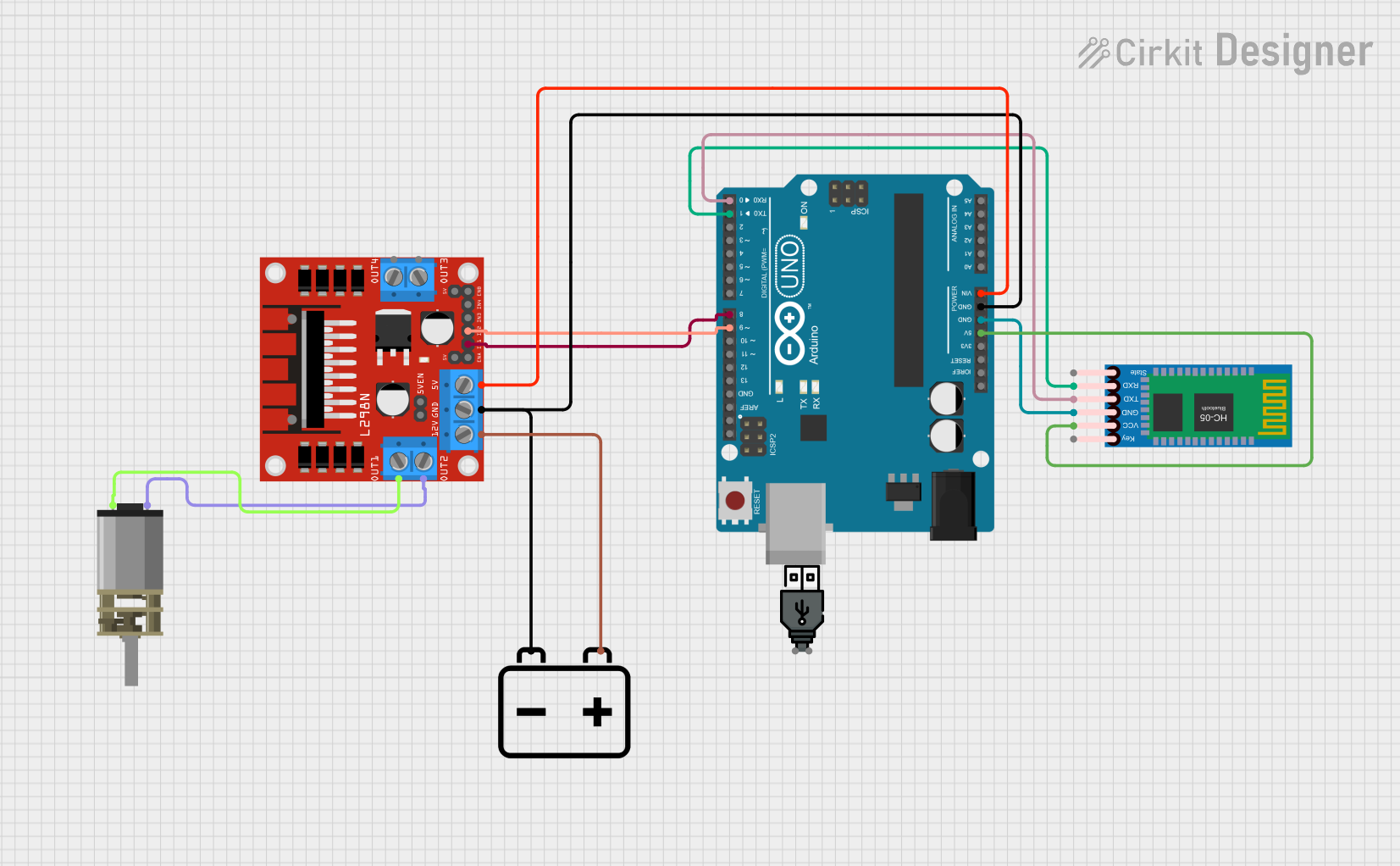
This circuit is designed to control a DC Mini Metal Gear Motor using an L298N DC motor driver, an Arduino UNO, and an HC-05 Bluetooth Module. The circuit is powered by a 12V battery and includes a USB power source for additional power requirements. The Arduino UNO is programmed to control the motor driver and communicate with the Bluetooth module.
Component List
L298N DC Motor Driver
- Description: A dual H-Bridge motor driver that allows for control of the speed and direction of two DC motors.
- Pins: OUT1, OUT2, 12V, GND, 5V, OUT3, OUT4, 5V-ENA-JMP-I, 5V-ENA-JMP-O, +5V-J1, +5V-J2, ENA, IN1, IN2, IN3, IN4, ENB
HC-05 Bluetooth Module
- Description: A Bluetooth module used for wireless communication.
- Pins: Key, VCC, GND, TXD, RXD, State
Arduino UNO
- Description: A microcontroller board based on the ATmega328P.
- Pins: UNUSED, IOREF, Reset, 3.3V, 5V, GND, Vin, A0, A1, A2, A3, A4, A5, SCL, SDA, AREF, D13, D12, D11, D10, D9, D8, D7, D6, D5, D4, D3, D2, D1, D0
DC Mini Metal Gear Motor
- Description: A small DC motor with metal gears for increased torque.
- Pins: IN1, IN2
USB Power
- Description: A USB power source for additional power requirements.
- Pins: +, -
12V Battery
- Description: A 12V battery used to power the motor driver and motor.
- Pins: -, +
Wiring Details
L298N DC Motor Driver
- OUT1 connected to IN2 of DC Mini Metal Gear Motor
- OUT2 connected to IN1 of DC Mini Metal Gear Motor
- 12V connected to + of 12V Battery
- GND connected to GND of Arduino UNO and - of 12V Battery
- 5V connected to Vin of Arduino UNO
- IN1 connected to D8 of Arduino UNO
- IN2 connected to D9 of Arduino UNO
HC-05 Bluetooth Module
- VCC connected to 5V of Arduino UNO
- GND connected to GND of Arduino UNO
- TXD connected to D0 of Arduino UNO
- RXD connected to D1 of Arduino UNO
Arduino UNO
- GND connected to GND of L298N DC Motor Driver and GND of HC-05 Bluetooth Module
- Vin connected to 5V of L298N DC Motor Driver
- D8 connected to IN1 of L298N DC Motor Driver
- D9 connected to IN2 of L298N DC Motor Driver
- 5V connected to VCC of HC-05 Bluetooth Module
- GND connected to GND of HC-05 Bluetooth Module
- D0 connected to TXD of HC-05 Bluetooth Module
- D1 connected to RXD of HC-05 Bluetooth Module
DC Mini Metal Gear Motor
- IN1 connected to OUT2 of L298N DC Motor Driver
- IN2 connected to OUT1 of L298N DC Motor Driver
USB Power
- + not connected in this circuit
- - not connected in this circuit
12V Battery
- + connected to 12V of L298N DC Motor Driver
- - connected to GND of L298N DC Motor Driver and GND of Arduino UNO
Documented Code
Arduino UNO Code (sketch.ino)
void setup() {
  // put your setup code here, to run once:

}

void loop() {
  // put your main code here, to run repeatedly:

}
This code is a basic template for the Arduino UNO. The setup function is where you initialize your components and the loop function is where you place the code that needs to run continuously.