
Arduino UNO-Based Card Counter with IR Sensor and LCD Display
View and Edit Project In Cirkit Designer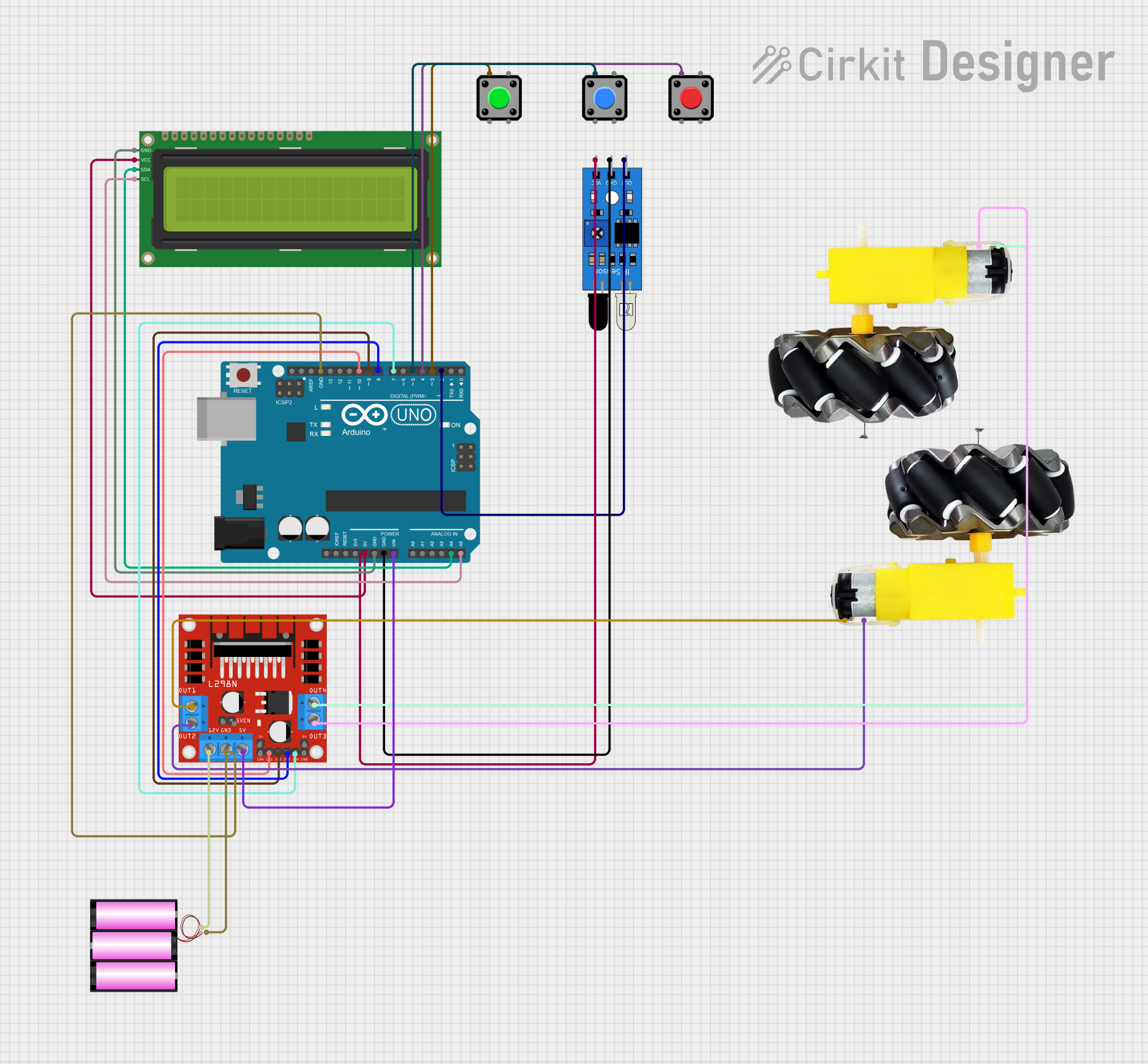
Circuit Documentation
Summary
This circuit is designed to control a card counting system using an Arduino UNO microcontroller. The system includes an IR sensor to detect cards, an LCD to display the count, pushbuttons for control, and a motor driver to move the cards. The circuit is powered by a 12V battery.
Component List
Arduino UNO
- Description: Microcontroller board based on the ATmega328P.
- Pins: UNUSED, IOREF, Reset, 3.3V, 5V, GND, Vin, A0, A1, A2, A3, A4, A5, SCL, SDA, AREF, D13, D12, D11, D10, D9, D8, D7, D6, D5, D4, D3, D2, D1, D0
IR Sensor
- Description: Infrared sensor for detecting objects.
- Pins: out, gnd, vcc
16x2 I2C LCD
- Description: 16x2 character LCD with I2C interface.
- Pins: GND, VCC, SDA, SCL
L298N DC Motor Driver
- Description: Dual H-Bridge motor driver for controlling DC motors.
- Pins: OUT1, OUT2, 12V, GND, 5V, OUT3, OUT4, 5V-ENA-JMP-I, 5V-ENA-JMP-O, +5V-J1, +5V-J2, ENA, IN1, IN2, IN3, IN4, ENB
Motor and Wheels
- Description: DC motor with attached wheels.
- Pins: vcc, GND
Pushbutton
- Description: Momentary pushbutton switch.
- Pins: Pin 2, Pin 1, Pin 3, Pin 4
Battery 12V
- Description: 12V battery for powering the circuit.
- Pins: +, -
Wiring Details
Arduino UNO
5V connected to:
- IR Sensor (vcc)
- 16x2 I2C LCD (VCC)
GND connected to:
- 16x2 I2C LCD (GND)
- IR Sensor (gnd)
- Battery 12V (-)
- L298N DC Motor Driver (GND)
Vin connected to:
- L298N DC Motor Driver (5V)
A4 connected to:
- 16x2 I2C LCD (SDA)
A5 connected to:
- 16x2 I2C LCD (SCL)
D10 connected to:
- L298N DC Motor Driver (IN1)
D9 connected to:
- L298N DC Motor Driver (IN2)
D8 connected to:
- L298N DC Motor Driver (IN3)
D7 connected to:
- L298N DC Motor Driver (IN4)
D5 connected to:
- Pushbutton (Pin 1)
D4 connected to:
- Pushbutton (Pin 1)
D3 connected to:
- Pushbutton (Pin 1)
D2 connected to:
- IR Sensor (out)
IR Sensor
vcc connected to:
- Arduino UNO (5V)
gnd connected to:
- Arduino UNO (GND)
out connected to:
- Arduino UNO (D2)
16x2 I2C LCD
VCC connected to:
- Arduino UNO (5V)
GND connected to:
- Arduino UNO (GND)
SDA connected to:
- Arduino UNO (A4)
SCL connected to:
- Arduino UNO (A5)
L298N DC Motor Driver
5V connected to:
- Arduino UNO (Vin)
GND connected to:
- Arduino UNO (GND)
- Battery 12V (-)
IN1 connected to:
- Arduino UNO (D10)
IN2 connected to:
- Arduino UNO (D9)
IN3 connected to:
- Arduino UNO (D8)
IN4 connected to:
- Arduino UNO (D7)
OUT1 connected to:
- Motor and Wheels (vcc)
OUT2 connected to:
- Motor and Wheels (GND)
OUT3 connected to:
- Motor and Wheels (GND)
OUT4 connected to:
- Motor and Wheels (vcc)
12V connected to:
- Battery 12V (+)
Motor and Wheels
vcc connected to:
- L298N DC Motor Driver (OUT1)
- L298N DC Motor Driver (OUT4)
GND connected to:
- L298N DC Motor Driver (OUT2)
- L298N DC Motor Driver (OUT3)
Pushbutton
- Pin 1 connected to:
- Arduino UNO (D5)
- Arduino UNO (D4)
- Arduino UNO (D3)
Battery 12V
+ connected to:
- L298N DC Motor Driver (12V)
- connected to:
- Arduino UNO (GND)
- L298N DC Motor Driver (GND)
Code Documentation
#include <Scheduler.h>
#include <HardWire.h>
#include <Wire.h>
#include <LiquidCrystal_I2C.h>

const int onOffButtonPin = 3;
const int startStopButtonPin = 4;
const int resetButtonPin = 5;
const int irSensorPin = 2;

const int motor1Pin1 = 10;
const int motor1Pin2 = 9;
const int motor2Pin1 = 8;
const int motor2Pin2 = 7;

bool isOn = false;
bool isRunning = false;
int cardCount = 0;

LiquidCrystal_I2C lcd(0x27, 16, 2);

void setup() {
  pinMode(onOffButtonPin, INPUT_PULLUP);
  pinMode(startStopButtonPin, INPUT_PULLUP);
  pinMode(resetButtonPin, INPUT_PULLUP);
  pinMode(irSensorPin, INPUT);

  pinMode(motor1Pin1, OUTPUT);
  pinMode(motor1Pin2, OUTPUT);
  pinMode(motor2Pin1, OUTPUT);
  pinMode(motor2Pin2, OUTPUT);

  lcd.init();
  lcd.backlight();
  lcd.setCursor(0, 0);
  lcd.print("Card Counter");
  lcd.setCursor(0, 1);
  lcd.print("Count: 0");

  Serial.begin(9600);
}

void loop() {
  if (digitalRead(onOffButtonPin) == LOW) {
    delay(50); // Debounce delay
    if (digitalRead(onOffButtonPin) == LOW) {
      isOn = !isOn;
      Serial.println(isOn ? "System On" : "System Off");
      while (digitalRead(onOffButtonPin) == LOW); // Wait for button release
    }
  }

  if (digitalRead(startStopButtonPin) == LOW) {
    delay(50); // Debounce delay
    if (digitalRead(startStopButtonPin) == LOW) {
      if (isOn) {
        isRunning = !isRunning;
        Serial.println(isRunning ? "System Running" : "System Stopped");
      }
      while (digitalRead(startStopButtonPin) == LOW); // Wait for button release
    }
  }

  if (digitalRead(resetButtonPin) == LOW) {
    delay(50); // Debounce delay
    if (digitalRead(resetButtonPin) == LOW) {
      if (isOn) {
        cardCount = 0;
        lcd.setCursor(0, 1);
        lcd.print("Count: ");
        lcd.print(cardCount);
        Serial.println("System Reset");
      }
      while (digitalRead(resetButtonPin) == LOW); // Wait for button release
    }
  }

  if (isOn && isRunning) {
    moveCard();
    if (digitalRead(irSensorPin) == LOW) {
      cardCount++;
      lcd.setCursor(0, 1);
      lcd.print("Count: ");
      lcd.print(cardCount);
      delay(500); // Debounce delay for IR sensor
    }
  }
}

void moveCard() {
  // Move card with Motor 1
  digitalWrite(motor1Pin1, HIGH);
  digitalWrite(motor1Pin2, LOW);
  delay(500); // Adjust delay as needed to move one card

  // Stop Motor 1
  digitalWrite(motor1Pin1, LOW);
  digitalWrite(motor1Pin2, LOW);

  // Move card with Motor 2
  digitalWrite(motor2Pin1, HIGH);
  digitalWrite(motor2Pin2, LOW);
  delay(500); // Adjust delay as needed to move one card

  // Stop