
Arduino-Controlled Dual Motor Driver with Infrared Proximity Sensing
View and Edit Project In Cirkit Designer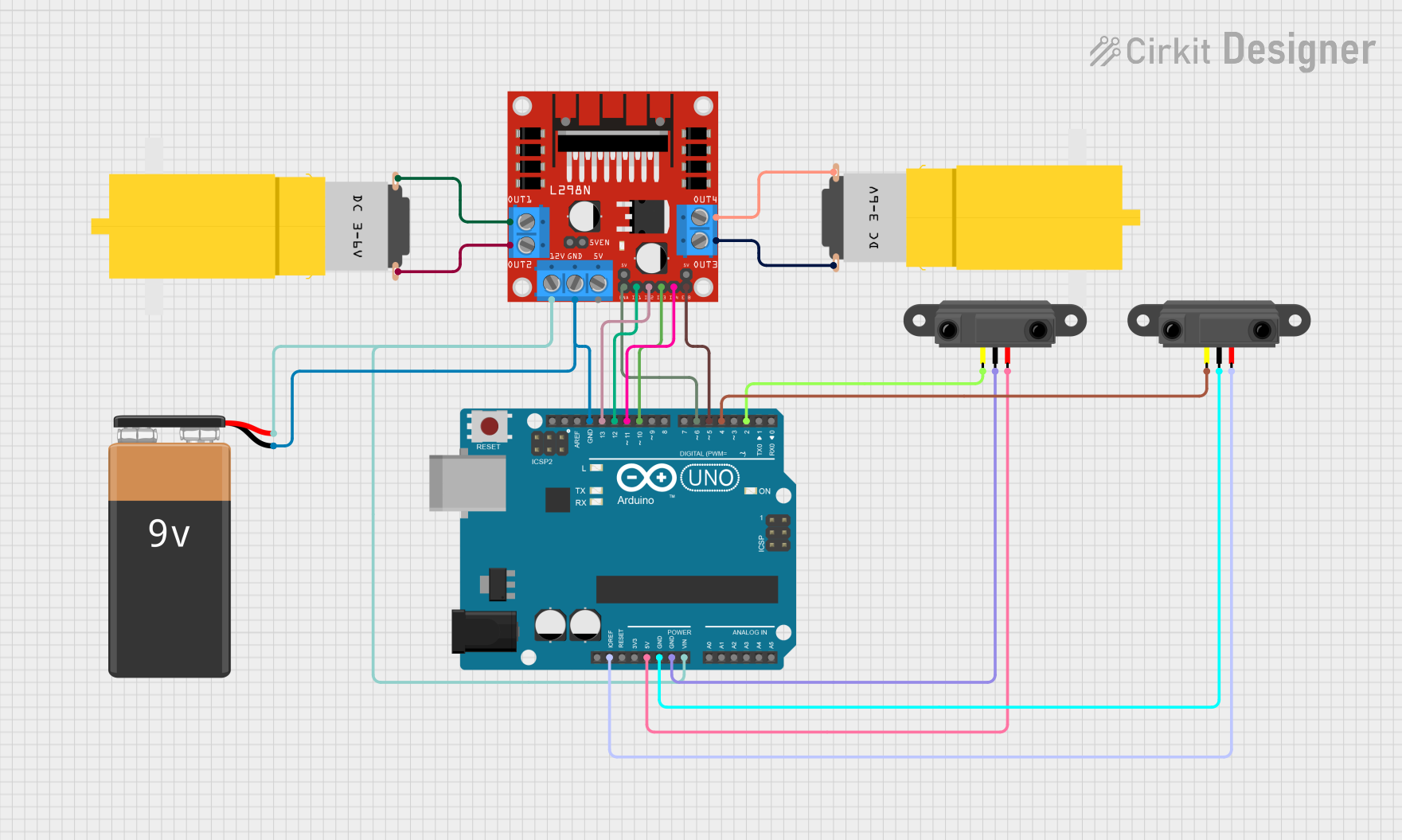
Circuit Documentation
Summary
This circuit is designed to control two DC motors using an L298N motor driver module, which is interfaced with an Arduino UNO microcontroller. The Arduino UNO is also connected to two infrared proximity sensors for input. A 9V battery provides power to the system. The circuit is likely intended for a small robotic vehicle that can detect obstacles using the infrared sensors and maneuver using the DC motors.
Component List
L298N DC Motor Driver
- Description: A module used to drive two DC motors with direction and speed control.
- Pins: OUT1, OUT2, 12V, GND, 5V, OUT3, OUT4, 5V-ENA-JMP-I, 5V-ENA-JMP-O, +5V-J1, +5V-J2, ENA, IN1, IN2, IN3, IN4, ENB
Arduino UNO
- Description: A microcontroller board based on the ATmega328P, widely used for building digital devices and interactive objects.
- Pins: UNUSED, IOREF, Reset, 3.3V, 5V, GND, Vin, A0, A1, A2, A3, A4, A5, SCL, SDA, AREF, D13, D12, D11, D10, D9, D8, D7, D6, D5, D4, D3, D2, D1, D0
Motor Amarillo Motorreductor Hobby (x2)
- Description: A yellow hobby gear motor commonly used in robotics for propulsion.
- Pins: vcc, GND
9V Battery
- Description: A standard 9V battery used to provide power to the circuit.
- Pins: -, +
Infrared Proximity Sensor (x2)
- Description: A sensor that detects the presence of nearby objects without physical contact.
- Pins: Vout, GND, Vcc
Wiring Details
L298N DC Motor Driver
- OUT1 connected to Motor 1 GND
- OUT2 connected to Motor 1 Vcc
- 12V connected to Arduino UNO Vin and 9V Battery +
- GND connected to Arduino UNO GND and 9V Battery -
- OUT3 connected to Motor 2 GND
- OUT4 connected to Motor 2 Vcc
- ENA connected to Arduino UNO D6
- IN1 connected to Arduino UNO D12
- IN2 connected to Arduino UNO D13
- IN3 connected to Arduino UNO D10
- IN4 connected to Arduino UNO D11
- ENB connected to Arduino UNO D5
Arduino UNO
- Vin connected to 9V Battery +
- GND connected to 9V Battery - and all GND connections of other components
- D6, D12, D13, D10, D11, D5 connected to L298N DC Motor Driver
- IOREF connected to Infrared Sensor 2 Vcc
- 5V connected to Infrared Sensor 1 Vcc
- D4 connected to Infrared Sensor 2 Vout
- D2 connected to Infrared Sensor 1 Vout
Motor Amarillo Motorreductor Hobby
- Motor 1 Vcc connected to L298N DC Motor Driver OUT2
- Motor 1 GND connected to L298N DC Motor Driver OUT1
- Motor 2 Vcc connected to L298N DC Motor Driver OUT4
- Motor 2 GND connected to L298N DC Motor Driver OUT3
9V Battery
-
- connected to Arduino UNO Vin and L298N DC Motor Driver 12V
-
- connected to Arduino UNO GND and L298N DC Motor Driver GND
Infrared Proximity Sensor
- Sensor 1 Vcc connected to Arduino UNO 5V
- Sensor 1 GND connected to Arduino UNO GND
- Sensor 1 Vout connected to Arduino UNO D2
- Sensor 2 Vcc connected to Arduino UNO IOREF
- Sensor 2 GND connected to Arduino UNO GND
- Sensor 2 Vout connected to Arduino UNO D4
Documented Code
Arduino UNO Code (sketch.ino)
void setup() {
  // put your setup code here, to run once:

}

void loop() {
  // put your main code here, to run repeatedly:

}
Note: The provided code is a template and does not contain any functional code to control the motors or read the sensors. It needs to be completed with the appropriate setup and loop code to control the L298N motor driver and read the infrared proximity sensors.