
Bluetooth-Controlled Robotic Vehicle with Servo Actuation and Water Pump
View and Edit Project In Cirkit Designer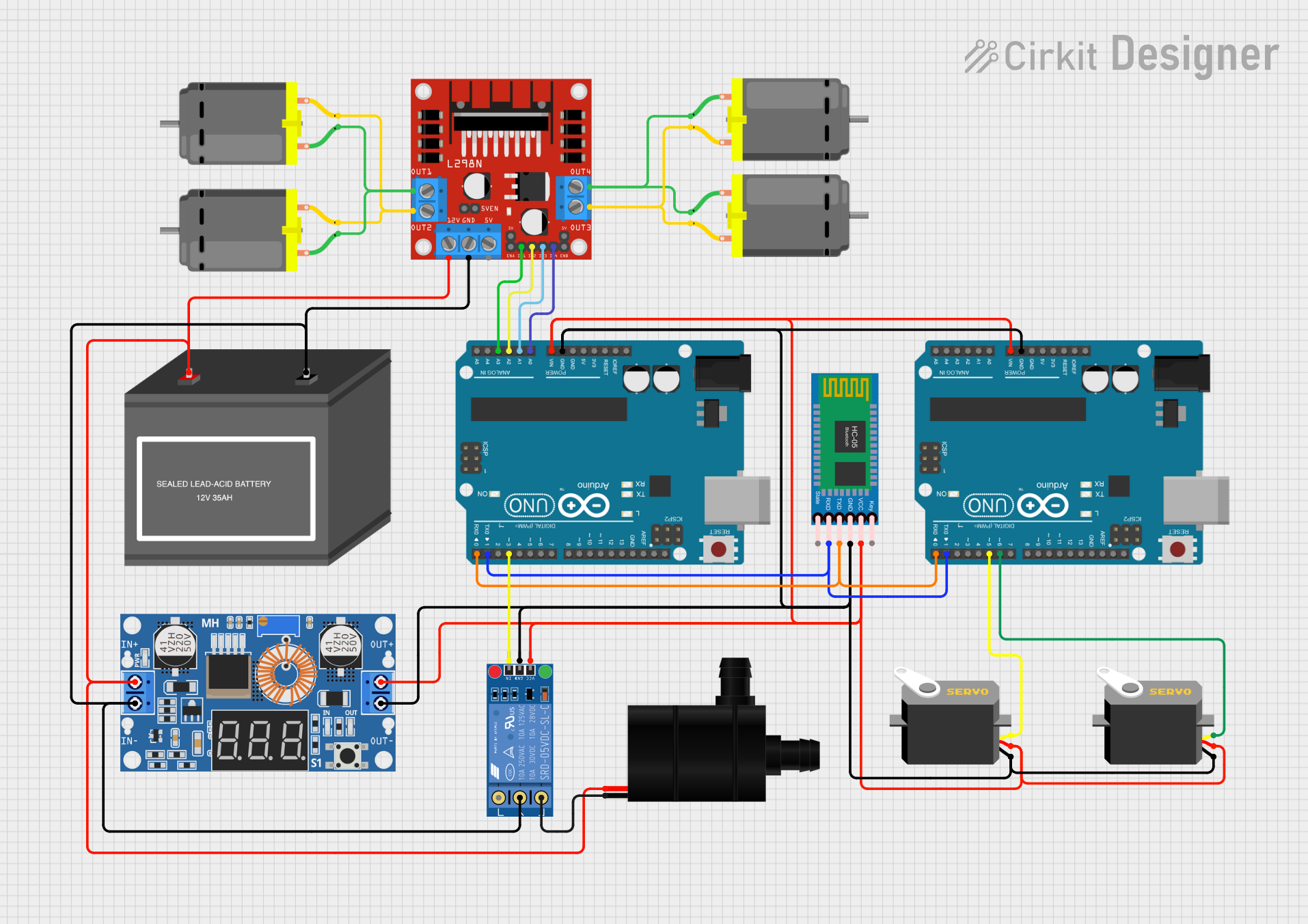
Circuit Documentation
Summary
The circuit in question is designed to control multiple DC motors, servos, and a water pump, with communication capabilities via a Bluetooth module. It includes motor drivers for controlling the speed and direction of the motors, a microcontroller for logic operations and interfacing with the Bluetooth module, and power regulation components to ensure stable operation. The circuit is powered by a 12V battery and includes a step-down converter to provide appropriate voltage levels to the servos and logic components.
Component List
L298N DC Motor Driver
- Description: A motor driver module capable of driving up to two DC motors.
- Pins: OUT1, OUT2, 12V, GND, 5V, OUT3, OUT4, ENA, IN1, IN2, IN3, IN4, ENB
DC Motor
- Description: A standard DC motor for rotational motion.
- Pins: pin 1, pin 2
12V Battery (mini)
- Description: A 12V power source for the circuit.
- Pins: -, +
Servo
- Description: A rotary actuator or linear actuator that allows for precise control of angular or linear position.
- Pins: gnd, vcc, pulse
HC-05 Bluetooth Module
- Description: A Bluetooth module for wireless communication.
- Pins: Key, VCC, TXD, RXD, State, GND
Water Pump
- Description: An electric water pump.
- Pins: VCC, GND
KF-301 Relay
- Description: An electromechanical switch used to control a high-power circuit with a low-power signal.
- Pins: signal, power, ground, NC, C, NO
XL4015 5A DC Buck Step-down
- Description: A DC-DC step-down (buck) converter module.
- Pins: Output +, Output -, Input +, Input -
Arduino UNO
- Description: A microcontroller board based on the ATmega328P.
- Pins: UNUSED, IOREF, Reset, 3.3V, 5V, GND, Vin, A0-A5, SCL, SDA, AREF, D0-D13
Wiring Details
L298N DC Motor Driver
- OUT1, OUT2: Connected to DC Motor 1
- OUT3, OUT4: Connected to DC Motor 2
- 12V: Connected to 12V Battery (+), XL4015 Input (+), Water Pump (VCC)
- GND: Connected to 12V Battery (-), XL4015 Input (-), KF-301 Relay (C)
- IN1, IN2, IN3, IN4: Connected to Arduino UNO (A3, A2, A1, A0)
DC Motors
- Motor 1: Connected to L298N (OUT1, OUT2)
- Motor 2: Connected to L298N (OUT3, OUT4)
12V Battery (mini)
- +: Connected to L298N (12V), XL4015 (Input +), Water Pump (VCC)
- -: Connected to L298N (GND), XL4015 (Input -), KF-301 Relay (C)
Servos
- gnd: Connected to XL4015 (Output -), Arduino UNO (GND)
- vcc: Connected to XL4015 (Output +), Arduino UNO (Vin)
- pulse: Connected to Arduino UNO (D5, D6)
HC-05 Bluetooth Module
- VCC: Connected to XL4015 (Output +), Arduino UNO (Vin)
- GND: Connected to XL4015 (Output -), Arduino UNO (GND)
- TXD: Connected to Arduino UNO (D0)
- RXD: Connected to Arduino UNO (D1)
Water Pump
- VCC: Connected to L298N (12V)
- GND: Connected to KF-301 Relay (NC)
KF-301 Relay
- signal: Connected to Arduino UNO (D3)
- power: Connected to XL4015 (Output +)
- ground: Connected to XL4015 (Output -)
- NC: Connected to Water Pump (GND)
XL4015 5A DC Buck Step-down
- Output +: Connected to Servos (vcc), Arduino UNO (Vin), HC-05 (VCC), KF-301 Relay (power)
- Output -: Connected to Servos (gnd), Arduino UNO (GND), HC-05 (GND), KF-301 Relay (ground)
- Input +: Connected to L298N (12V)
- Input -: Connected to L298N (GND)
Arduino UNO
- A0-A3: Connected to L298N (IN4-IN1)
- GND: Connected to XL4015 (Output -), Servos (gnd), HC-05 (GND)
- Vin: Connected to XL4015 (Output +), Servos (vcc), HC-05 (VCC)
- D0: Connected to HC-05 (TXD)
- D1: Connected to HC-05 (RXD)
- D3: Connected to KF-301 Relay (signal)
- D5, D6: Connected to Servos (pulse)
Documented Code
Arduino UNO (Instance ID: 94b79694-ef5b-40cb-a43b-24013add43bd)
#include <Servo.h>;

Servo servo1;
Servo servo2;
char d;
int c;
int S2;
bool a = false;

void setup() {
  // Initialize serial communication at 9600 bits per second:
  Serial.begin(9600);

  // Attach the servos to digital pins D5 and D6:
  servo1.attach(5);
  servo2.attach(6);

  // Set servos to mid-position:
  servo1.write(90);
  servo2.write(90);
}

void loop() {
  // Check if data is available to read:
  if (Serial.available()) {
    d = Serial.read();
  }
  Serial.println(d);

  // If 'U' is received, enter a loop to move servos:
  if (d == 'U') {
    while (1) {
      int z = 20;
      int y = 160;

      // Move servos in one direction:
      for (int S1 = z; S1 < y; S1 += 2) {
        if (Serial.available()) {
          d = Serial.read();
        }
        if (d == 'u') {
          goto b;
        }
        S2 = map(S1, z, y, y, z);
        servo1.write(S1);
        servo2.write(S2);
        delay(7);
      }

      // Move servos in the opposite direction:
      for (int S1 = y; S1 > z; S1 -= 2) {
        if (Serial.available()) {
          d = Serial.read();
        }
        if (d == 'u') {
          goto b;
        }
        S2 = map(S1, y, z, 180 - y, 180 - z);
        servo1.write(S1);
        servo2.write(S2);
        delay(7);
      }

      // If 'a' is true, reset servos to predefined positions:
      if (a == true) {
b:
        c++;
        delay(100);
        if (c == 1) {
          servo1.write(90);
          servo2.write(90);
        }
        if (c == 2) {
          servo1.write(160);
          servo2.write(20);
        }
        if (c == 3) {
          servo1.write(20);
          servo2.write(160);
          c = 0;
        }
        d = '0';
        break;
      }
    }
  }
}
Arduino UNO (Instance ID: 73d09187-cbb5-46d2-a8e0-80d1ad184464)
void setup() {
  // Setup code here
}

void loop() {
  // Main code here
}
This concludes the documentation for the given circuit. The code provided controls the servos based on serial input and interfaces with the Bluetooth module for potential wireless control. The circuit is designed to manage power distribution and control the motors, servos, and water pump effectively.