
Arduino-Based Temperature Monitoring System with DHT11 Sensor and Relay Control
View and Edit Project In Cirkit Designer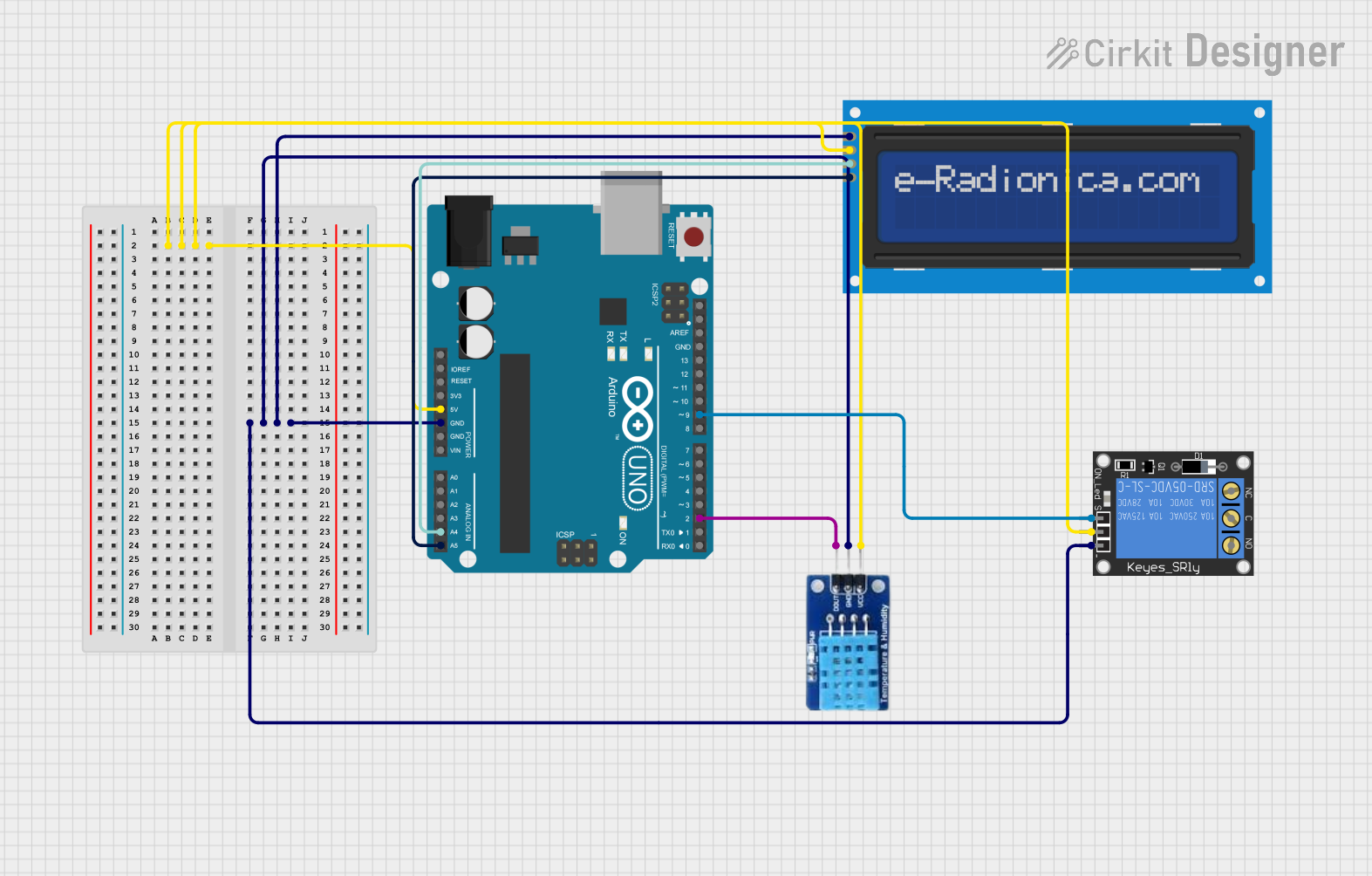
Circuit Documentation
Summary
This circuit is designed to monitor the temperature using a DHT11 sensor and display the readings on a 16x2 I2C LCD screen. If the temperature exceeds a predefined threshold, a 1-Channel Relay is activated to trigger an alert or control a cooling mechanism. The entire system is controlled by an Arduino UNO microcontroller.
Component List
DHT11
- Description: Temperature and Humidity Sensor
- Pins: DATA, GND, VCC
1-Channel Relay (5V 10A)
- Description: Relay module for switching high power devices
- Pins: NC, signal, C, power, NO, ground
Arduino UNO
- Description: Microcontroller board based on the ATmega328P
- Pins: UNUSED, IOREF, Reset, 3.3V, 5V, GND, Vin, A0, A1, A2, A3, A4, A5, SCL, SDA, AREF, D13, D12, D11, D10, D9, D8, D7, D6, D5, D4, D3, D2, D1, D0
LCD screen 16x2 I2C
- Description: 16x2 character LCD display with I2C interface
- Pins: SCL, SDA, VCC, GND
Wiring Details
DHT11
- VCC: Connected to Arduino UNO 5V
- GND: Connected to Arduino UNO GND
- DATA: Connected to Arduino UNO D2
1-Channel Relay (5V 10A)
- power: Connected to Arduino UNO 5V
- ground: Connected to Arduino UNO GND
- signal: Connected to Arduino UNO D9
Arduino UNO
- 5V: Connected to DHT11 VCC, 1-Channel Relay power, LCD screen 16x2 I2C VCC
- GND: Connected to DHT11 GND, 1-Channel Relay ground, LCD screen 16x2 I2C GND
- A4: Connected to LCD screen 16x2 I2C SDA
- A5: Connected to LCD screen 16x2 I2C SCL
- D2: Connected to DHT11 DATA
- D9: Connected to 1-Channel Relay signal
LCD screen 16x2 I2C
- VCC: Connected to Arduino UNO 5V
- GND: Connected to Arduino UNO GND
- SDA: Connected to Arduino UNO A4
- SCL: Connected to Arduino UNO A5
Code Documentation
/*
 * Arduino Sketch for Temperature Detection in Battery
 *
 * This code interfaces with a DHT11 temperature sensor, a 16x2 I2C LCD screen,
 * and a 1-Channel Relay. The DHT11 sensor reads the temperature, which is then
 * displayed on the LCD screen. If the temperature exceeds a predefined threshold,
 * the relay is activated to trigger an alert or control a cooling mechanism.
 */

#include <Wire.h>
#include <LiquidCrystal_I2C.h>
#include <DHT.h>

#define DHTPIN 2          // Pin connected to the DATA pin of DHT11
#define DHTTYPE DHT11     // DHT 11
#define RELAY_PIN 9       // Pin connected to the signal pin of the relay
#define TEMP_THRESHOLD 30 // Temperature threshold in Celsius

DHT dht(DHTPIN, DHTTYPE);
LiquidCrystal_I2C lcd(0x27, 16, 2); // Set the LCD address to 0x27 for a 16 chars and 2 line display

void setup() {
  // Initialize the DHT sensor
  dht.begin();
  // Initialize the LCD
  lcd.begin();
  lcd.backlight();
  // Initialize the relay pin as an output
  pinMode(RELAY_PIN, OUTPUT);
  // Start with the relay off
  digitalWrite(RELAY_PIN, LOW);
}

void loop() {
  // Read temperature as Celsius
  float temp = dht.readTemperature();
  // Check if any reads failed and exit early (to try again).
  if (isnan(temp)) {
    lcd.setCursor(0, 0);
    lcd.print("Error reading");
    lcd.setCursor(0, 1);
    lcd.print("temperature");
    return;
  }
  // Display temperature on LCD
  lcd.setCursor(0, 0);
  lcd.print("Temp: ");
  lcd.print(temp);
  lcd.print(" C");
  // Check if temperature exceeds threshold
  if (temp > TEMP_THRESHOLD) {
    digitalWrite(RELAY_PIN, HIGH); // Activate relay
  } else {
    digitalWrite(RELAY_PIN, LOW);  // Deactivate relay
  }
  // Wait a few seconds between measurements
  delay(2000);
}
This code initializes the DHT11 sensor, the LCD screen, and the relay. It continuously reads the temperature from the DHT11 sensor and displays it on the LCD screen. If the temperature exceeds the predefined threshold of 30°C, the relay is activated. The relay can be used to trigger an alert or control a cooling mechanism.