
Circuit Documentation
Summary of the Circuit
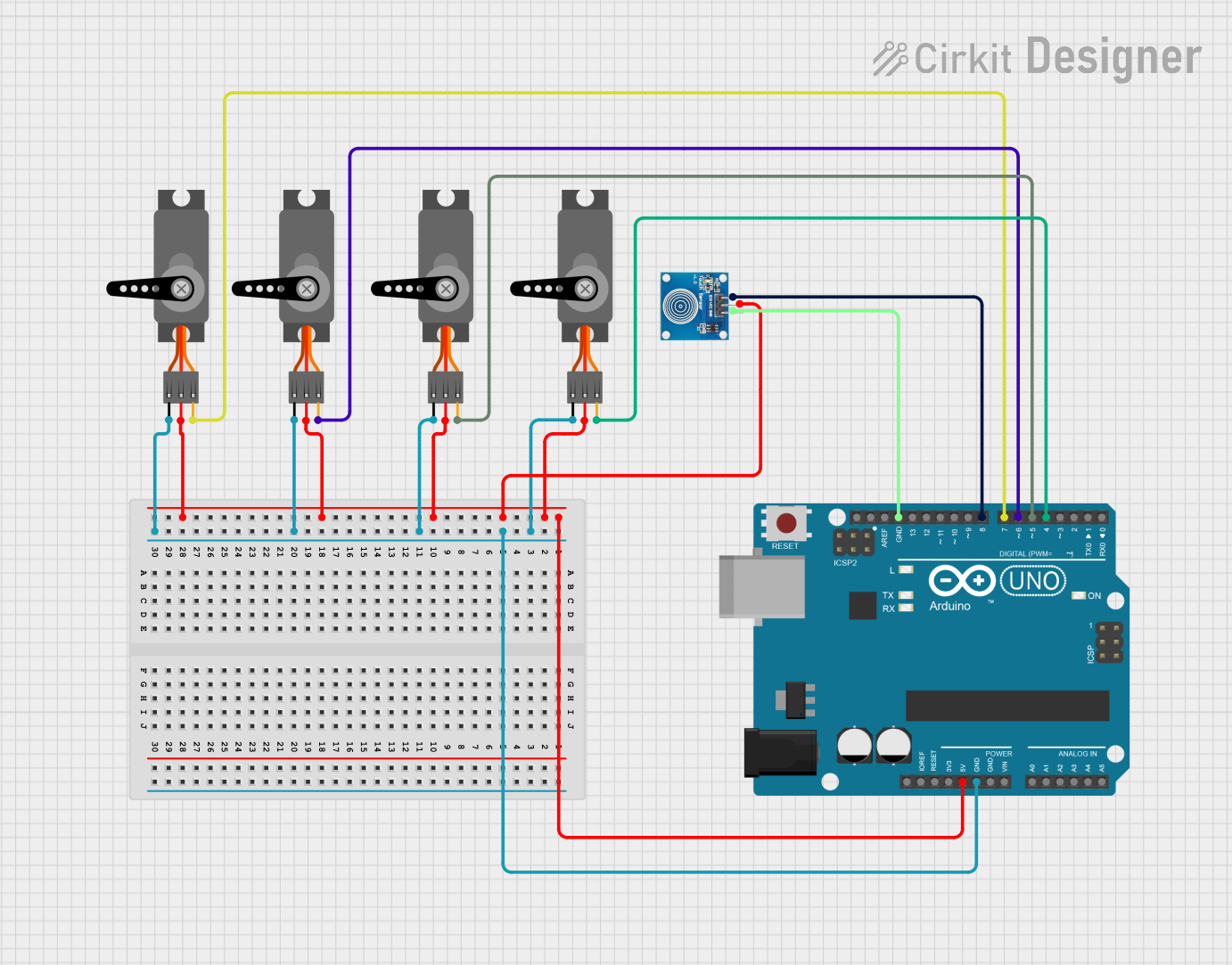
This circuit is designed to control multiple servo motors using an Arduino UNO microcontroller. Additionally, it includes a touch sensor for user input. The Arduino UNO provides power to the servos and the touch sensor, and it also controls the position of the servo motors by sending PWM (Pulse Width Modulation) signals. The touch sensor is interfaced with the Arduino to potentially trigger events or actions when touched.
Component List
Servo Motors
- Description: Servo motors are used for precise control of angular or linear position, velocity, and acceleration. They consist of a suitable motor coupled to a sensor for position feedback.
- Pins: GND, VCC, PWM
Touch Sensor
- Description: A touch sensor is an electronic sensor used to detect and record physical touch. This sensor acts as a switch that is activated upon touch.
- Pins: IO, VCC, GND
Arduino UNO
- Description: The Arduino UNO is a microcontroller board based on the ATmega328P. It has digital input/output pins, analog inputs, a USB connection for programming the board, a power jack, an ICSP header, and a reset button.
- Pins: UNUSED, IOREF, Reset, 3.3V, 5V, GND, Vin, A0-A5, SCL, SDA, AREF, D0-D13
Wiring Details
Servo Motors
- VCC: Connected to the 5V output from the Arduino UNO.
- GND: Connected to the ground (GND) on the Arduino UNO.
- PWM: Each servo motor's PWM pin is connected to a unique digital pin (D4-D7) on the Arduino UNO for individual control.
Touch Sensor
- VCC: Connected to the 5V output from the Arduino UNO.
- GND: Connected to the ground (GND) on the Arduino UNO.
- IO: Connected to digital pin D8 on the Arduino UNO.
Arduino UNO
- 5V: Provides power to the servo motors and the touch sensor.
- GND: Common ground for the servo motors and the touch sensor.
- D4-D7: Control pins for the PWM signal to the servo motors.
- D8: Input pin connected to the touch sensor.
Documented Code
void setup() {
  // put your setup code here, to run once:

}

void loop() {
  // put your main code here, to run repeatedly:

}
File Details
- File Name: sketch.ino
- Description: This Arduino sketch is the main program that will control the servo motors and read the touch sensor input. The setup function is used to initialize the pins and the loop function will contain the code to control the servos and handle touch events.
Note: The provided code is a template and does not contain any functional code for controlling the servos or reading the touch sensor. The user is expected to fill in the setup and loop functions with the appropriate code to implement the desired functionality.