
Arduino UNO-Based Contactless Water Level Monitoring System with LCD Display
View and Edit Project In Cirkit Designer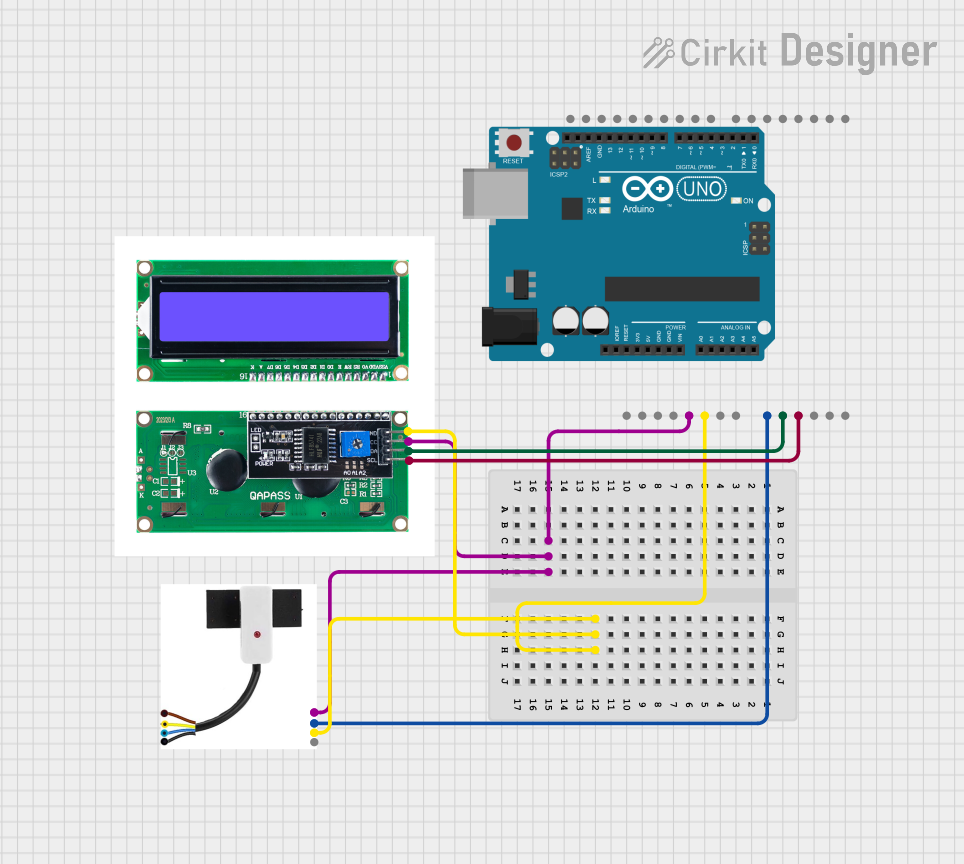
Circuit Documentation
Summary
This circuit is designed to monitor water levels using a contactless water level sensor and display the readings on an I2C LCD screen. The system is controlled by an Arduino UNO microcontroller, which reads the sensor data and updates the LCD display accordingly.
Component List
Arduino UNO
- Description: A microcontroller board based on the ATmega328P.
- Pins: UNUSED, IOREF, Reset, 3.3V, 5V, GND, Vin, A0, A1, A2, A3, A4, A5, SCL, SDA, AREF, D13, D12, D11, D10, D9, D8, D7, D6, D5, D4, D3, D2, D1, D0
LCD I2C
- Description: An I2C LCD display module.
- Pins: GND, VCC, SDA, SCL
XKC-Y26-V Contactless Water Level Sensor
- Description: A contactless water level sensor.
- Pins: VCC, OUT, MODE, GND
Wiring Details
Arduino UNO
- GND: Connected to GND of LCD I2C and XKC-Y26-V Contactless Water Level Sensor
- 5V: Connected to VCC of LCD I2C and XKC-Y26-V Contactless Water Level Sensor
- A0: Connected to OUT of XKC-Y26-V Contactless Water Level Sensor
- A1: Connected to SDA of LCD I2C
- A2: Connected to SCL of LCD I2C
LCD I2C
- GND: Connected to GND of Arduino UNO and XKC-Y26-V Contactless Water Level Sensor
- VCC: Connected to 5V of Arduino UNO and XKC-Y26-V Contactless Water Level Sensor
- SDA: Connected to A1 of Arduino UNO
- SCL: Connected to A2 of Arduino UNO
XKC-Y26-V Contactless Water Level Sensor
- GND: Connected to GND of Arduino UNO and LCD I2C
- VCC: Connected to 5V of Arduino UNO and LCD I2C
- OUT: Connected to A0 of Arduino UNO
Code Documentation
#include <Wire.h>
#include <LiquidCrystal_I2C.h>

// Initialisation de l'écran LCD (adresse I2C = 0x27 ou 0x3F selon votre écran)
LiquidCrystal_I2C lcd(0x27, 16, 2);

// Définir les broches
const int waterSensorPin = A0; // Capteur connecté à A0
const int waterMaxValue = 1023; // Valeur maximale analogique pour le capteur (0-1023)

// Variables
int waterLevelRaw = 0;     // Lecture brute du capteur
float waterLevelPercent = 0.0; // Pourcentage d'eau dans le bassin

void setup() {
  // Initialisation de la communication série
  Serial.begin(9600);

  // Initialisation de l'écran LCD
  lcd.init();
  lcd.backlight();
  lcd.setCursor(0, 0);
  lcd.print("Initialisation...");
  delay(2000);
  lcd.clear();
}

void loop() {
  // Lecture du capteur de niveau d'eau
  waterLevelRaw = analogRead(waterSensorPin);

  // Conversion de la valeur brute en pourcentage (0% à 100%)
  waterLevelPercent = (waterLevelRaw / (float)waterMaxValue) * 100.0;

  // Affichage des informations sur le LCD
  lcd.setCursor(0, 0);
  lcd.print("Niveau d'eau:");
  lcd.setCursor(0, 1);
  lcd.print(waterLevelPercent, 1); // Afficher avec 1 chiffre après la virgule
  lcd.print("%");

  // Affichage des informations dans le moniteur série
  Serial.print("Niveau d'eau: ");
  Serial.print(waterLevelPercent);
  Serial.println("%");

  // Pause avant la prochaine mesure
  delay(1000);
}
This code initializes the LCD and sets up the water level sensor. In the main loop, it reads the sensor value, converts it to a percentage, and displays the value on both the LCD and the serial monitor. The loop repeats every second.