
Arduino UNO Bluetooth-Controlled Robotic Car with Pan-Tilt Servos
View and Edit Project In Cirkit Designer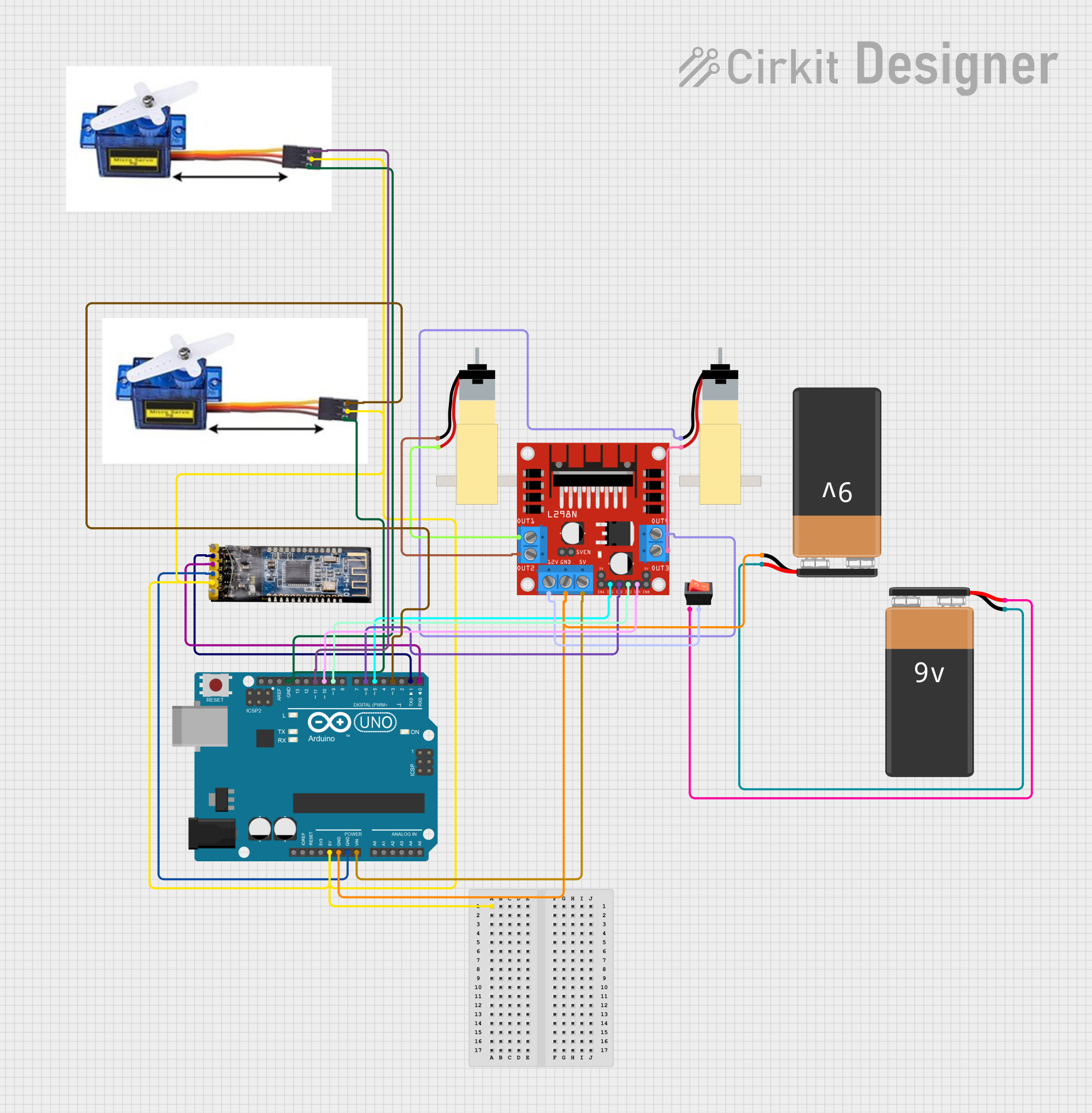
Circuit Documentation
Summary
This circuit is designed to control a two-wheel drive robot with a pan-tilt mechanism using an Arduino UNO. The robot is controlled via Bluetooth using the ArduinoBlue app. The circuit includes an Arduino UNO, an HM-10 Bluetooth module, two DC motors, two servo motors, an L298N motor driver, a rocker switch, and two 9V batteries.
Component List
Arduino UNO
- Description: Microcontroller board based on the ATmega328P.
- Pins: UNUSED, IOREF, Reset, 3.3V, 5V, GND, Vin, A0, A1, A2, A3, A4, A5, SCL, SDA, AREF, D13, D12, D11, D10, D9, D8, D7, D6, D5, D4, D3, D2, D1, D0
Bluetooth module HM-10
- Description: Bluetooth Low Energy (BLE) module for wireless communication.
- Pins: BRK, RX, TX, GND, VCC, State
Hobby Gearmotor with 48:1 gearbox
- Description: DC motor with a 48:1 gearbox for increased torque.
- Pins: pin 1, pin 2
9V Battery
- Description: Power source for the circuit.
- Pins: -, +
Rocker switch
- Description: Switch to control the power supply.
- Pins: output, input
L298N DC motor driver
- Description: Dual H-Bridge motor driver to control the DC motors.
- Pins: OUT1, OUT2, 12V, GND, 5V, OUT3, OUT4, 5V-ENA-JMP-I, 5V-ENA-JMP-O, +5V-J1, +5V-J2, ENA, IN1, IN2, IN3, IN4, ENB
Servo Motor 9G
- Description: Small servo motor for precise control.
- Pins: VCC 5V, PMW, GND
Wiring Details
Arduino UNO
- 5V: Connected to VCC of both Servo Motors and the Bluetooth module.
- GND: Connected to GND of both Servo Motors, the Bluetooth module, the L298N motor driver, and the negative terminal of one 9V Battery.
- Vin: Connected to 5V of the L298N motor driver.
- D11: Connected to PMW of one Servo Motor.
- D10: Connected to IN4 of the L298N motor driver.
- D9: Connected to IN3 of the L298N motor driver.
- D6: Connected to IN2 of the L298N motor driver.
- D5: Connected to IN1 of the L298N motor driver.
- D3: Connected to PMW of the other Servo Motor.
- D1: Connected to RX of the Bluetooth module.
- D0: Connected to TX of the Bluetooth module.
Bluetooth module HM-10
- VCC: Connected to 5V of the Arduino UNO.
- GND: Connected to GND of the Arduino UNO.
- RX: Connected to D1 of the Arduino UNO.
- TX: Connected to D0 of the Arduino UNO.
Hobby Gearmotor with 48:1 gearbox
- pin 1: Connected to OUT4 of the L298N motor driver.
- pin 2: Connected to OUT3 of the L298N motor driver.
Hobby Gearmotor with 48:1 gearbox
- pin 1: Connected to OUT2 of the L298N motor driver.
- pin 2: Connected to OUT1 of the L298N motor driver.
9V Battery
- -: Connected to the negative terminal of the other 9V Battery and GND of the Arduino UNO.
- +: Connected to the input of the rocker switch.
Rocker switch
- input: Connected to the positive terminal of one 9V Battery.
- output: Connected to 12V of the L298N motor driver.
L298N DC motor driver
- GND: Connected to GND of the Arduino UNO.
- 5V: Connected to Vin of the Arduino UNO.
- 12V: Connected to the output of the rocker switch.
- IN1: Connected to D5 of the Arduino UNO.
- IN2: Connected to D6 of the Arduino UNO.
- IN3: Connected to D9 of the Arduino UNO.
- IN4: Connected to D10 of the Arduino UNO.
- OUT1: Connected to pin 2 of one Hobby Gearmotor.
- OUT2: Connected to pin 1 of one Hobby Gearmotor.
- OUT3: Connected to pin 2 of the other Hobby Gearmotor.
- OUT4: Connected to pin 1 of the other Hobby Gearmotor.
Servo Motor 9G
- VCC 5V: Connected to 5V of the Arduino UNO.
- PMW: Connected to D11 of the Arduino UNO.
- GND: Connected to GND of the Arduino UNO.
Servo Motor 9G
- VCC 5V: Connected to 5V of the Arduino UNO.
- PMW: Connected to D3 of the Arduino UNO.
- GND: Connected to GND of the Arduino UNO.
Code Documentation
/*
 * ArduinoBlue app controlled 2 wheel drive and 2 servo pan tilt
 * This code interfaces with an HM-10 Bluetooth module to receive commands
 * from the ArduinoBlue app. It controls two DC motors via an L298N motor driver
 * and two servo motors for pan and tilt functionality.
 */

#include <Servo.h>

// Pin definitions
const int motor1Pin1 = 5;
const int motor1Pin2 = 6;
const int motor2Pin1 = 9;
const int motor2Pin2 = 10;
const int servo1Pin = 3;
const int servo2Pin = 11;

// Create Servo objects
Servo servo1;
Servo servo2;

void setup() {
  // Initialize motor control pins as outputs
  pinMode(motor1Pin1, OUTPUT);
  pinMode(motor1Pin2, OUTPUT);
  pinMode(motor2Pin1, OUTPUT);
  pinMode(motor2Pin2, OUTPUT);

  // Attach servos to their respective pins
  servo1.attach(servo1Pin);
  servo2.attach(servo2Pin);

  // Initialize serial communication for Bluetooth module
  Serial.begin(9600);
}

void loop() {
  // Check if data is available from the Bluetooth module
  if (Serial.available() > 0) {
    char command = Serial.read();
    handleCommand(command);
  }
}

void handleCommand(char command) {
  switch (command) {
    case 'F': // Move forward
      digitalWrite(motor1Pin1, HIGH);
      digitalWrite(motor1Pin2, LOW);
      digitalWrite(motor2Pin1, HIGH);
      digitalWrite(motor2Pin2, LOW);
      break;
    case 'B': // Move backward
      digitalWrite(motor1Pin1, LOW);
      digitalWrite(motor1Pin2, HIGH);
      digitalWrite(motor2Pin1, LOW);
      digitalWrite(motor2Pin2, HIGH);
      break;
    case 'L': // Turn left
      digitalWrite(motor1Pin1, LOW);
      digitalWrite(motor1Pin2, HIGH);
      digitalWrite(motor2Pin1, HIGH);
      digitalWrite(motor2Pin2, LOW);
      break;
    case 'R': // Turn right
      digitalWrite(motor1Pin1, HIGH);
      digitalWrite(motor1Pin2, LOW);
      digitalWrite(motor2Pin1, LOW);
      digitalWrite(motor2Pin2, HIGH);
      break;
    case 'S': // Stop
      digitalWrite(motor1Pin1, LOW);
      digitalWrite(motor1Pin2, LOW);
      digitalWrite(motor2Pin1, LOW);
      digitalWrite(motor2Pin2, LOW);
      break;
    case 'U': // Pan up
      servo1.write(servo1.read() + 10);
      break;
    case 'D': // Pan down
      servo1.write(servo1.read() - 10);
      break;
    case 'P': // Tilt up
      servo2.write(servo2.read() + 10);
      break;
    case 'T': // Tilt down
      servo2.write(servo2.read() - 10);
      break;
    default:
      // Do nothing for unrecognized commands
      break;
  }
}
This code interfaces with the HM-10 Bluetooth module to receive commands from the ArduinoBlue app. It controls two DC motors via an L298N motor driver and two servo motors for pan and tilt functionality. The commands include moving forward, backward, turning left, right, stopping, and controlling the pan-tilt mechanism.