
Arduino Mega 2560 Hall Sensor Interface for Real-Time Magnetic Field Detection
View and Edit Project In Cirkit Designer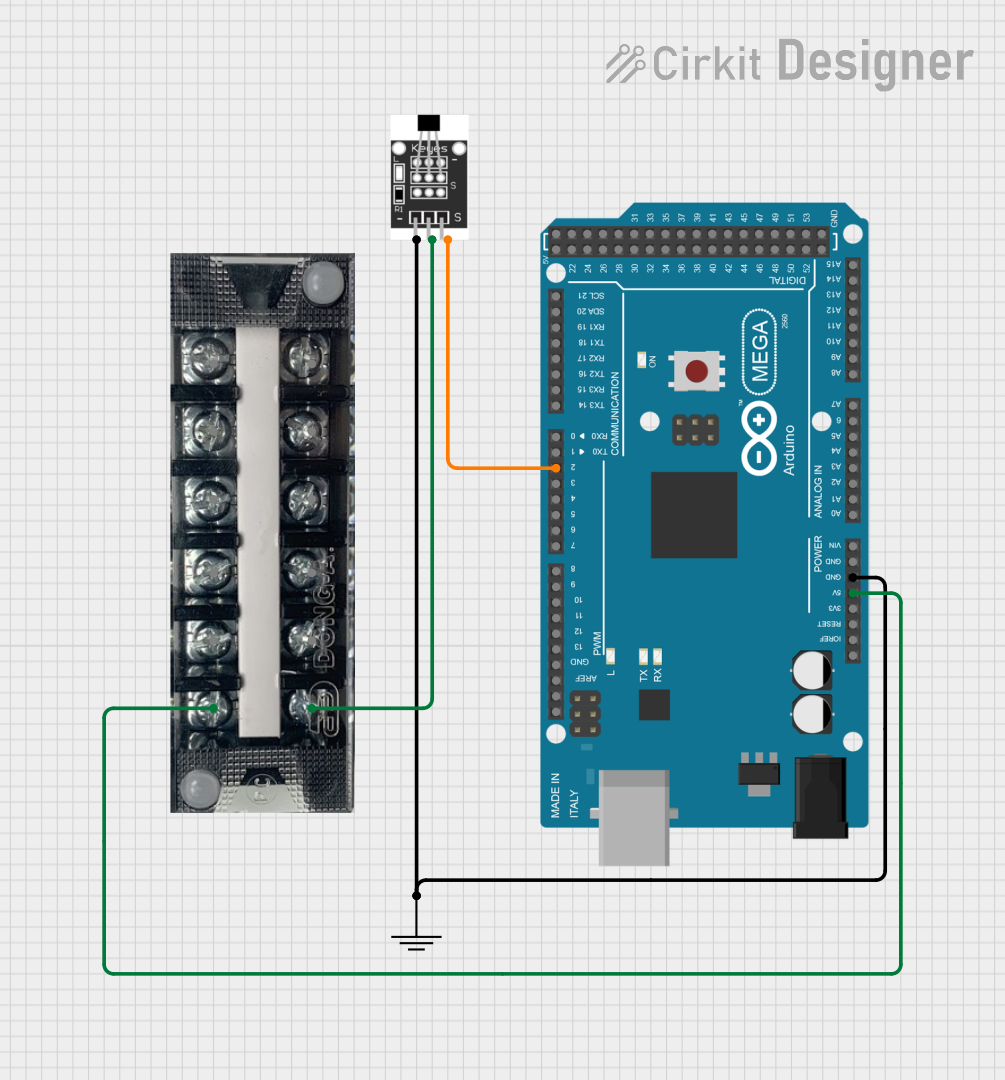
Circuit Documentation
Summary
This document provides a detailed overview of a circuit that includes a Hall Sensor, an Arduino Mega 2560, a Terminal Block, and a Ground connection. The Hall Sensor is used to detect magnetic fields, and its output is read by the Arduino Mega 2560. The Terminal Block is used to distribute power to the Hall Sensor.
Component List
Hall Sensor
- Component Name: Hall Sensor
- Description: A sensor used to detect magnetic fields.
- Pins: -, +, S
GND
- Component Name: GND
- Description: Ground connection.
- Pins: GND
Terminal Block KTB1 20A 6P
- Component Name: Terminal Block KTB1 20A 6P
- Description: A terminal block used for power distribution.
- Pins: 1, 2, 3, 4, 5, 6
Arduino Mega 2560
- Component Name: Arduino Mega 2560
- Description: A microcontroller board based on the ATmega2560.
- Pins: IOREF, RESET, 3V3, 5V, GND, VIN, A0, A1, A2, A3, A4, A5, A6, A7, A8, A9, A10, A11, A12, A13, A14, A15, D21/SCL, D20/SDA, D19/RX1, D18/TX1, D17 PWM/RX2, D16 PWM/TX2, D15/RX3, D14/TX3, D0 RX0, D1 TX0, D2 PWM, D3 PWM, D4 PWM, D5 PWM, D6 PWM, D7 PWM, D8 PWM, D9 PWM, D10 PWM, D11 PWM, D12 PWM, D13 PWM, AREF, SDA, SCL, D52, D50, D48, D46, D44, D42, D40, D38, D36, D34, D32, D30, D28, D26, D24, D22, D53, D51, D49, D47, D45, D43, D41, D39, D37, D35, D33, D31, D29, D27, D25, D23
Wiring Details
Hall Sensor
- Pin -: Connected to GND of the GND component and GND of the Arduino Mega 2560.
- Pin +: Connected to pin 1 of the Terminal Block KTB1 20A 6P.
- Pin S: Connected to pin D2 PWM of the Arduino Mega 2560.
GND
- Pin GND: Connected to pin - of the Hall Sensor and GND of the Arduino Mega 2560.
Terminal Block KTB1 20A 6P
- Pin 1: Connected to pin + of the Hall Sensor and 5V of the Arduino Mega 2560.
Arduino Mega 2560
- Pin GND: Connected to pin - of the Hall Sensor and GND of the GND component.
- Pin 5V: Connected to pin 1 of the Terminal Block KTB1 20A 6P.
- Pin D2 PWM: Connected to pin S of the Hall Sensor.
Documented Code
Arduino Mega 2560 Code
void setup() {
  // put your setup code here, to run once:

}

void loop() {
  // put your main code here, to run repeatedly:

}
Additional Documentation
This document provides a comprehensive overview of the circuit, including the components used, their connections, and the code running on the Arduino Mega 2560.