
Arduino UNO-Based Ultrasonic Parking Sensor with LCD Display and LED Indicators
View and Edit Project In Cirkit Designer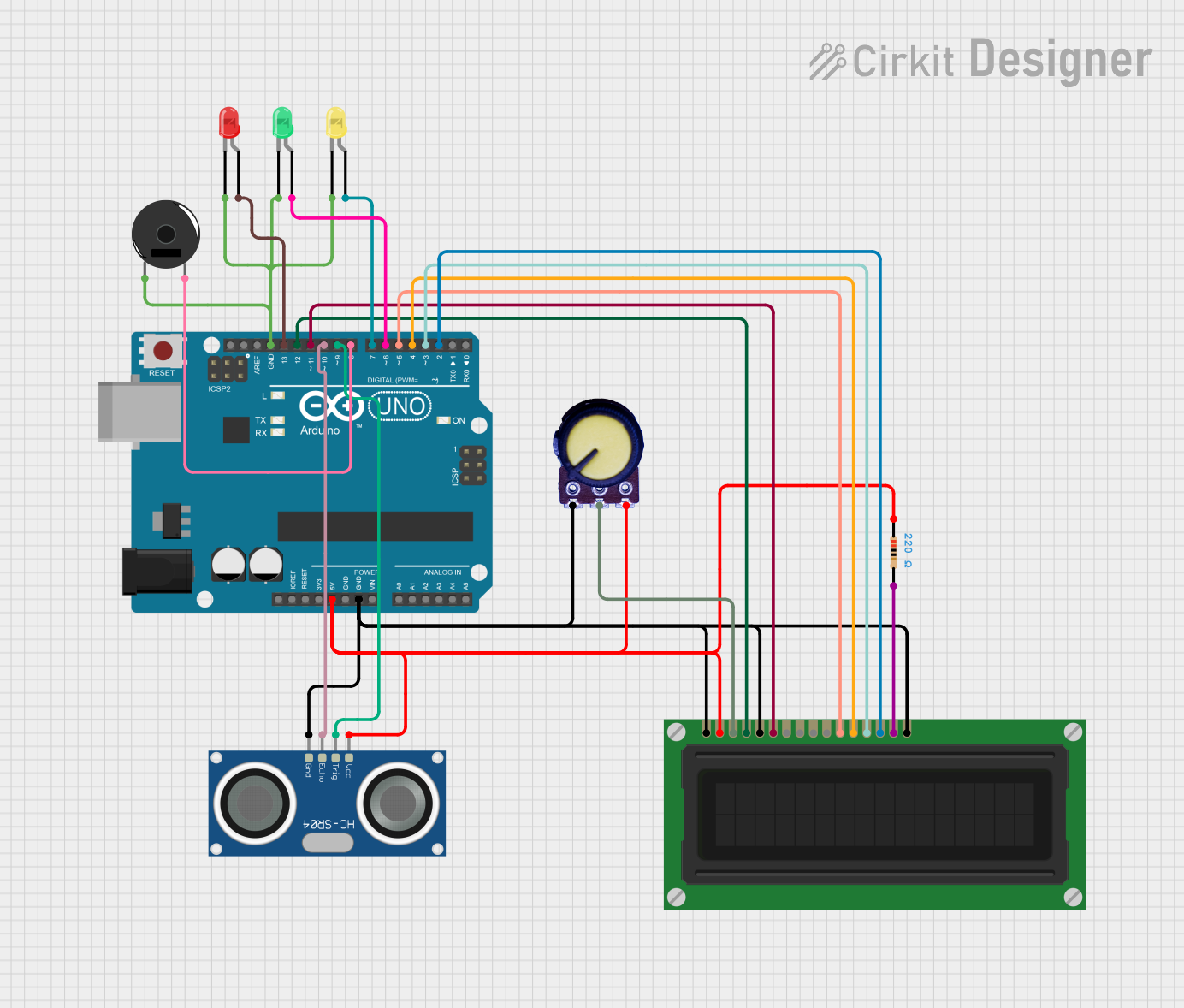
Circuit Documentation
Summary
This circuit is a parking sensor system that uses an Arduino UNO microcontroller to measure the distance of an object using an HC-SR04 ultrasonic sensor. The distance is displayed on an LCD display, and LEDs and a piezo buzzer provide visual and auditory warnings based on the measured distance. A potentiometer is used to adjust the contrast of the LCD display.
Component List
Arduino UNO
- Description: Microcontroller board based on the ATmega328P.
- Pins: UNUSED, IOREF, Reset, 3.3V, 5V, GND, Vin, A0, A1, A2, A3, A4, A5, SCL, SDA, AREF, D13, D12, D11, D10, D9, D8, D7, D6, D5, D4, D3, D2, D1, D0
Resistor
- Description: 220 Ohms resistor.
- Pins: pin1, pin2
- Properties: Resistance: 220 Ohms
LCD Display (16 pin)
- Description: 16x2 character LCD display.
- Pins: VSS, VDD, VO, RS, R_W, E, DB0, DB1, DB2, DB3, DB4, DB5, DB6, DB7, A, K
Potentiometer
- Description: Variable resistor used to adjust LCD contrast.
- Pins: GND, Output, VCC
LED: Two Pin (red)
- Description: Red LED.
- Pins: cathode, anode
LED: Two Pin (green)
- Description: Green LED.
- Pins: cathode, anode
LED: Two Pin (yellow)
- Description: Yellow LED.
- Pins: cathode, anode
HC-SR04 Ultrasonic Sensor
- Description: Ultrasonic distance sensor.
- Pins: VCC, TRIG, ECHO, GND
Piezo Buzzer
- Description: Buzzer for auditory warnings.
- Pins: pin 1, pin 2
Wiring Details
Arduino UNO
- 5V connected to VCC of Potentiometer, VDD of LCD Display, VCC of HC-SR04 Ultrasonic Sensor, and pin1 of Resistor.
- GND connected to GND of Potentiometer, VSS, K, and R_W of LCD Display, GND of HC-SR04 Ultrasonic Sensor, cathode of green LED, pin 1 of Piezo Buzzer, cathode of yellow LED, and cathode of red LED.
- D13 connected to anode of red LED.
- D12 connected to RS of LCD Display.
- D11 connected to E of LCD Display.
- D10 connected to ECHO of HC-SR04 Ultrasonic Sensor.
- D9 connected to TRIG of HC-SR04 Ultrasonic Sensor.
- D8 connected to pin 2 of Piezo Buzzer.
- D7 connected to anode of yellow LED.
- D6 connected to anode of green LED.
- D5 connected to DB4 of LCD Display.
- D4 connected to DB5 of LCD Display.
- D3 connected to DB6 of LCD Display.
- D2 connected to DB7 of LCD Display.
Potentiometer
- VCC connected to 5V of Arduino UNO.
- GND connected to GND of Arduino UNO.
- Output connected to VO of LCD Display.
LCD Display (16 pin)
- VDD connected to 5V of Arduino UNO.
- VSS connected to GND of Arduino UNO.
- VO connected to Output of Potentiometer.
- RS connected to D12 of Arduino UNO.
- R_W connected to GND of Arduino UNO.
- E connected to D11 of Arduino UNO.
- DB4 connected to D5 of Arduino UNO.
- DB5 connected to D4 of Arduino UNO.
- DB6 connected to D3 of Arduino UNO.
- DB7 connected to D2 of Arduino UNO.
- A connected to pin2 of Resistor.
- K connected to GND of Arduino UNO.
HC-SR04 Ultrasonic Sensor
- VCC connected to 5V of Arduino UNO.
- GND connected to GND of Arduino UNO.
- TRIG connected to D9 of Arduino UNO.
- ECHO connected to D10 of Arduino UNO.
Piezo Buzzer
- pin 1 connected to GND of Arduino UNO.
- pin 2 connected to D8 of Arduino UNO.
LED: Two Pin (red)
- cathode connected to GND of Arduino UNO.
- anode connected to D13 of Arduino UNO.
LED: Two Pin (green)
- cathode connected to GND of Arduino UNO.
- anode connected to D6 of Arduino UNO.
LED: Two Pin (yellow)
- cathode connected to GND of Arduino UNO.
- anode connected to D7 of Arduino UNO.
Resistor
- pin1 connected to 5V of Arduino UNO.
- pin2 connected to A of LCD Display.
Code Documentation
#include <LiquidCrystal.h>

// Initialize LCD pins (RS, E, D4, D5, D6, D7)
LiquidCrystal lcd(12, 11, 5, 4, 3, 2);

// Pin definitions
const int trigPin = 9;    // Ultrasonic sensor trigger
const int echoPin = 10;   // Ultrasonic sensor echo
const int buzzerPin = 8;  // Buzzer
const int greenLed = 7;   // Safe distance
const int yellowLed = 6;  // Warning distance
const int redLed = 13;    // Danger distance

// Distance thresholds (in cm)
const int SAFE_DISTANCE = 100;
const int WARNING_DISTANCE = 50;
const int DANGER_DISTANCE = 20;

void setup() {
  // Initialize LCD
  lcd.begin(16, 2);  // 16 columns, 2 rows

  // Initialize pins
  pinMode(trigPin, OUTPUT);
  pinMode(echoPin, INPUT);
  pinMode(buzzerPin, OUTPUT);
  pinMode(greenLed, OUTPUT);
  pinMode(yellowLed, OUTPUT);
  pinMode(redLed, OUTPUT);

  // Display startup message
  lcd.print("Parking Sensor");
  lcd.setCursor(0,1);
  lcd.print("Starting...");
  delay(2000);
}

void loop() {
  // Get distance measurement
  long duration, distance;

  // Clear trigger pin
  digitalWrite(trigPin, LOW);
  delayMicroseconds(2);

  // Send ultrasonic pulse
  digitalWrite(trigPin, HIGH);
  delayMicroseconds(10);
  digitalWrite(trigPin, LOW);

  // Read echo
  duration = pulseIn(echoPin, HIGH);

  // Calculate distance in cm
  distance = duration * 0.034 / 2;

  // Update display and warnings
  updateDisplay(distance);
  updateWarnings(distance);

  delay(100);
}

void updateDisplay(long distance) {
  lcd.clear();
  lcd.setCursor(0,0);
  lcd.print("Dist:");
  lcd.print(distance);
  lcd.print("cm");

  lcd.setCursor(0,1);
  if (distance > SAFE_DISTANCE) {
    lcd.print("Safe to Park");
  } else if (distance > WARNING_DISTANCE) {
    lcd.print("Getting Close!");
  } else if (distance > DANGER_DISTANCE) {
    lcd.print("Warning!");
  } else {
    lcd.print("STOP!");
  }
}

void updateWarnings(long distance) {
  // Update LEDs
  digitalWrite(greenLed, distance > SAFE_DISTANCE);
  digitalWrite(yellowLed, distance <= SAFE_DISTANCE && distance > DANGER_DISTANCE);
  digitalWrite(redLed, distance <= DANGER_DISTANCE);

  // Update buzzer
  if (distance <= DANGER_DISTANCE) {
    // Continuous tone
    tone(buzzerPin, 2000);
  } else if (distance <= WARNING_DISTANCE) {
    // Intermittent beeping
    tone(buzzerPin, 1500);
    delay(distance * 2);
    noTone(buzzerPin);
    delay(distance * 2);
  } else