
Arduino UNO Solenoid Valve Controller with L293D Driver and I2C LCD Display
View and Edit Project In Cirkit Designer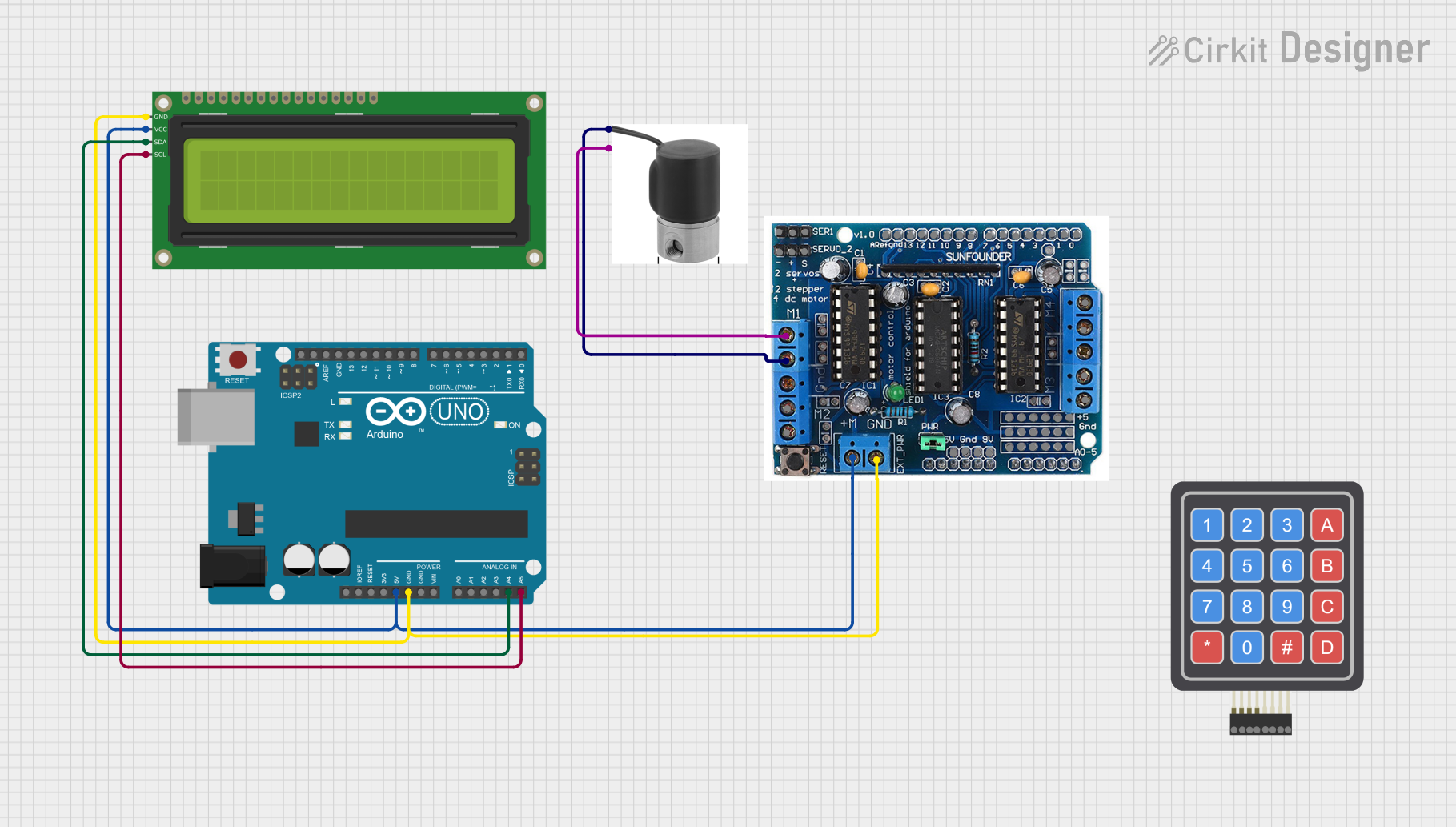
Circuit Documentation
Summary
This circuit is designed to control a 12V solenoid valve using an Arduino UNO and an L293D driver shield. The valve is opened and closed based on predefined time intervals. Additionally, a 16x2 I2C LCD is used to display the current state of the valve. The circuit includes the following components:
- Arduino UNO
- L293D driver shield
- 12V Solenoid Valve
- 16x2 I2C LCD
Component List
Arduino UNO
- Description: A microcontroller board based on the ATmega328P.
- Pins: UNUSED, IOREF, Reset, 3.3V, 5V, GND, Vin, A0, A1, A2, A3, A4, A5, SCL, SDA, AREF, D13, D12, D11, D10, D9, D8, D7, D6, D5, D4, D3, D2, D1, D0
L293D Driver Shield
- Description: A motor driver shield that can control up to four DC motors or two stepper motors.
- Pins: 5V, GND, A0, A1, A2, A3, A4, A5, M+, M2, M1, M3, M4, 0, 1, 2, 3, 4, 5, 6, 7, 8, 9, 10, 11, 12, gnd, Aref, ser1, Servo2, +, -, 9V
Solenoid Valve 12V
- Description: An electromechanical valve for controlling the flow of liquid or gas.
- Pins: GND, 12V
4x4 Keypad (Simulator)
- Description: A matrix keypad used for user input.
- Pins: R1, C4, R2, C2, R3, R4, C1, C3
16x2 I2C LCD
- Description: A 16x2 character LCD with I2C interface.
- Pins: GND, VCC, SDA, SCL
Wiring Details
Arduino UNO
- 5V: Connected to L293D Driver Shield (M+), 16x2 I2C LCD (VCC)
- GND: Connected to L293D Driver Shield (GND), 16x2 I2C LCD (GND)
- A4: Connected to 16x2 I2C LCD (SDA)
- A5: Connected to 16x2 I2C LCD (SCL)
- D9: Used as the control pin for the solenoid valve (via L293D Driver Shield M1)
L293D Driver Shield
- M+: Connected to Arduino UNO (5V)
- GND: Connected to Arduino UNO (GND), 16x2 I2C LCD (GND)
- M1: Connected to Solenoid Valve (GND, 12V)
Solenoid Valve 12V
- GND: Connected to L293D Driver Shield (M1)
- 12V: Connected to L293D Driver Shield (M1)
16x2 I2C LCD
- VCC: Connected to Arduino UNO (5V)
- GND: Connected to Arduino UNO (GND), L293D Driver Shield (GND)
- SDA: Connected to Arduino UNO (A4)
- SCL: Connected to Arduino UNO (A5)
Documented Code
/*
 * Arduino Sketch to control a solenoid valve using an L293D driver shield.
 * The valve is opened and closed based on a predefined time interval.
 * The circuit includes:
 * - Arduino UNO
 * - L293D driver shield
 * - 12V Solenoid Valve
 * - 16x2 I2C LCD for display
 *
 * Connections:
 * - Solenoid Valve GND to L293D M1
 * - Solenoid Valve 12V to L293D M1
 * - L293D M+ to Arduino 5V
 * - L293D GND to Arduino GND
 * - LCD VCC to Arduino 5V
 * - LCD GND to Arduino GND
 * - LCD SDA to Arduino A4
 * - LCD SCL to Arduino A5
 */

#include <Wire.h>
#include <LiquidCrystal_I2C.h>

// Initialize the LCD
LiquidCrystal_I2C lcd(0x27, 16, 2);

// Define the solenoid valve control pin
const int valvePin = 9; // L293D M1 is connected to Arduino D9

// Define the time intervals (in milliseconds)
const unsigned long openDuration = 5000; // Valve open for 5 seconds
const unsigned long closeDuration = 5000; // Valve closed for 5 seconds

// Variables to store the current state and timing
unsigned long previousMillis = 0;
bool valveState = false; // false = closed, true = open

void setup() {
  // Initialize the LCD
  lcd.begin();
  lcd.backlight();
  lcd.setCursor(0, 0);
  lcd.print("Valve Control");

  // Initialize the valve control pin
  pinMode(valvePin, OUTPUT);
  digitalWrite(valvePin, LOW); // Start with the valve closed
}

void loop() {
  // Get the current time
  unsigned long currentMillis = millis();

  // Check if it's time to change the valve state
  if ((valveState && (currentMillis - previousMillis >= openDuration)) ||
      (!valveState && (currentMillis - previousMillis >= closeDuration))) {
    // Toggle the valve state
    valveState = !valveState;
    digitalWrite(valvePin, valveState ? HIGH : LOW);

    // Update the LCD display
    lcd.setCursor(0, 1);
    lcd.print(valveState ? "Valve: OPEN " : "Valve: CLOSED");

    // Update the previousMillis to the current time
    previousMillis = currentMillis;
  }
}
This code initializes the LCD and sets up the solenoid valve control pin. In the loop function, it toggles the valve state based on predefined time intervals and updates the LCD display accordingly.