
Arduino UNO-Based Automatic Water Dispenser with Water Level Sensor and Relay Control
View and Edit Project In Cirkit Designer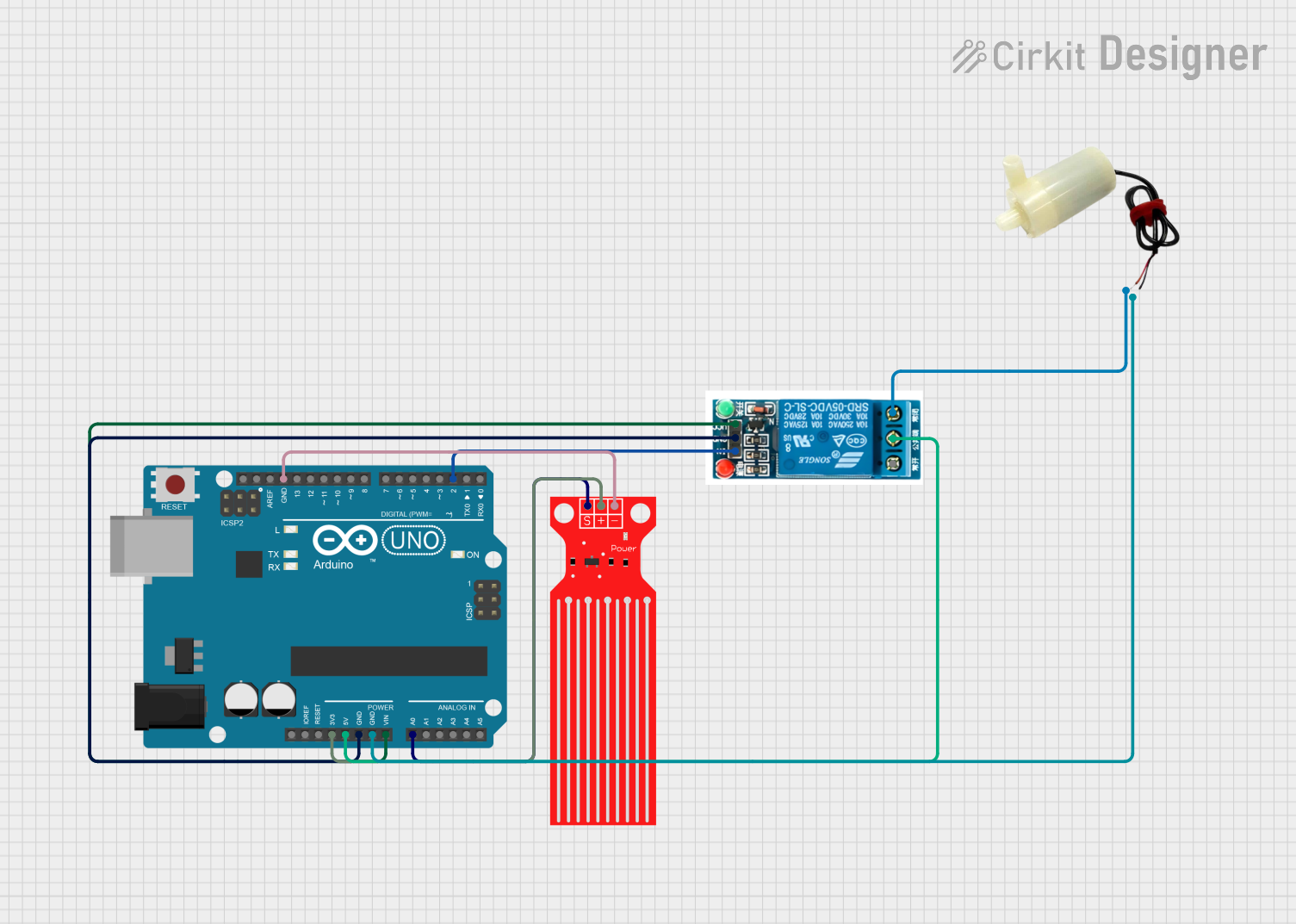
Automatic Water Dispenser Circuit Documentation
Summary
This document provides a detailed overview of an automatic water dispenser circuit. The circuit uses an Arduino UNO microcontroller to control a water pump via a relay, based on the input from a water level sensor. When the water level reaches a certain threshold, the pump is activated to dispense water.
Component List
Arduino UNO
- Description: A microcontroller board based on the ATmega328P.
- Pins: UNUSED, IOREF, Reset, 3.3V, 5V, GND, Vin, A0, A1, A2, A3, A4, A5, SCL, SDA, AREF, D13, D12, D11, D10, D9, D8, D7, D6, D5, D4, D3, D2, D1, D0
Water Level Sensor
- Description: A sensor used to detect the water level.
- Pins: SIG, VCC, GND
5V Mini Water Pump
- Description: A small water pump that operates at 5V.
- Pins: positive pin, negative pin
5V Relay
- Description: A relay module that operates at 5V to control high-power devices.
- Pins: Normally Open, Common terminal, Normally Closed, In, GND, VCC
Wiring Details
Arduino UNO
- 3.3V: Connected to VCC of the Water Level Sensor
- 5V: Connected to the Common terminal of the 5V Relay
- GND: Connected to GND of the Water Level Sensor, GND of the 5V Relay, and the negative pin of the 5V Mini Water Pump
- Vin: Connected to VCC of the 5V Relay
- A0: Connected to SIG of the Water Level Sensor
- D2: Connected to In of the 5V Relay
Water Level Sensor
- VCC: Connected to 3.3V of the Arduino UNO
- SIG: Connected to A0 of the Arduino UNO
- GND: Connected to GND of the Arduino UNO
5V Mini Water Pump
- positive pin: Connected to Normally Closed of the 5V Relay
- negative pin: Connected to GND of the Arduino UNO
5V Relay
- Common terminal: Connected to 5V of the Arduino UNO
- GND: Connected to GND of the Arduino UNO
- VCC: Connected to Vin of the Arduino UNO
- In: Connected to D2 of the Arduino UNO
- Normally Closed: Connected to the positive pin of the 5V Mini Water Pump
Code Documentation
/*
 * Automatic Water Dispenser
 * This Arduino sketch controls a water pump using a water level sensor and a relay.
 * When the water level reaches a certain threshold, the pump is activated.
 */

const int waterLevelPin = 14; // Water level sensor connected to A0
const int relayPin = 2;       // Relay control pin connected to D2

void setup() {
  pinMode(waterLevelPin, INPUT); // Set water level sensor pin as input
  pinMode(relayPin, OUTPUT);     // Set relay pin as output
  digitalWrite(relayPin, LOW);   // Ensure relay is off initially
}

void loop() {
  int waterLevel = analogRead(waterLevelPin); // Read water level sensor value
  if (waterLevel > 500) { // Threshold value for water level
    digitalWrite(relayPin, HIGH); // Turn on the relay (and the pump)
  } else {
    digitalWrite(relayPin, LOW);  // Turn off the relay (and the pump)
  }
  delay(1000); // Wait for 1 second before next reading
}
This code initializes the water level sensor and relay pin, reads the water level sensor value, and controls the relay to turn the water pump on or off based on the water level. The loop continuously checks the water level every second.