
Arduino UNO-Based Smart Door Lock with Fingerprint, Keypad, and LCD Display
View and Edit Project In Cirkit Designer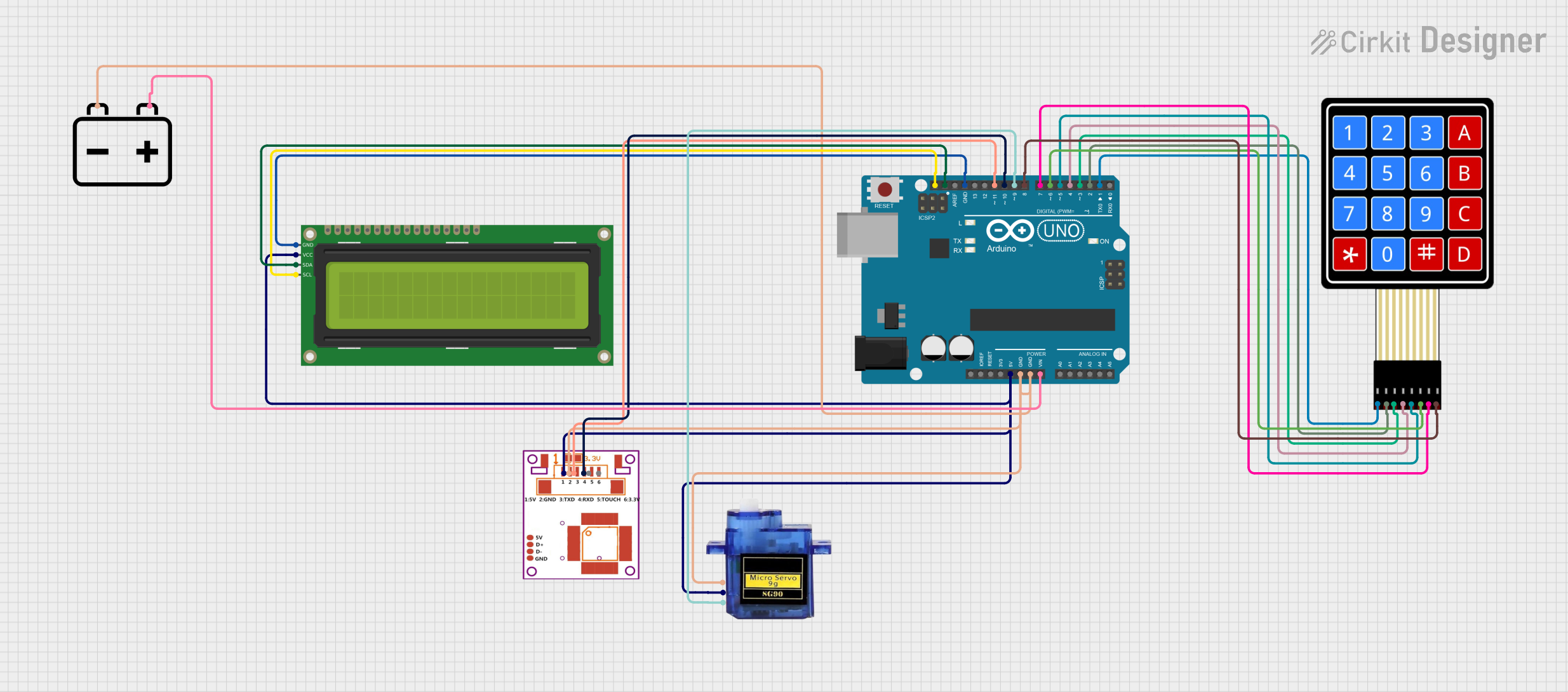
Circuit Documentation
Summary
This circuit is designed to implement a secure door lock system using an Arduino UNO microcontroller. The system integrates multiple components including a fingerprint sensor, a 4x4 membrane matrix keypad, a 16x2 I2C LCD, a micro servo motor, and a 12V battery. The system operates in three modes: RFID mode, Keypad mode, and Fingerprint mode, ensuring multi-layered security.
Component List
R307 Fingerprint Sensor
- Description: A biometric sensor used to capture and verify fingerprints.
- Pins: VCC, GND, TX, RX, Touch, 3.3V
Arduino UNO
- Description: A microcontroller board based on the ATmega328P.
- Pins: UNUSED, IOREF, Reset, 3.3V, 5V, GND, Vin, A0, A1, A2, A3, A4, A5, SCL, SDA, AREF, D13, D12, D11, D10, D9, D8, D7, D6, D5, D4, D3, D2, D1, D0
Micro Servo 9G
- Description: A small servo motor used to control the door lock mechanism.
- Pins: GND, +5V, PWM
4X4 Membrane Matrix Keypad
- Description: A keypad used for entering passwords.
- Pins: R1, R2, R3, R4, C1, C2, C3, C4
16x2 I2C LCD
- Description: A liquid crystal display used to show messages and prompts.
- Pins: GND, VCC, SDA, SCL
12V Battery
- Description: A power source for the circuit.
- Pins: -, +
Wiring Details
R307 Fingerprint Sensor
- VCC connected to 5V on Arduino UNO
- GND connected to GND on Arduino UNO
- TX connected to D11 on Arduino UNO
- RX connected to D10 on Arduino UNO
Arduino UNO
- 5V connected to VCC on R307 Fingerprint Sensor, Micro Servo 9G, and 16x2 I2C LCD
- GND connected to GND on R307 Fingerprint Sensor, Micro Servo 9G, 16x2 I2C LCD, and 12V Battery
- Vin connected to + on 12V Battery
- SCL connected to SCL on 16x2 I2C LCD
- SDA connected to SDA on 16x2 I2C LCD
- D9 connected to PWM on Micro Servo 9G
- D8 connected to C4 on 4X4 Membrane Matrix Keypad
- D7 connected to C3 on 4X4 Membrane Matrix Keypad
- D6 connected to C2 on 4X4 Membrane Matrix Keypad
- D5 connected to C1 on 4X4 Membrane Matrix Keypad
- D4 connected to R4 on 4X4 Membrane Matrix Keypad
- D3 connected to R3 on 4X4 Membrane Matrix Keypad
- D2 connected to R2 on 4X4 Membrane Matrix Keypad
- D1 connected to R1 on 4X4 Membrane Matrix Keypad
Micro Servo 9G
- +5V connected to 5V on Arduino UNO
- GND connected to GND on Arduino UNO
- PWM connected to D9 on Arduino UNO
4X4 Membrane Matrix Keypad
- C4 connected to D8 on Arduino UNO
- C3 connected to D7 on Arduino UNO
- C2 connected to D6 on Arduino UNO
- C1 connected to D5 on Arduino UNO
- R4 connected to D4 on Arduino UNO
- R3 connected to D3 on Arduino UNO
- R2 connected to D2 on Arduino UNO
- R1 connected to D1 on Arduino UNO
16x2 I2C LCD
- VCC connected to 5V on Arduino UNO
- GND connected to GND on Arduino UNO
- SCL connected to SCL on Arduino UNO
- SDA connected to SDA on Arduino UNO
12V Battery
- + connected to Vin on Arduino UNO
- - connected to GND on Arduino UNO
Documented Code
// Include required libraries
#include <MFRC522.h>
#include <LiquidCrystal_I2C.h>
#include <Keypad.h>
#include <Servo.h>
#include <SoftwareSerial.h>
#include <Wire.h>
#include <Adafruit_Fingerprint.h>

// Create instances
SoftwareSerial mySerial(12,14); //fingerprint pins
LiquidCrystal_I2C lcd(0x27, 16, 2);
MFRC522 mfrc522(53,0); // MFRC522 mfrc522(SS_PIN, RST_PIN)
Servo sg90;

//fingerprint
Adafruit_Fingerprint finger = Adafruit_Fingerprint(&mySerial);

// Initialize Pins for led's, servo and buzzer
constexpr uint8_t greenLed=100;
constexpr uint8_t redLed=101;
constexpr uint8_t servoPin = 9;
constexpr uint8_t buzzerPin=102;

char initial_password[4] = {'4', '4', '4', '5'};  // Variable to store initial password
String tagUID = "AB 55 3A 0C";  // String to store UID of tag. Change it with tag's UID
char password[4];   // Variable to store users password
boolean RFIDMode = false; // boolean to change modes
boolean KeypadMode= true;  //change modes
boolean FingerMode = false; //change modes
char key_pressed = 0; // Variable to store incoming keys
uint8_t i = 0;  // Variable used for counter

// defining how many rows and columns our keypad have
const byte rows = 4;
const byte columns = 4;

// Keypad pin map
char hexaKeys[rows][columns] = {
  {'1', '2', '3', 'A'},
  {'4', '5', '6', 'B'},
  {'7', '8', '9', 'C'},
  {'*', '0', '#', 'D'}
};

// Initializing pins for keypad
byte row_pins[rows] = {1,2,3,4};
byte column_pins[columns] = {5,6,7,8};

// Create instance for keypad
Keypad keypad_key = Keypad( makeKeymap(hexaKeys), row_pins, column_pins, rows, columns);

void setup() {
  // Arduino Pin configuration
  Serial.begin(9600);
  pinMode(buzzerPin, OUTPUT);
  pinMode(redLed, OUTPUT);
  pinMode(greenLed, OUTPUT);

  sg90.attach(servoPin);  //Declare pin acc for servo
  sg90.write(0); // Set initial position at 90 degrees

  lcd.init();   // LCD screen
  lcd.backlight(); //as using I2C

  mfrc522.PCD_Init();   // Init MFRC522
  finger.begin(57600);
  delay(5);
  lcd.clear(); // Clear LCD screen
}

void loop() {
  // System will first look for mode
  if (RFIDMode == true) {
    //initially on the LCD
    lcd.setCursor(0, 0);
    lcd.print("   Door Lock");
    lcd.setCursor(0, 1);
    lcd.print(" Scan Your Tag ");

    // Look for new cards
    if ( ! mfrc522.PICC_IsNewCardPresent()) {
      return;
    }

    // Select one of the cards
    if ( ! mfrc522.PICC_ReadCardSerial()) {
      return;
    }

    //Reading from the card
    String tag = "";
    for (byte j = 0; j < mfrc522.uid.size; j++)
    {
      tag.concat(String(mfrc522.uid.uidByte[j] < 0x10 ? " 0" : " "));
      tag.concat(String(mfrc522.uid.uidByte[j], HEX));
    }
    tag.toUpperCase();

    //Checking the card
    if (tag.substring(1) == tagUID)
    {
      // If UID of tag is matched.
      lcd.clear();
      lcd.print("Tag Matched");
      digitalWrite(greenLed, HIGH);
      delay(3000);
      digital