
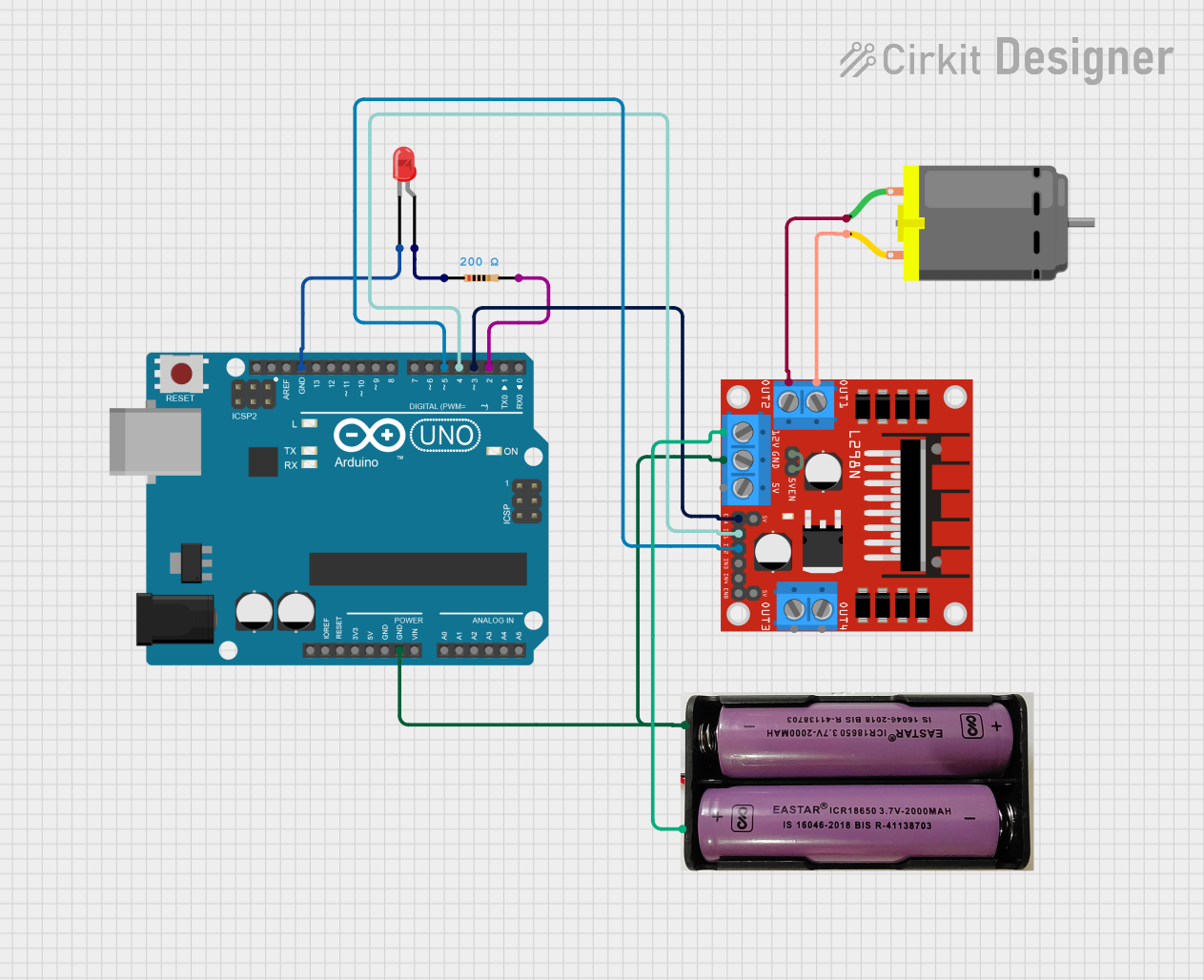
Circuit Documentation
Summary
This circuit involves an Arduino UNO microcontroller, an L298N motor driver, a DC motor, a red LED, a resistor, and a 7.4V power supply. The Arduino UNO controls the motor driver to operate the DC motor and also controls the LED through a resistor.
Component List
Arduino UNO
- Description: A microcontroller board based on the ATmega328P.
- Pins: UNUSED, IOREF, Reset, 3.3V, 5V, GND, Vin, A0, A1, A2, A3, A4, A5, SCL, SDA, AREF, D13, D12, D11, D10, D9, D8, D7, D6, D5, D4, D3, D2, D1, D0
LED: Two Pin (red)
- Description: A red light-emitting diode.
- Pins: cathode, anode
Resistor
- Description: A resistor with a resistance of 200 Ohms.
- Pins: pin1, pin2
- Properties:
- Resistance: 200 Ohms
L298N DC Motor Driver
- Description: A dual H-Bridge motor driver.
- Pins: OUT1, OUT2, 12V, GND, 5V, OUT3, OUT4, 5V-ENA-JMP-I, 5V-ENA-JMP-O, +5V-J1, +5V-J2, ENA, IN1, IN2, IN3, IN4, ENB
DC Motor
- Description: A standard DC motor.
- Pins: pin 1, pin 2
7.4V Power Supply
- Description: A 7.4V power supply.
- Pins: +, -
Wiring Details
Arduino UNO
- GND: Connected to GND of L298N motor driver and - of 7.4V power supply.
- GND: Connected to cathode of LED.
- D5: Connected to IN2 of L298N motor driver.
- D4: Connected to IN1 of L298N motor driver.
- D3: Connected to ENA of L298N motor driver.
- D2: Connected to pin2 of Resistor.
LED: Two Pin (red)
- cathode: Connected to GND of Arduino UNO.
- anode: Connected to pin1 of Resistor.
Resistor
- pin1: Connected to anode of LED.
- pin2: Connected to D2 of Arduino UNO.
L298N DC Motor Driver
- GND: Connected to GND of Arduino UNO and - of 7.4V power supply.
- IN2: Connected to D5 of Arduino UNO.
- IN1: Connected to D4 of Arduino UNO.
- ENA: Connected to D3 of Arduino UNO.
- OUT1: Connected to pin 2 of DC Motor.
- OUT2: Connected to pin 1 of DC Motor.
- 12V: Connected to + of 7.4V power supply.
- 5V-ENA-JMP-I: Connected to 5V-ENA-JMP-O of L298N motor driver.
DC Motor
- pin 2: Connected to OUT1 of L298N motor driver.
- pin 1: Connected to OUT2 of L298N motor driver.
7.4V Power Supply
- -: Connected to GND of Arduino UNO and GND of L298N motor driver.
- +: Connected to 12V of L298N motor driver.
Code Documentation
Arduino UNO Code
#include <L298N_MotorDriver.h>

void setup() {
  // put your setup code here, to run once:

}

void loop() {
  // put your main code here, to run repeatedly:

}
This code includes the L298N motor driver library and sets up the Arduino environment. The setup function is where initialization code would go, and the loop function is where the main code would run repeatedly. Currently, both functions are empty and need to be filled with the appropriate logic to control the motor and LED.