
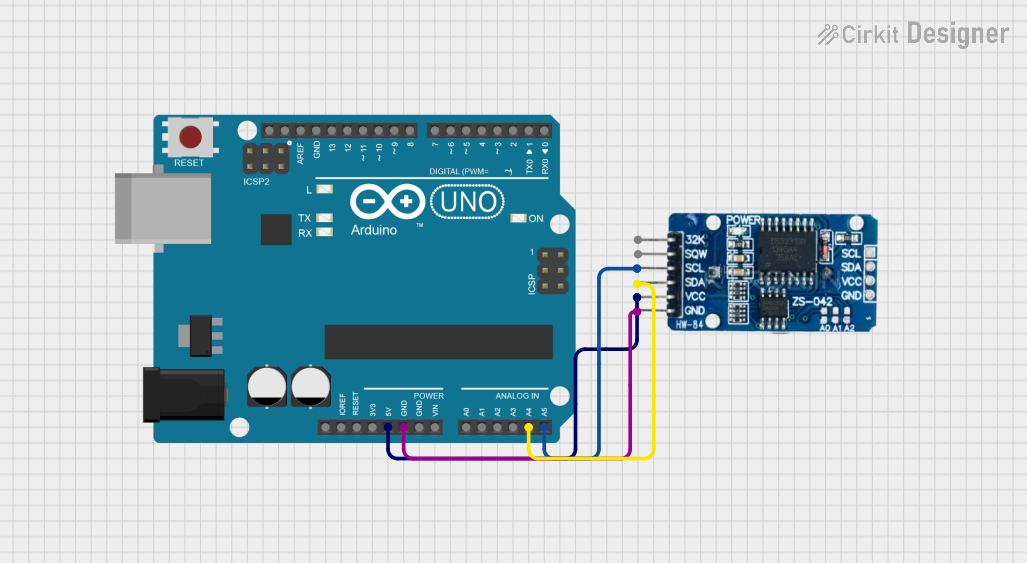
Circuit Documentation
Summary of the Circuit
This circuit integrates an Arduino UNO microcontroller board with a Real-Time Clock (RTC) module, specifically the RTC DS3231. The Arduino UNO is responsible for interfacing with the RTC module to retrieve and display the current time. The RTC module maintains accurate timekeeping even when the main microcontroller is powered off, provided it has a battery backup. The circuit is designed to communicate over the I2C protocol, using the SDA and SCL lines for data and clock signals, respectively.
Component List
Arduino UNO
- Description: A microcontroller board based on the ATmega328P.
- Pins: UNUSED, IOREF, Reset, 3.3V, 5V, GND, Vin, A0-A5, SCL, SDA, AREF, D0-D13.
- Purpose: Acts as the main controller for the circuit, interfacing with the RTC module and handling data processing and serial communication.
RTC DS3231
- Description: A highly accurate I2C real-time clock with an integrated temperature-compensated crystal oscillator (TCXO) and crystal.
- Pins: 32K, SQW, SCL, SDA, VCC, GND.
- Purpose: Maintains accurate timekeeping and provides time information to the Arduino UNO upon request.
Wiring Details
Arduino UNO
- 5V: Provides power to the RTC DS3231 module.
- GND: Common ground with the RTC DS3231 module.
- A4 (SDA): I2C data line connected to the SDA pin of the RTC DS3231.
- A5 (SCL): I2C clock line connected to the SCL pin of the RTC DS3231.
RTC DS3231
- VCC: Connected to the 5V output from the Arduino UNO.
- GND: Connected to the ground (GND) on the Arduino UNO.
- SDA: I2C data line connected to the A4 pin on the Arduino UNO.
- SCL: I2C clock line connected to the A5 pin on the Arduino UNO.
Documented Code
Arduino UNO Code
#include <Wire.h>             // Library for I2C communication
#include <RTClib.h>           // RTC DS3231 Library

RTC_DS3231 rtc;               // Create an rtc object for communication with the RTC

void setup() {
  Serial.begin(9600);          // Start serial communication at baud rate 9600

  if (!rtc.begin()) {          // Check if the RTC is connected properly
    Serial.println("Could not find RTC!");
    while (1); // Stop if RTC is not found
  }

  if (rtc.lostPower()) {       // Check if the RTC lost power
    Serial.println("RTC lost power, setting time to default");
    // Set the current time using the compile time (time from the compiler)
    rtc.adjust(DateTime(F(__DATE__), F(__TIME__)));
  }
}

void loop() {
  DateTime now = rtc.now();    // Read the time from the RTC

  // Display the time in the format YYYY/MM/DD HH:MM:SS
  Serial.print(now.year(), DEC);    // Display the year
  Serial.print('/');
  Serial.print(now.month(), DEC);   // Display the month
  Serial.print('/');
  Serial.print(now.day(), DEC);     // Display the day
  Serial.print(" ");
  Serial.print(now.hour(), DEC);    // Display the hour
  Serial.print(':');
  Serial.print(now.minute(), DEC);  // Display the minute
  Serial.print(':');
  Serial.print(now.second(), DEC);  // Display the second
  Serial.println();

  delay(1000); // Wait for 1 second
}
RTC DS3231 Code
The RTC DS3231 module does not have user-accessible code as it is a hardware module with built-in firmware. Communication with the module is handled by the Arduino UNO using the provided libraries and code.
This documentation provides an overview of the circuit, including the components used, their wiring, and the code that operates the microcontroller. Further details can be added as needed, such as schematics, power requirements, and additional functionality.