
ESP32-Based Smart Weighing Scale with Wi-Fi and Environmental Monitoring
View and Edit Project In Cirkit Designer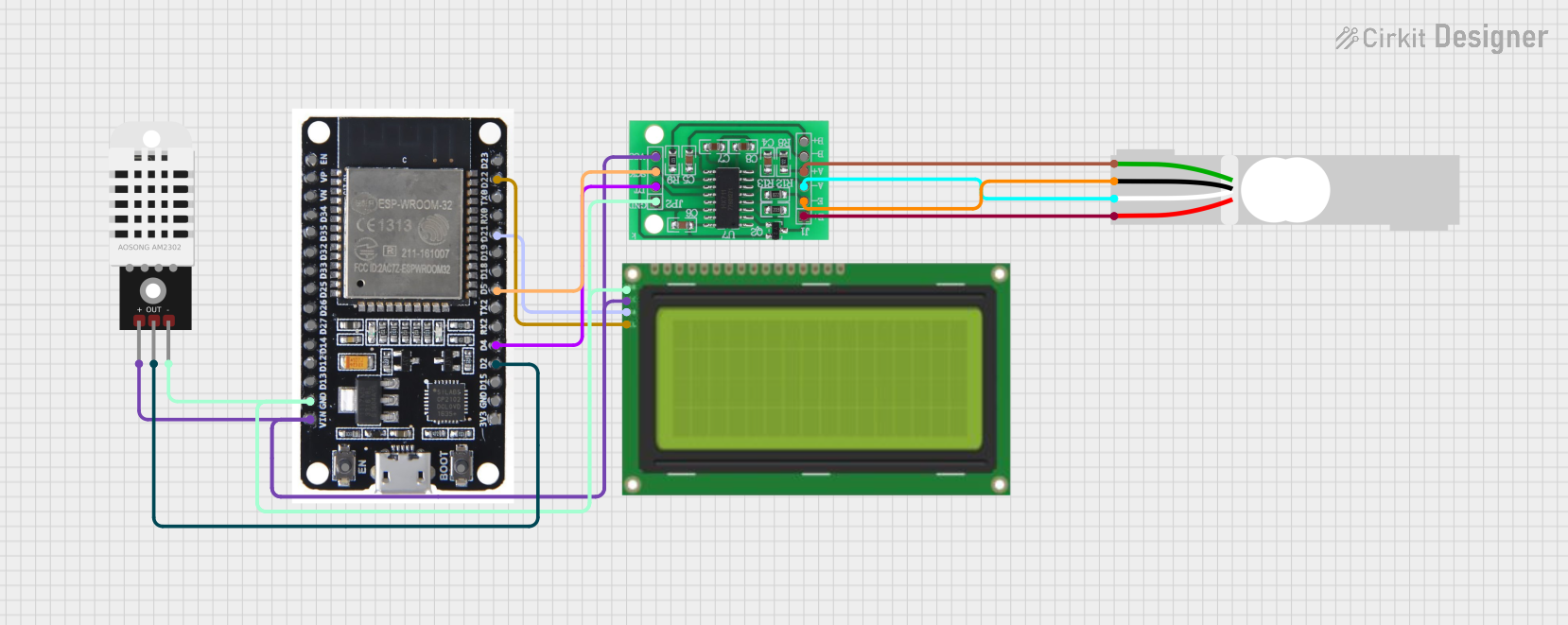
Circuit Documentation
Summary
This circuit is designed to measure weight using a load cell and an HX711 amplifier, read temperature and humidity using a DHT22 sensor, and display the data on a 20x4 I2C LCD. The ESP32 microcontroller is used to process the data and send it to the Blynk IoT platform for remote monitoring.
Component List
HX711 - Bridge Sensor Interface
- Description: Amplifies the signal from the load cell and converts it to a digital signal.
- Pins: E+, E-, A-, A+, B-, B+, GND, DATA (OUT), SCK (IN), 3.3/3.5V Supply
DHT22
- Description: Measures temperature and humidity.
- Pins: +, Out, -
Load Cell - Red/white/black/green
- Description: Measures weight.
- Pins: E+, A-, E-, A+
Lcd 20x4 i2c
- Description: Displays data on a 20x4 character LCD using I2C communication.
- Pins: GND, 5V, SCA, SCL
ESP32
- Description: Microcontroller used for processing data and communication with the Blynk IoT platform.
- Pins: EN, VP, VN, D34, D35, D32, D33, D25, D26, D27, D14, D12, D13, GND, VIN, 3V3, D15, D2, D4, RX2, TX2, D5, D18, D19, D21, RX0, TX0, D22, D23, BOOT
Wiring Details
HX711 - Bridge Sensor Interface
- E+ connected to Load Cell - Red/white/black/green E+
- A- connected to Load Cell - Red/white/black/green A-
- E- connected to Load Cell - Red/white/black/green E-
- A+ connected to Load Cell - Red/white/black/green A+
- 3.3/3.5V Supply connected to ESP32 VIN, Lcd 20x4 i2c 5V, DHT22 +
- GND - GROUND connected to ESP32 GND, Lcd 20x4 i2c GND, DHT22 -
- DATA (OUT) connected to ESP32 D4
- SCK - CLOCK (IN) connected to ESP32 D5
DHT22
- + connected to ESP32 VIN
- Out connected to ESP32 D2
- - connected to ESP32 GND
Load Cell - Red/white/black/green**
- E+ connected to HX711 E+
- A- connected to HX711 A-
- E- connected to HX711 E-
- A+ connected to HX711 A+
Lcd 20x4 i2c
- GND connected to ESP32 GND
- 5V connected to ESP32 VIN
- SCA connected to ESP32 D21
- SCL connected to ESP32 D22
ESP32
- VIN connected to Lcd 20x4 i2c 5V, DHT22 +, HX711 3.3/3.5V Supply
- GND connected to Lcd 20x4 i2c GND, DHT22 -, HX711 GND - GROUND
- D2 connected to DHT22 Out
- D4 connected to HX711 DATA (OUT)
- D5 connected to HX711 SCK - CLOCK (IN)
- D21 connected to Lcd 20x4 i2c SCA
- D22 connected to Lcd 20x4 i2c SCL
Code Documentation
#define BLYNK_TEMPLATE_ID "TMPL6P-ui2uWk"
#define BLYNK_TEMPLATE_NAME "Timbangan 10 Kg"
#define BLYNK_AUTH_TOKEN "LvyVJ6w76SOZJhu0Z7ClDJvb4KbiSuZC"

#include <WiFi.h>
#include <BlynkSimpleEsp32.h>
#include <HX711.h>
#include <DHT.h>
#include <Wire.h>
#include <LiquidCrystal_I2C.h>

// WiFi credentials
char ssid[] = "Kost Pink";
char pass[] = "Rumahkami12345678";

// HX711 pins
#define LOADCELL_DOUT_PIN 4
#define LOADCELL_SCK_PIN 5

// DHT22 pin
#define DHTPIN 2
#define DHTTYPE DHT22

// Initialize HX711
HX711 scale;

// Initialize DHT22
DHT dht(DHTPIN, DHTTYPE);

// Initialize LCD
LiquidCrystal_I2C lcd(0x27, 20, 4);

void setup() {
  // Start serial communication
  Serial.begin(115200);

  // Connect to WiFi
  WiFi.begin(ssid, pass);
  while (WiFi.status() != WL_CONNECTED) {
    delay(1000);
    Serial.println("Connecting to WiFi...");
  }
  Serial.println("Connected to WiFi");

  // Connect to Blynk
  Blynk.begin(BLYNK_AUTH_TOKEN, ssid, pass);

  // Initialize HX711
  scale.begin(LOADCELL_DOUT_PIN, LOADCELL_SCK_PIN);

  // Initialize DHT22
  dht.begin();

  // Initialize LCD
  lcd.init();
  lcd.backlight();
  lcd.setCursor(0, 0);
  lcd.print("Initializing...");
}

void loop() {
  // Run Blynk
  Blynk.run();

  // Read weight from load cell
  float weight = scale.get_units(10);

  // Read temperature and humidity from DHT22
  float temperature = dht.readTemperature();
  float humidity = dht.readHumidity();

  // Display values on LCD
  lcd.clear();
  lcd.setCursor(0, 0);
  lcd.print("Weight: ");
  lcd.print(weight);
  lcd.print(" kg");
  lcd.setCursor(0, 1);
  lcd.print("Temp: ");
  lcd.print(temperature);
  lcd.print(" C");
  lcd.setCursor(0, 2);
  lcd.print("Humidity: ");
  lcd.print(humidity);
  lcd.print(" %");

  // Send values to Blynk
  Blynk.virtualWrite(V1, weight);
  Blynk.virtualWrite(V2, temperature);
  Blynk.virtualWrite(V3, humidity);

  // Wait before next loop
  delay(2000);
}
This code initializes the ESP32, connects it to WiFi and Blynk, and sets up the HX711, DHT22, and LCD. In the main loop, it reads the weight, temperature, and humidity, displays them on the LCD, and sends them to the Blynk platform.