
Arduino UNO-Based Smart Request System with Flex Sensors and I2C LCD
View and Edit Project In Cirkit Designer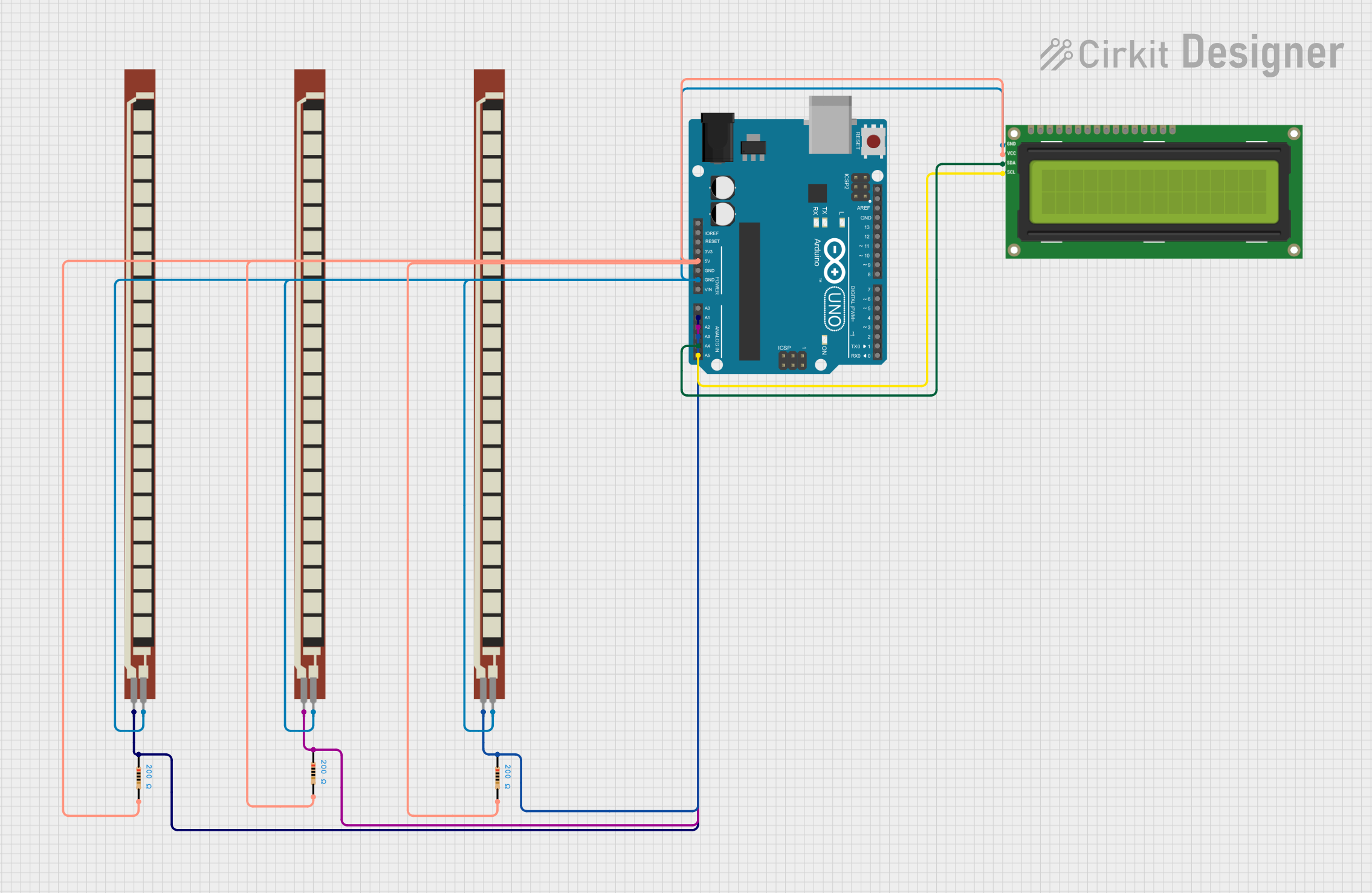
Circuit Documentation
Summary
This circuit involves an Arduino UNO microcontroller interfacing with multiple resistors, flex resistors, and an I2C LCD 16x2 screen. The circuit is designed to read analog values from the flex resistors and display messages on the LCD screen based on the readings. The Arduino also communicates via a software serial interface.
Component List
Arduino UNO
- Description: A microcontroller board based on the ATmega328P.
- Pins: UNUSED, IOREF, Reset, 3.3V, 5V, GND, Vin, A0, A1, A2, A3, A4, A5, SCL, SDA, AREF, D13, D12, D11, D10, D9, D8, D7, D6, D5, D4, D3, D2, D1, D0
Basic Flex Resistor
- Description: A resistor that changes resistance when flexed.
- Pins: Pin 2, Pin 1
Resistor
- Description: A 200 Ohm resistor.
- Pins: pin1, pin2
- Properties:
- Resistance: 200 Ohms
I2C LCD 16x2 Screen
- Description: A 16x2 character LCD screen with I2C interface.
- Pins: SCL, SDA, VCC (5V), GND, VDD, VO, RS, RW, E, D0, D1, D2, D3, D4, D5, D6, D7, BLA, BLK
Wiring Details
Arduino UNO
5V connected to:
- Resistor (pin2)
- Resistor (pin2)
- I2C LCD 16x2 Screen (VCC (5V))
- Resistor (pin2)
GND connected to:
- Basic Flex Resistor (Pin 2)
- I2C LCD 16x2 Screen (GND)
- Basic Flex Resistor (Pin 2)
- Basic Flex Resistor (Pin 2)
A1 connected to:
- Basic Flex Resistor (Pin 1)
- Resistor (pin1)
A2 connected to:
- Resistor (pin1)
- Basic Flex Resistor (Pin 1)
A3 connected to:
- Basic Flex Resistor (Pin 1)
- Resistor (pin1)
A4 connected to:
- I2C LCD 16x2 Screen (SDA)
A5 connected to:
- I2C LCD 16x2 Screen (SCL)
Basic Flex Resistor
Pin 2 connected to:
- Arduino UNO (GND)
- I2C LCD 16x2 Screen (GND)
- Basic Flex Resistor (Pin 2)
- Basic Flex Resistor (Pin 2)
Pin 1 connected to:
- Arduino UNO (A1)
- Resistor (pin1)
Resistor
pin1 connected to:
- Arduino UNO (A1)
- Basic Flex Resistor (Pin 1)
pin2 connected to:
- Arduino UNO (5V)
- Resistor (pin2)
- I2C LCD 16x2 Screen (VCC (5V))
- Resistor (pin2)
I2C LCD 16x2 Screen
VCC (5V) connected to:
- Arduino UNO (5V)
- Resistor (pin2)
- Resistor (pin2)
GND connected to:
- Basic Flex Resistor (Pin 2)
- Arduino UNO (GND)
- Basic Flex Resistor (Pin 2)
- Basic Flex Resistor (Pin 2)
SDA connected to:
- Arduino UNO (A4)
SCL connected to:
- Arduino UNO (A5)
Code Documentation
#include "SoftwareSerial.h"
#include <LiquidCrystal_I2C.h>
#include <SoftwareSerial.h>

SoftwareSerial mySerial(3, 2);
LiquidCrystal_I2C lcd(0x27, 16, 2);

#define blue 2
#define green 3
#define red 4

unsigned int f;
unsigned int g;
unsigned int h;

void setup() {
  pinMode(blue, OUTPUT);
  pinMode(green, OUTPUT);
  pinMode(red, OUTPUT);
  Serial.begin(9600);
  mySerial.begin(9600);
  Serial.println();
  lcd.init();
  lcd.backlight();
  lcd.setCursor(0, 0);
  lcd.print("  Welcome To");
  lcd.setCursor(0, 1);
  lcd.print("JustDoElectronic");
  lcd.clear();
  delay(3000);
}

void loop() {
  f = analogRead(1);
  g = analogRead(2);
  h = analogRead(3);

  if (f <= 722) {
    digitalWrite(blue, HIGH);
    digitalWrite(green, LOW);
    digitalWrite(red, LOW);
    mySerial.println("Plz Give Me Water");
    lcd.clear();
    lcd.setCursor(0, 0);
    lcd.print("  Plz Give Me");
    lcd.setCursor(0, 1);
    lcd.print("     Water   ");
    delay(3000);
    lcd.clear();
    lcd.setCursor(0, 0);
    lcd.print(" If Anything");
    lcd.setCursor(0, 1);
    lcd.print("  You Want ");
  } else if (g <= 670) {
    digitalWrite(green, HIGH);
    digitalWrite(blue, LOW);
    digitalWrite(red, LOW);
    mySerial.println("Plz Give Me Food");
    lcd.clear();
    lcd.setCursor(0, 0);
    lcd.print("  Plz Give Me ");
    lcd.setCursor(0, 1);
    lcd.print("     Food   ");
    delay(3000);
    lcd.clear();
    lcd.setCursor(0, 0);
    lcd.print(" If Anything");
    lcd.setCursor(0, 1);
    lcd.print("  You Want ");
  } else if (h <= 675) {
    digitalWrite(green, HIGH);
    digitalWrite(blue, LOW);
    digitalWrite(red, LOW);
    mySerial.println("Plz Give Me Tea");
    lcd.clear();
    lcd.setCursor(0, 0);
    lcd.print("  Plz Give Me");
    lcd.setCursor(0, 1);
    lcd.print("     Tea   ");
    delay(3000);
    lcd.clear();
    lcd.setCursor(0, 0);
    lcd.print(" If Anything");
    lcd.setCursor(0, 1);
    lcd.print("  You Want ");
  } else {
  }
  delay(200);
}
This code initializes the LCD and sets up the pins for the Arduino. It reads analog values from the flex resistors and displays messages on the LCD based on the readings. The messages are also sent via software serial communication.