
Circuit Documentation
Summary
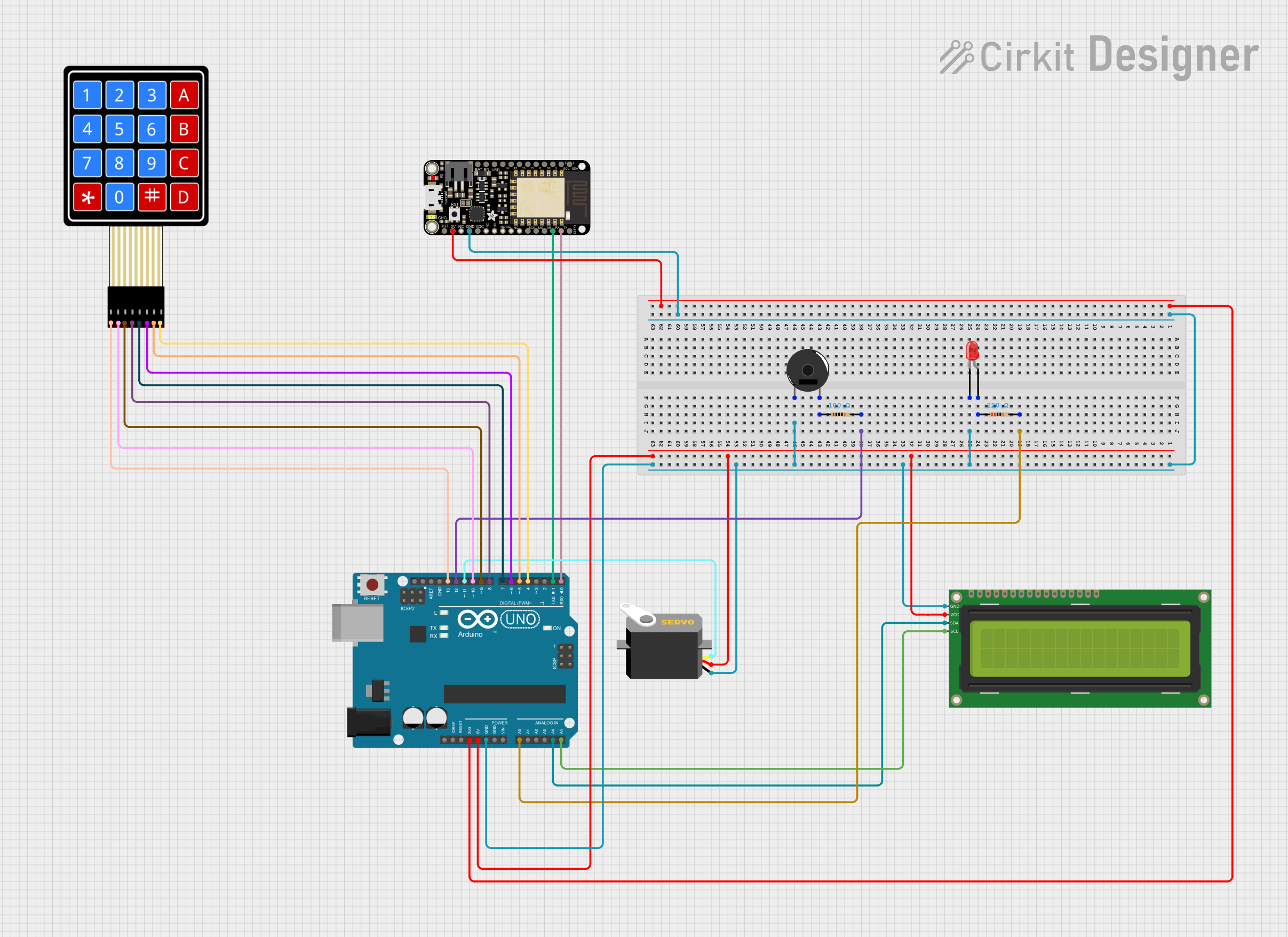
This circuit integrates a variety of components including an Arduino UNO, an Adafruit Feather HUZZAH ESP8266, a servo motor, a red LED, a 16x2 I2C LCD, two resistors, a piezo buzzer, and a 4x4 membrane matrix keypad. The Arduino UNO serves as the primary microcontroller, interfacing with the keypad, LCD, servo, and LED. The Adafruit Feather HUZZAH ESP8266 is connected to the Arduino for potential wireless communication capabilities. The resistors are used to limit current to the LED and the piezo buzzer. The servo is controlled by the Arduino and can be used for various actuation tasks. The keypad provides user input capabilities, and the LCD displays information.
Component List
- Arduino UNO: A microcontroller board based on the ATmega328P, with a variety of digital and analog I/O pins.
- Adafruit Feather HUZZAH ESP8266: A Wi-Fi enabled development board with an ESP8266 microcontroller.
- Servo: An actuator that can be precisely controlled to turn to different angles.
- LED (Red): A two-pin light-emitting diode that emits red light.
- 16x2 I2C LCD: A liquid crystal display that can show 16 characters per line, with 2 lines, and uses the I2C protocol for communication.
- Resistor (220 Ohms): A passive two-terminal electrical component that provides resistance to limit current.
- Resistor (100 Ohms): Another resistor with a lower resistance value.
- Piezo Buzzer: An electronic device that emits sound when an electrical signal is applied.
- 4X4 Membrane Matrix Keypad: A 16-button keypad that provides a user interface for input.
Wiring Details
Arduino UNO
- A0 connected to Resistor (220 Ohms)
- GND connected to common ground net
- 3.3V connected to Adafruit Feather HUZZAH ESP8266 (3.3V)
- 5V connected to 16x2 I2C LCD (VCC) and Servo (VCC)
- A4 (SDA) connected to 16x2 I2C LCD (SDA)
- A5 (SCL) connected to 16x2 I2C LCD (SCL)
- D12 connected to Resistor (100 Ohms)
- D13 connected to 4X4 Membrane Matrix Keypad (R1)
- D11 connected to Servo (Pulse)
- D10 connected to 4X4 Membrane Matrix Keypad (R2)
- D9 connected to 4X4 Membrane Matrix Keypad (R3)
- D8 connected to 4X4 Membrane Matrix Keypad (R4)
- D7 connected to 4X4 Membrane Matrix Keypad (C1)
- D6 connected to 4X4 Membrane Matrix Keypad (C2)
- D5 connected to 4X4 Membrane Matrix Keypad (C3)
- D4 connected to 4X4 Membrane Matrix Keypad (C4)
- D1 (TX) connected to Adafruit Feather HUZZAH ESP8266 (RXD)
- D0 (RX) connected to Adafruit Feather HUZZAH ESP8266 (TXD)
Adafruit Feather HUZZAH ESP8266
- GND connected to common ground net
- 3.3V connected to Arduino UNO (3.3V)
- RXD connected to Arduino UNO (D1)
- TXD connected to Arduino UNO (D0)
Servo
- GND connected to common ground net
- VCC connected to Arduino UNO (5V)
- Pulse connected to Arduino UNO (D11)
LED (Red)
- Cathode connected to common ground net
- Anode connected to Resistor (220 Ohms)
16x2 I2C LCD
- GND connected to common ground net
- VCC connected to Arduino UNO (5V)
- SDA connected to Arduino UNO (A4)
- SCL connected to Arduino UNO (A5)
Resistor (220 Ohms)
- Pin1 connected to LED (Red) (Anode)
- Pin2 connected to Arduino UNO (A0)
Resistor (100 Ohms)
- Pin1 connected to Piezo Buzzer (Pin 2)
- Pin2 connected to Arduino UNO (D12)
Piezo Buzzer
- Pin 1 connected to common ground net
- Pin 2 connected to Resistor (100 Ohms)
4X4 Membrane Matrix Keypad
- R1 connected to Arduino UNO (D13)
- R2 connected to Arduino UNO (D10)
- R3 connected to Arduino UNO (D9)
- R4 connected to Arduino UNO (D8)
- C1 connected to Arduino UNO (D7)
- C2 connected to Arduino UNO (D6)
- C3 connected to Arduino UNO (D5)
- C4 connected to Arduino UNO (D4)
Documented Code
Arduino UNO Code (sketch.ino)
void setup() {
  // put your setup code here, to run once:

}

void loop() {
  // put your main code here, to run repeatedly:

}
Note: The provided code for the Arduino UNO is a template with empty setup and loop functions. This code needs to be filled in with the logic to control the connected components based on the circuit's requirements.