
Circuit Documentation
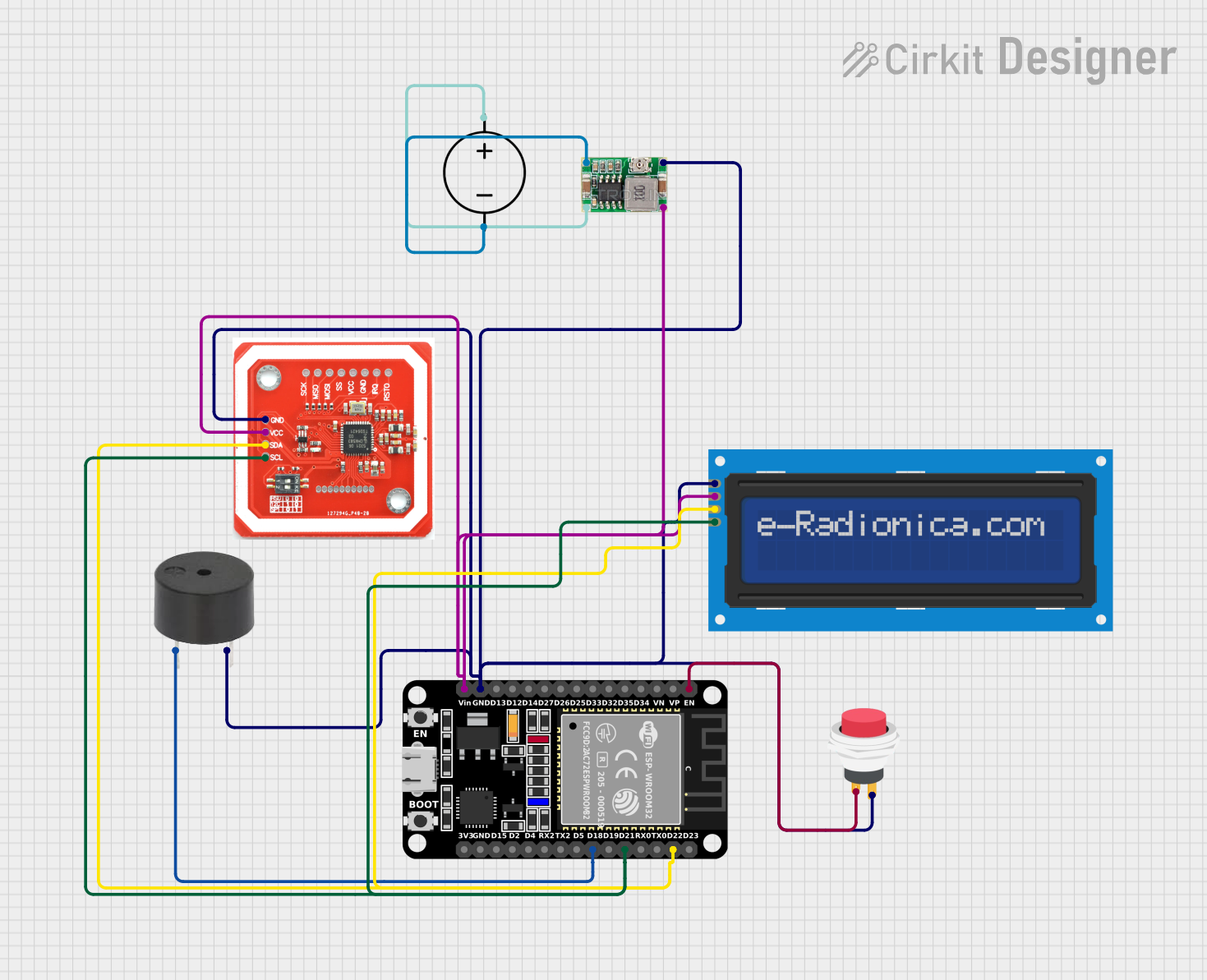
Summary
This circuit is designed to interface an ESP32 microcontroller with an LCD screen, an NFC/RFID reader, a buzzer, and a push switch. The LCD screen is used to display information, while the NFC/RFID reader is intended for identification purposes. The buzzer provides audible feedback, and the push switch serves as a user input device. A Mini 360 Buck Converter is used to regulate the power supplied by a DC Power Source to the components. The ESP32 microcontroller is the central processing unit that controls the LCD screen and communicates with the NFC/RFID reader.
Component List
ESP32 (30 pin)
- Description: A microcontroller with Wi-Fi and Bluetooth capabilities.
- Pins: EN, VP, VN, D34, D35, D32, D33, D25, D26, D27, D14, D12, D13, GND, Vin, D23, D22, TX0, RX0, D21, D19, D18, D5, TX2, RX2, D4, D2, D15, 3V3
LCD screen 16x2 I2C
- Description: A 16x2 character LCD display with an I2C interface.
- Pins: SCL, SDA, VCC, GND
NFC/RFID reader
- Description: A reader for NFC and RFID tags.
- Pins: GND, VCC, SDA, SCL
Buzzer
- Description: An electronic buzzer for audible alerts.
- Pins: PIN, GND
2Pin Push Switch
- Description: A simple push-button switch.
- Pins: Input +, Output +
Mini 360 Buck Converter
- Description: A DC-DC step-down (buck) converter.
- Pins: IN-, OUT-, OUT+, IN+
DC Power Source
- Description: A source of DC power for the circuit.
- Pins: Ground, Positive
Wiring Details
ESP32 (30 pin)
- EN connected to 2Pin Push Switch (Input +)
- GND connected to common ground net
- Vin connected to Mini 360 Buck Converter (OUT+)
- D22 connected to I2C SDA net
- D21 connected to I2C SCL net
- D18 connected to Buzzer (PIN)
LCD screen 16x2 I2C
- SCL connected to I2C SCL net
- SDA connected to I2C SDA net
- VCC connected to Mini 360 Buck Converter (OUT+)
- GND connected to common ground net
NFC/RFID reader
- SCL connected to I2C SCL net
- SDA connected to I2C SDA net
- VCC connected to Mini 360 Buck Converter (OUT+)
- GND connected to common ground net
Buzzer
- PIN connected to ESP32 (D18)
- GND connected to common ground net
2Pin Push Switch
- Input + connected to ESP32 (EN)
- Output + connected to common ground net
Mini 360 Buck Converter
- IN- connected to DC Power Source (Ground)
- OUT- connected to common ground net
- OUT+ connected to ESP32 (Vin), LCD screen (VCC), and NFC/RFID reader (VCC)
- IN+ connected to DC Power Source (Positive)
DC Power Source
- Ground connected to Mini 360 Buck Converter (IN-)
- Positive connected to Mini 360 Buck Converter (IN+)
Documented Code
/*
 * This Arduino Sketch is designed for an ESP32 microcontroller to interface
 * with an LCD screen and an NFC/RFID reader. The LCD will display the
 * student count on the first line and a fixed count value of 15 on the
 * second line.
 */

#include <Wire.h>
#include <LiquidCrystal_I2C.h>

// LCD address and dimensions
#define LCD_ADDR 0x27
#define LCD_COLS 16
#define LCD_ROWS 2

// Initialize the LCD
LiquidCrystal_I2C lcd(LCD_ADDR, LCD_COLS, LCD_ROWS);

void setup() {
  // Initialize the LCD
  lcd.begin();
  lcd.backlight();
  // Display initial messages
  lcd.setCursor(0, 0);
  lcd.print("Student Count");
  lcd.setCursor(0, 1);
  lcd.print("Count : 15");
}

void loop() {
  // Main loop does nothing in this example
}
The provided code is for the ESP32 microcontroller. It initializes an I2C LCD screen, sets the cursor to specific positions, and prints static text. The main loop is empty, indicating that no additional functionality is implemented in this example.