
Arduino Mega 2560 Based Temperature Monitoring and Relay Control System
View and Edit Project In Cirkit Designer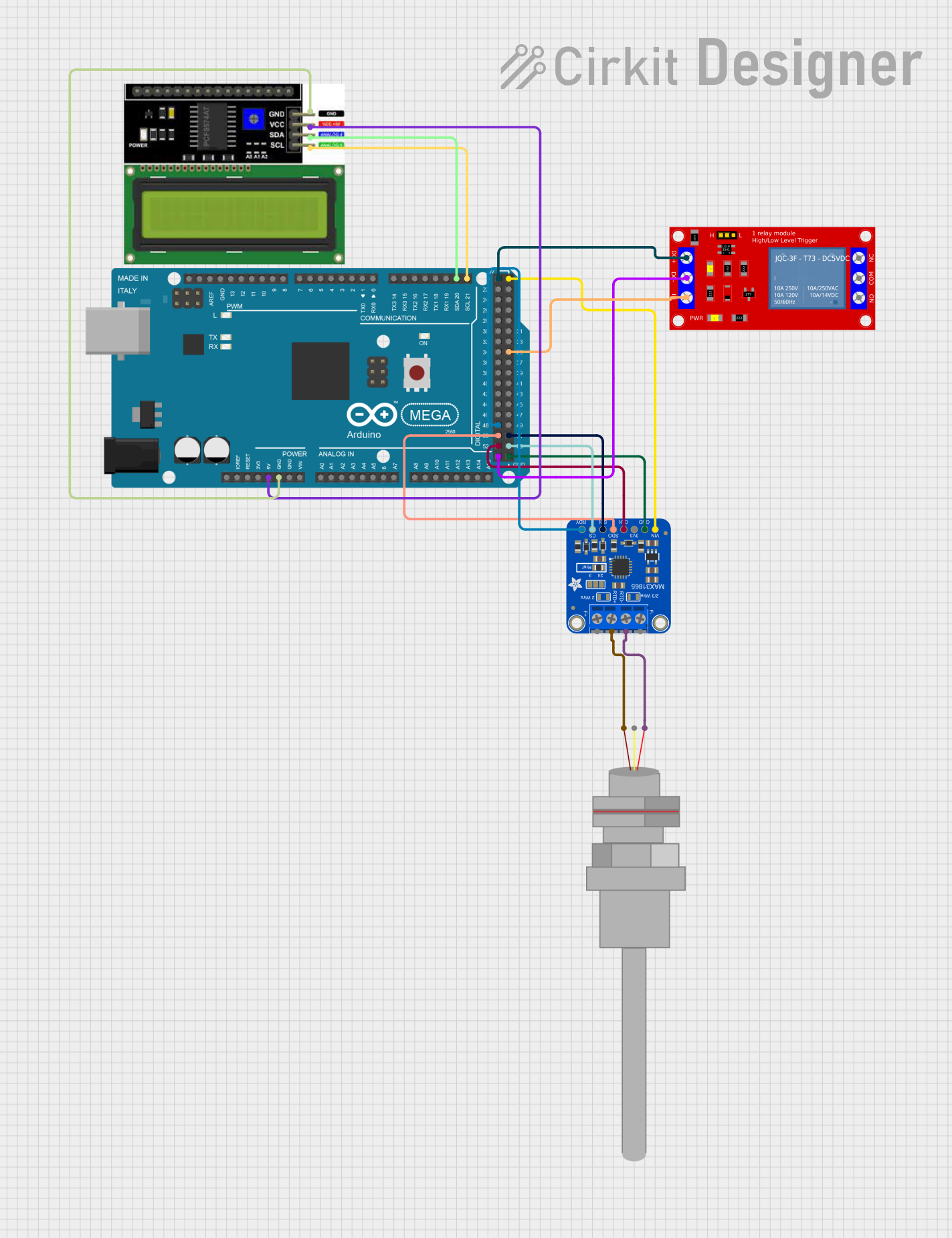
Circuit Documentation
Summary
This circuit is designed to interface with a PT100 temperature sensor through the Adafruit MAX31865 RTD Sensor Breakout. It controls a 1 Channel 5V Relay Module based on temperature thresholds and displays the temperature readings on an I2C LCD display. The Arduino Mega 2560 serves as the central microcontroller unit, managing the sensor data, controlling the relay, and communicating with the LCD display.
Component List
Arduino Mega 2560
- Microcontroller board based on the ATmega2560
- It has 54 digital input/output pins, 16 analog inputs, 4 UARTs, a 16 MHz crystal oscillator, a USB connection, a power jack, an ICSP header, and a reset button.
Adafruit MAX31865 RTD Sensor Breakout
- An interface board for reading resistance temperature detectors (RTDs)
- Communicates with the Arduino via SPI and provides a digital reading of temperature.
PT100
- A platinum resistance temperature detector (RTD) with high accuracy
- It changes resistance with temperature and is interfaced with the MAX31865 breakout board.
1 Channel 5V Relay Module
- A relay module that allows for controlling high power devices with a low power signal
- It has one channel and can be driven by 5V from the Arduino.
LCD I2C Display
- A liquid crystal display that uses the I2C communication protocol
- It can display text on two lines with 16 characters each.
Wiring Details
Arduino Mega 2560
5Vto LCD I2C Display VCC, Adafruit MAX31865 RTD Sensor Breakout VIN, and 1 Channel 5V Relay Module VCC+GNDto LCD I2C Display GND, Adafruit MAX31865 RTD Sensor Breakout GND, and 1 Channel 5V Relay Module VCC- (GND)D21/SCLto LCD I2C Display SCLD20/SDAto LCD I2C Display SDAD52to Adafruit MAX31865 RTD Sensor Breakout SCLKD50to Adafruit MAX31865 RTD Sensor Breakout SDOD48to Adafruit MAX31865 RTD Sensor Breakout DRDYD53to Adafruit MAX31865 RTD Sensor Breakout CSD51to Adafruit MAX31865 RTD Sensor Breakout SDID35to 1 Channel 5V Relay Module IN
Adafruit MAX31865 RTD Sensor Breakout
RTDIN+to PT100 -RTDIN-to PT100 +
PT100
-to Adafruit MAX31865 RTD Sensor Breakout RTDIN++to Adafruit MAX31865 RTD Sensor Breakout RTDIN-
1 Channel 5V Relay Module
INto Arduino Mega 2560 D35VCC+to Arduino Mega 2560 5VVCC- (GND)to Arduino Mega 2560 GND
LCD I2C Display
VCCto Arduino Mega 2560 5VGNDto Arduino Mega 2560 GNDSCLto Arduino Mega 2560 D21/SCLSDAto Arduino Mega 2560 D20/SDA
Documented Code
Arduino Mega 2560 Code
/*
 * This Arduino sketch interfaces with a PT100 temperature sensor via the
 * MAX31865 RTD Sensor Breakout, controls a relay module based on temperature
 * thresholds, and displays information on an I2C LCD display.
 */

#include <SPI.h>
#include <Adafruit_MAX31865.h>
#include <Wire.h>
#include <LiquidCrystal_I2C.h>

// MAX31865 pins
#define MAX31865_CS 53
#define MAX31865_DRDY 48

// Relay pin
#define RELAY_PIN 35

// Create the RTD sensor object
Adafruit_MAX31865 rtd = Adafruit_MAX31865(MAX31865_CS);

// The value of the Rref resistor
#define RREF 420.0

// Temperature threshold
float tempThreshold = 0.0;

// Create the LCD object
LiquidCrystal_I2C lcd(0x27, 16, 2);

void setup() {
  Serial.begin(9600);
  while (!Serial) delay(10); // Wait for serial monitor

  Serial.println("Enter temperature threshold:");
  while (Serial.available() == 0) delay(10); // Wait for input
  tempThreshold = Serial.parseFloat();
  Serial.print("Threshold set to: ");
  Serial.println(tempThreshold);

  // Initialize the MAX31865
  rtd.begin(MAX31865_2WIRE);

  // Set relay pin as output
  pinMode(RELAY_PIN, OUTPUT);
  digitalWrite(RELAY_PIN, LOW); // Ensure relay is off

  // Initialize the LCD
  lcd.begin();
  lcd.backlight();
  lcd.print("Temp: ");
}

void loop() {
  uint16_t rtdRaw = rtd.readRTD();
  float ratio = rtdRaw;
  ratio /= 32768;
  float rtdResistance = ratio * RREF;
  float temperature = (rtdResistance - 100) / 0.385;

  Serial.print("Temperature: ");
  Serial.println(temperature);

  lcd.setCursor(6, 0);
  lcd.print(temperature);
  lcd.print(" C");

  if (temperature >= tempThreshold) {
    digitalWrite(RELAY_PIN, HIGH); // Turn on relay
  } else {
    digitalWrite(RELAY_PIN, LOW); // Turn off relay
  }

  delay(1000); // Wait 1 second before next read
}
Adafruit MAX31865 RTD Sensor Breakout Code
The Adafruit MAX31865 RTD Sensor Breakout does not have separate code as it is controlled by the Arduino Mega 2560 through the SPI interface. The relevant code is included in the Arduino Mega 2560 sketch above.