
Solar-Powered ESP8266 NodeMCU Weather Station with Multiple DS18B20 Sensors and Turbidity Monitoring
View and Edit Project In Cirkit Designer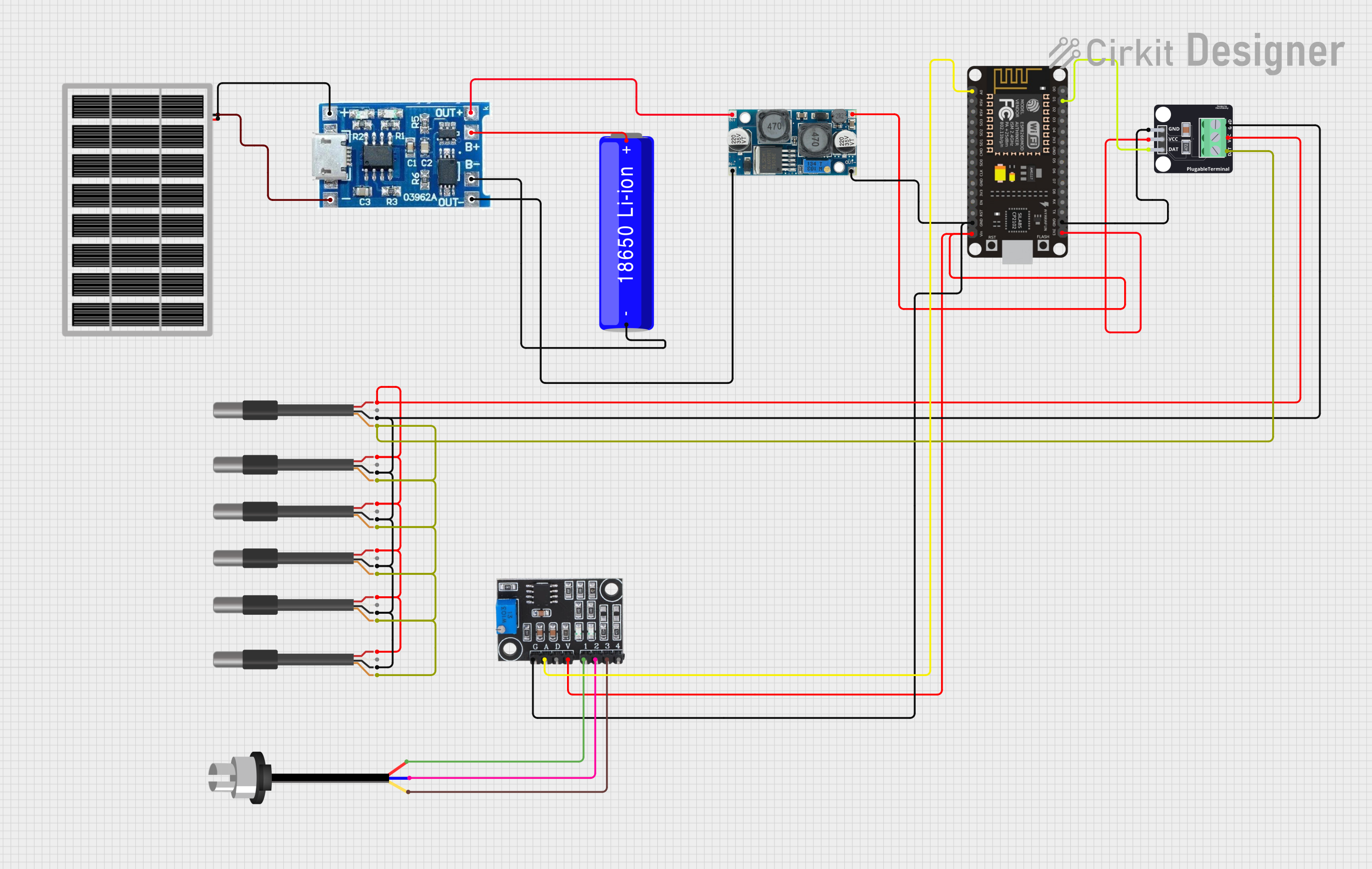
Circuit Documentation
Summary
This circuit is designed to monitor environmental parameters, specifically temperature and turbidity, and send the data to a cloud service (ThingSpeak). It is powered by a solar panel and includes a charge controller to manage the charging of a Li-ion battery. The core of the circuit is an ESP8266 NodeMCU microcontroller, which reads data from multiple DS18B20 temperature sensors and a turbidity sensor, then transmits the data over WiFi.
Component List
Solar Panel
- Description: A photovoltaic panel used to convert solar energy into electrical power.
- Pins: Ground (GND), Voltage Supply (VCC)
Do solara (Charge Controller)
- Description: Manages the charging of the battery from the solar panel and provides regulated output.
- Pins: Negative (-), Positive (+), Output Positive (out+), Output Negative (out-), Battery Positive (b+), Battery Negative (b-)
XL6009 Voltage Regulator
- Description: Boosts or steps up the voltage to a desired level.
- Pins: Output Positive (OUT +), Output Negative (OUT -), Input Positive (IN +), Input Negative (IN -)
18650 Li-ion Battery
- Description: Rechargeable battery that provides power to the circuit.
- Pins: Positive (+), Negative (-)
ESP8266 NodeMCU
- Description: A microcontroller with integrated WiFi used for processing and transmitting data.
- Pins: Digital I/O (D0-D8), RX, TX, Analog Input (A0), 3.3V Supply (3V3), Ground (GND), Reset (RST), Voltage Input (VIN), and others.
Module DS18B20
- Description: A digital temperature sensor module.
- Pins: Ground (GND), Voltage Supply (VCC), Data (DAT)
DS18B20 1-Wire Temperature Sensor Probe Cable
- Description: A waterproofed version of the DS18B20 temperature sensor with a cable.
- Pins: Shield, Ground (GND), Data (DQ), Voltage Supply (VDD)
Sonda Sensor Turbidez / Turbidity Sensor
- Description: Measures the turbidity of water.
- Pins: Signal (S), Negative (-), Positive (+)
Turbidity Module
- Description: Interfaces with the turbidity sensor and provides an analog output.
- Pins: Ground (GND), Analog Output (AO), Digital Output (DO), Voltage Supply (VCC), Sensor Positive (S+), Sensor Output (SO), Sensor Negative (S-)
Wiring Details
Solar Panel
- GND connected to Do solara (-)
- VCC connected to Do solara (+)
Do solara (Charge Controller)
- out+ connected to XL6009 Voltage Regulator (IN +)
- out- connected to XL6009 Voltage Regulator (IN -)
- b+ connected to 18650 Li-ion Battery (+)
- b- connected to 18650 Li-ion Battery (-)
XL6009 Voltage Regulator
- OUT + connected to ESP8266 NodeMCU (VIN) and Turbidity Module (VCC)
- OUT - connected to ESP8266 NodeMCU (GND) and Turbidity Module (GND)
ESP8266 NodeMCU
- D1 connected to Module DS18B20 (DAT)
- GND connected to Module DS18B20 (GND) and all DS18B20 Sensor Probes (GND)
- 3V3 connected to Module DS18B20 (VCC) and all DS18B20 Sensor Probes (VDD)
- A0 connected to Turbidity Module (AO)
Module DS18B20
- DAT connected to ESP8266 NodeMCU (D1) and all DS18B20 Sensor Probes (shield)
- GND connected to ESP8266 NodeMCU (GND)
- VCC connected to ESP8266 NodeMCU (3V3)
Sonda Sensor Turbidez / Turbidity Sensor
- S connected to Turbidity Module (S-)
- - connected to Turbidity Module (SO)
- + connected to Turbidity Module (S+)
Documented Code
The following code is written for the ESP8266 NodeMCU microcontroller. It initializes the temperature sensors and WiFi connection, reads temperature data from the sensors, and sends the data to ThingSpeak.
/*
 * Ing.Misael Condado Fomperosa
 * Universidad Tecnologica de Matamoros
 * PROYECTO BIOVIDA HUMEDALES UT MATAMOROS
 */

// Include the libraries we need
#include <OneWire.h>
#include <DallasTemperature.h>
#include <ESP8266WiFi.h>

String apiKey = "2CPV52I3FAFOHK8O"; // Enter your Write API key from ThingSpeak

const char *ssid = "INFINITUM010D_2.4"; // Replace with your wifi ssid and WPA2 key
const char *pass = "JrxgMmuYt6";
const char* server = "api.thingspeak.com";
// Data wire is connected to GPIOD2
#define ONE_WIRE_BUS D1

// Setup a oneWire instance to communicate with a OneWire device
OneWire oneWire(ONE_WIRE_BUS);
// Pass our oneWire reference to Dallas Temperature sensor
DallasTemperature sensors(&oneWire);

WiFiClient client;

void setup()
{
  Serial.begin(115200);
  delay(10);

  Serial.println("Connecting to ");
  Serial.println(ssid);
  WiFi.begin(ssid, pass);

  while (WiFi.status() != WL_CONNECTED)
  {
    delay(500);
    Serial.print(".");
  }
  Serial.println("");
  Serial.println("WiFi connected");

}

// DeviceAddress of the temperature sensors
DeviceAddress sensor1 = { 0x28, 0xFF, 0x77, 0x62, 0x40, 0x17, 0x4, 0x31 };
// ... (other sensor addresses)

void loop(void){
  // Request temperatures
  sensors.requestTemperatures();
  // Read temperatures in Celsius and Fahrenheit
  float tempC = sensors.getTempCByIndex(0);
  // ... (reading other sensors)

  // Check if reading was successful
  if ((tempC == -127.00) || (tempF == -196))
  {
    Serial.println("Failed to read from sensor!");
    delay(1000);
  }
  else
  {
    // Print temperatures
    Serial.print("Temperature in Celsius campo # 1: ");
    Serial.println(tempC);
    // ... (printing other sensor readings)

    // Send data to ThingSpeak
    if (client.connect(server,80))
    {
      String postStr = apiKey;
      postStr +="&field1=";
      postStr += String(tempC); //tempC
      // ... (adding other fields)
      postStr += "\r\n\r\n";

      client.print("POST /update HTTP/1.1\n");
      client.print("Host: api.thingspeak.com\n");
      client.print("Connection: close\n");
      client.print("X-THINGSPEAKAPIKEY: "+apiKey+"\n");
      client.print("Content-Type: application/x-www-form-urlencoded\n");
      client.print("Content-Length: ");
      client.print(postStr.length());
      client.print("\n\n");
      client.print(postStr);
      Serial.println("Sent data to Thingspeak");
    }
    client.stop();
    Serial.println("Delay of 15 Sec");
    // thingspeak needs minimum 15 sec delay between updates
    delay(15000);
  }
}
This code is responsible for initializing the sensors and WiFi module, reading temperature data, and sending it to the ThingSpeak server. It includes error handling for failed sensor readings and ensures that data is sent at intervals that comply with ThingSpeak's update policy.