
Arduino Nano-Based GPS Logger and Proximity Alert System with Vibration Feedback
View and Edit Project In Cirkit Designer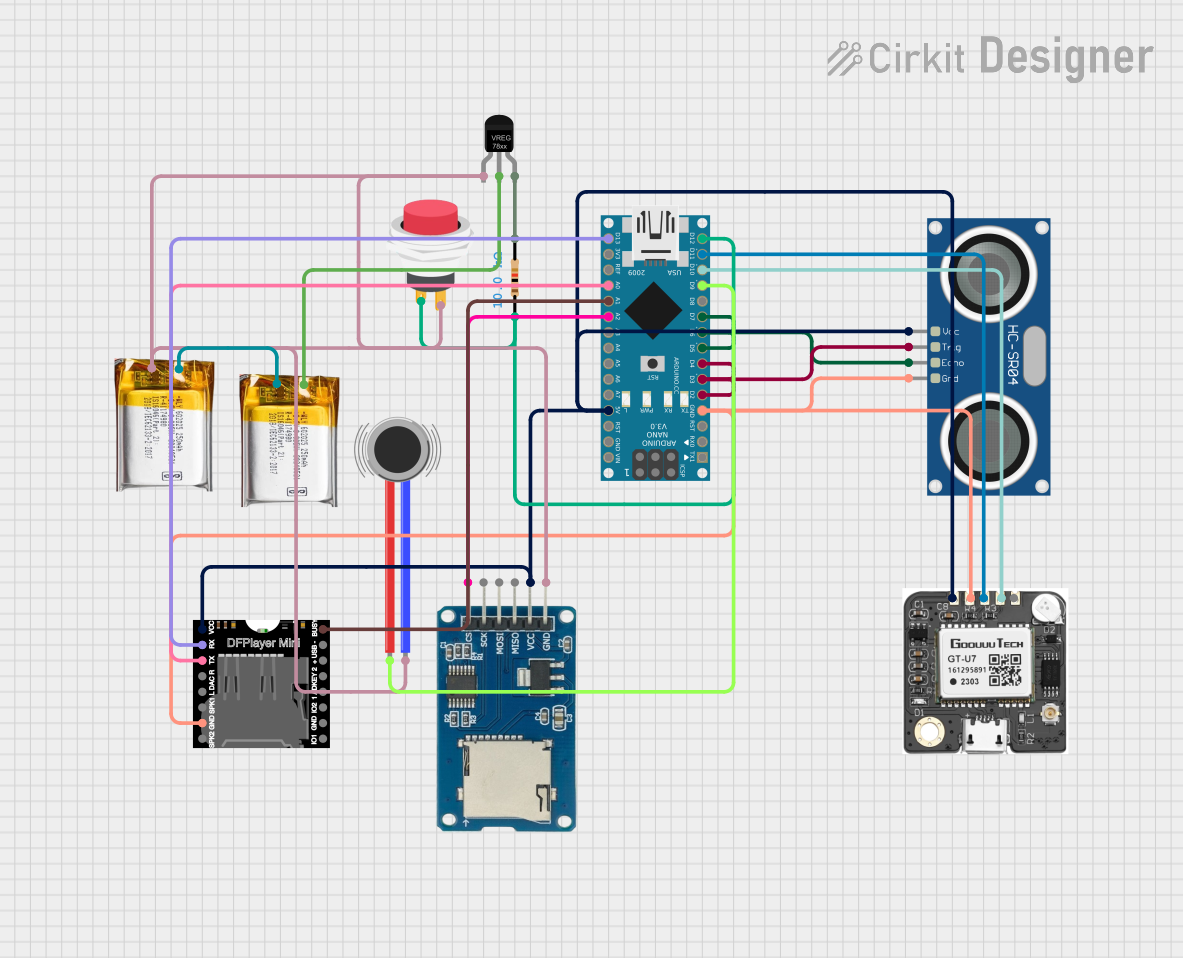
Circuit Documentation
Summary
This circuit is designed to interface with a variety of components including a neo 6m GPS module, an HC-SR04 Ultrasonic Sensor, a DFPlayer MINI audio module, a Micro SD Card Module, and a Vibration Motor. The primary controller for the circuit is an Arduino Nano, which manages data logging from the GPS to the SD card, distance measurement using the ultrasonic sensor, audio playback through the DFPlayer MINI based on the measured distance, and control of a vibration motor under specific conditions.
Component List
neo 6m GPS
- Description: A GPS module capable of providing geolocation data.
- Pins: VCC, GND, RXD, TXD, PPS
HC-SR04 Ultrasonic Sensor
- Description: An ultrasonic sensor used for measuring distances by emitting ultrasonic waves.
- Pins: VCC, TRIG, ECHO, GND
Voltage Regulator
- Description: A component that regulates input voltage to a stable output voltage.
- Pins: GND, IN, OUT
3.7v LiPo Battery
- Description: A rechargeable lithium polymer battery providing power to the circuit.
- Pins: +Ve, GND
2Pin Push Switch
- Description: A simple push-button switch used to control the flow of electricity.
- Pins: Input +, Output +
Micro SD Card Module
- Description: A module that allows an SD card to be interfaced with a microcontroller for data storage.
- Pins: cs, sck, mosi, miso, vcc, gnd
Arduino Nano
- Description: A small, complete, and breadboard-friendly board based on the ATmega328 (Arduino Nano 3.x).
- Pins: D1/TX, D0/RX, RESET, GND, D2, D3, D4, D5, D6, D7, D8, D9, D10, D11/MOSI, D12/MISO, VIN, 5V, A7, A6, A5, A4, A3, A2, A1, A0, AREF, 3V3, D13/SCK
Resistor (10k Ohms)
- Description: A passive two-terminal electrical component that implements electrical resistance as a circuit element.
- Pins: pin1, pin2
DFPlayer MINI
- Description: A small and low-cost MP3 module that can directly play MP3 files from an SD card.
- Pins: VCC, BUSY, RX, USB -, TX, USB +, DAC_R, K2/ADC_KEY, DAC_L, K1/ADC_KEY, SPK1, IO 2, GND, SPK2, IO 1
Vibration Motor
- Description: A motor that generates vibration when voltage is applied.
- Pins: POS, NEG
Wiring Details
neo 6m GPS
- VCC: Connected to 5V power supply from the Arduino Nano.
- GND: Connected to the common ground.
- RXD: Connected to D11/MOSI on the Arduino Nano.
- TXD: Connected to D10 on the Arduino Nano.
HC-SR04 Ultrasonic Sensor
- VCC: Connected to 5V power supply from the Arduino Nano.
- TRIG: Connected to D2 on the Arduino Nano.
- ECHO: Connected to D5 on the Arduino Nano.
- GND: Connected to the common ground.
Voltage Regulator
- GND: Connected to the common ground.
- IN: Connected to the +Ve of the 3.7v LiPo battery.
- OUT: Connected to one end of a 10k Ohm resistor.
3.7v LiPo Battery
- +Ve: Connected to the IN pin of the Voltage Regulator and to another 3.7v LiPo battery in parallel.
- GND: Connected to the common ground.
2Pin Push Switch
- Input +: Connected to one end of a 10k Ohm resistor.
- Output +: Connected to the common ground.
Micro SD Card Module
- vcc: Connected to 5V power supply from the Arduino Nano.
- gnd: Connected to the common ground.
- cs: Connected to A2 on the Arduino Nano.
Arduino Nano
- 5V: Provides power to the neo 6m GPS, Micro SD Card Module, DFPlayer MINI, and HC-SR04 Ultrasonic Sensor.
- GND: Common ground for all components.
- D2: Connected to TRIG on the HC-SR04 Ultrasonic Sensor.
- D5: Connected to ECHO on the HC-SR04 Ultrasonic Sensor.
- D10: Connected to TXD on the neo 6m GPS.
- D11/MOSI: Connected to RXD on the neo 6m GPS.
- A2: Connected to cs on the Micro SD Card Module.
- D9: Connected to POS on the Vibration Motor.
Resistor (10k Ohms)
- pin1: Connected to Input + on the 2Pin Push Switch and D12/MISO on the Arduino Nano.
- pin2: Connected to OUT on the Voltage Regulator.
DFPlayer MINI
- VCC: Connected to 5V power supply from the Arduino Nano.
- GND: Connected to the common ground.
- BUSY: Connected to A1 on the Arduino Nano.
- RX: Connected to D13/SCK on the Arduino Nano.
- TX: Connected to A0 on the Arduino Nano.
Vibration Motor
- POS: Connected to D9 on the Arduino Nano.
- NEG: Connected to the common ground.
Documented Code
/*
 * Arduino Nano Circuit Project
 * This code interfaces with a neo 6m GPS, HC-SR04 Ultrasonic Sensor,
 * DFPlayer MINI, Micro SD Card Module, and a Vibration Motor.
 * The GPS data is read and logged to the SD card. The ultrasonic sensor
 * measures distance, and the DFPlayer MINI plays audio based on distance.
 * The vibration motor is activated based on specific conditions.
 */

#include <SoftwareSerial.h>
#include <SD.h>
#include <DFPlayer_Mini_Mp3.h>

// Pin definitions
#define TRIG_PIN 2
#define ECHO_PIN 5
#define GPS_TX_PIN 10
#define GPS_RX_PIN 11
#define SD_CS_PIN A2
#define DFPLAYER_BUSY_PIN A1
#define DFPLAYER_TX_PIN A0
#define DFPLAYER_RX_PIN 13
#define VIBRATION_MOTOR_PIN 9

// Global variables
SoftwareSerial gpsSerial(GPS_RX_PIN, GPS_TX_PIN);
SoftwareSerial dfPlayerSerial(DFPLAYER_RX_PIN, DFPLAYER_TX_PIN);
File logFile;

void setup() {
  // Initialize serial communication
  Serial.begin(9600);
  gpsSerial.begin(9600);
  dfPlayerSerial.begin(9600);

  // Initialize pins
  pinMode(TRIG_PIN, OUTPUT);
  pinMode(ECHO_PIN, INPUT);
  pinMode(SD_CS_PIN, OUTPUT);
  pinMode(VIBRATION_MOTOR_PIN, OUTPUT);

  // Initialize SD card
  if (!SD.begin(SD_CS_PIN)) {
    Serial.println("SD card initialization failed!");
    return;
  }
  logFile = SD.open("log.txt", FILE_WRITE);
  if (!logFile) {
    Serial.println("Failed to open log file!");
    return;
  }

  // Initialize DFPlayer
  mp3_set_serial(dfPlayerSerial);
  mp3_set_volume(20);
}

void loop() {
  // Read GPS data
  if (gpsSerial.available()) {
    String gpsData = gpsSerial.readStringUntil('\n');
    logFile.println(gpsData);
    logFile.flush();
  }

  // Measure distance with HC-SR04
  long duration, distance;
  digitalWrite(TRIG_PIN, LOW);
  delayMicroseconds(2);
  digitalWrite(TRIG_PIN, HIGH);
  delayMicroseconds(10);
  digitalWrite(TRIG_PIN, LOW);
  duration = pulseIn(ECHO_PIN, HIGH);
  distance = (duration / 2) / 29.1;

  // Play audio and activate vibration motor based on distance
  if (distance < 10) {
    mp3_play(1);
    digitalWrite(VIBRATION_MOTOR_PIN, HIGH);
  } else {
    digitalWrite(VIBRATION_MOTOR_PIN, LOW);
  }

  delay(1000);
}
This code is designed to be uploaded to an Arduino Nano and assumes that the wiring has been done according to the details provided in the wiring section. The code includes comments that describe the functionality and the purpose of each section, making it easier to understand and modify if necessary.