
Circuit Documentation
Summary
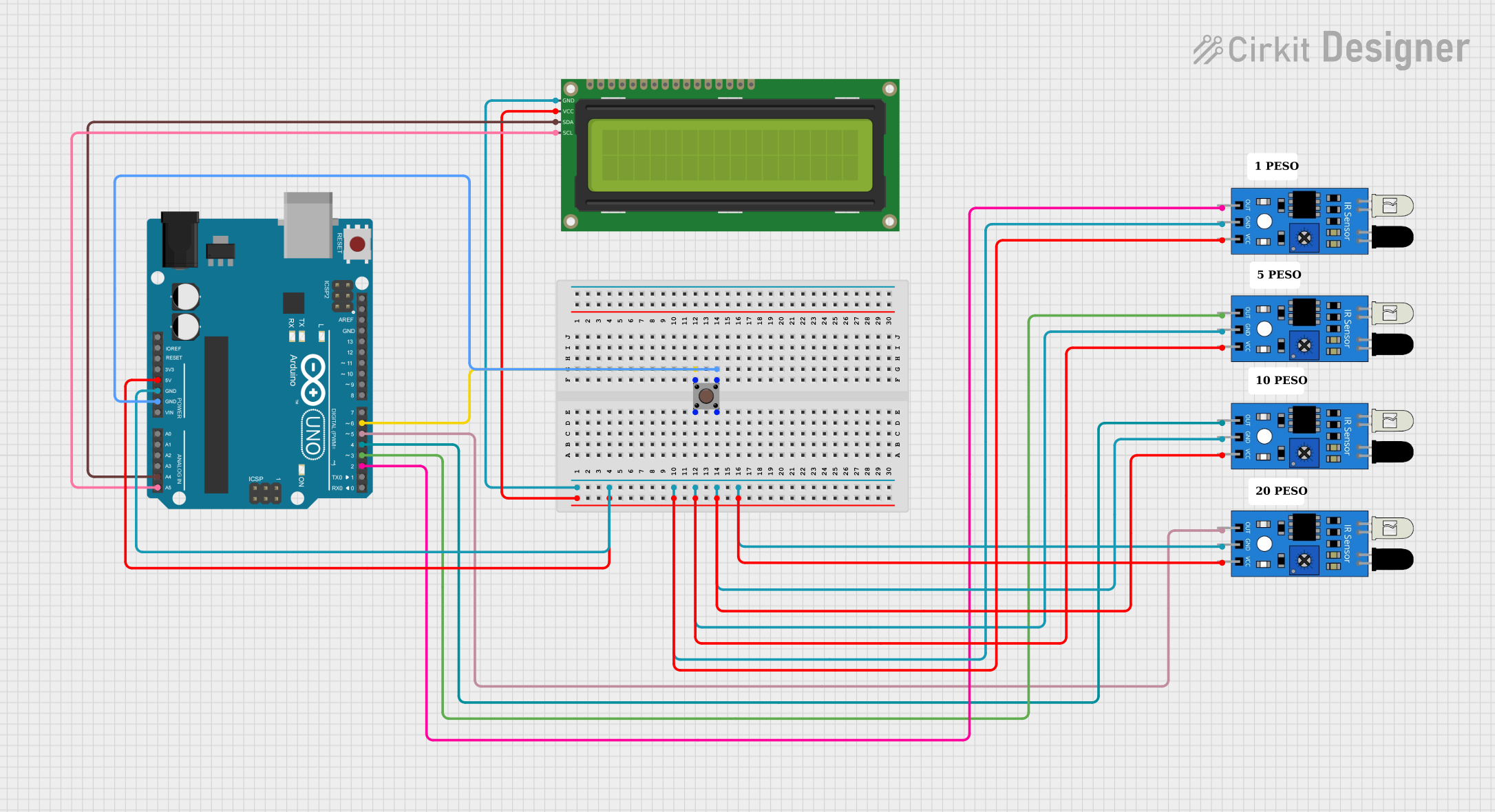
This circuit consists of an Arduino UNO microcontroller, multiple IR sensors, a pushbutton, and a 16x2 I2C LCD display. The IR sensors are used to detect objects, and their outputs are read by the Arduino. The pushbutton is used as an input to the Arduino, and the LCD display is used to show information. The Arduino is programmed to handle the inputs and outputs accordingly.
Component List
Arduino UNO
- Description: A microcontroller board based on the ATmega328P.
- Pins: UNUSED, IOREF, Reset, 3.3V, 5V, GND, Vin, A0, A1, A2, A3, A4, A5, SCL, SDA, AREF, D13, D12, D11, D10, D9, D8, D7, D6, D5, D4, D3, D2, D1, D0
IR Sensor
- Description: An infrared sensor used for object detection.
- Pins: out, gnd, vcc
Pushbutton
- Description: A simple pushbutton used as an input device.
- Pins: Pin 3 (out), Pin 4 (out), Pin 1 (in), Pin 2 (in)
16x2 I2C LCD
- Description: A 16x2 character LCD display with I2C interface.
- Pins: GND, VCC, SDA, SCL
Comment
- Description: Placeholder for comments in the circuit.
- Pins: None
Wiring Details
Arduino UNO
- 5V: Connected to VCC of 16x2 I2C LCD, VCC of all IR sensors
- GND: Connected to GND of 16x2 I2C LCD, GND of all IR sensors, Pin 3 (out) of Pushbutton
- A4: Connected to SDA of 16x2 I2C LCD
- A5: Connected to SCL of 16x2 I2C LCD
- D2: Connected to out of IR sensor
- D3: Connected to out of IR sensor
- D4: Connected to out of IR sensor
- D5: Connected to out of IR sensor
- D6: Connected to Pin 1 (in) of Pushbutton
IR Sensor
- VCC: Connected to 5V of Arduino UNO
- GND: Connected to GND of Arduino UNO
- out: Connected to D2, D3, D4, D5 of Arduino UNO
Pushbutton
- Pin 1 (in): Connected to D6 of Arduino UNO
- Pin 3 (out): Connected to GND of Arduino UNO
16x2 I2C LCD
- VCC: Connected to 5V of Arduino UNO
- GND: Connected to GND of Arduino UNO
- SDA: Connected to A4 of Arduino UNO
- SCL: Connected to A5 of Arduino UNO
Code Documentation
Arduino UNO Code
void setup() {
  // put your setup code here, to run once:

}

void loop() {
  // put your main code here, to run repeatedly:

}
This code is a basic template for the Arduino UNO. The setup() function is where you initialize your components and settings, and the loop() function is where the main logic of your program runs repeatedly.
Additional Documentation
This section is reserved for any additional documentation or comments related to the code or circuit.