
Arduino UNO with I2C LCD and DHT11 Temperature and Humidity Sensor
View and Edit Project In Cirkit Designer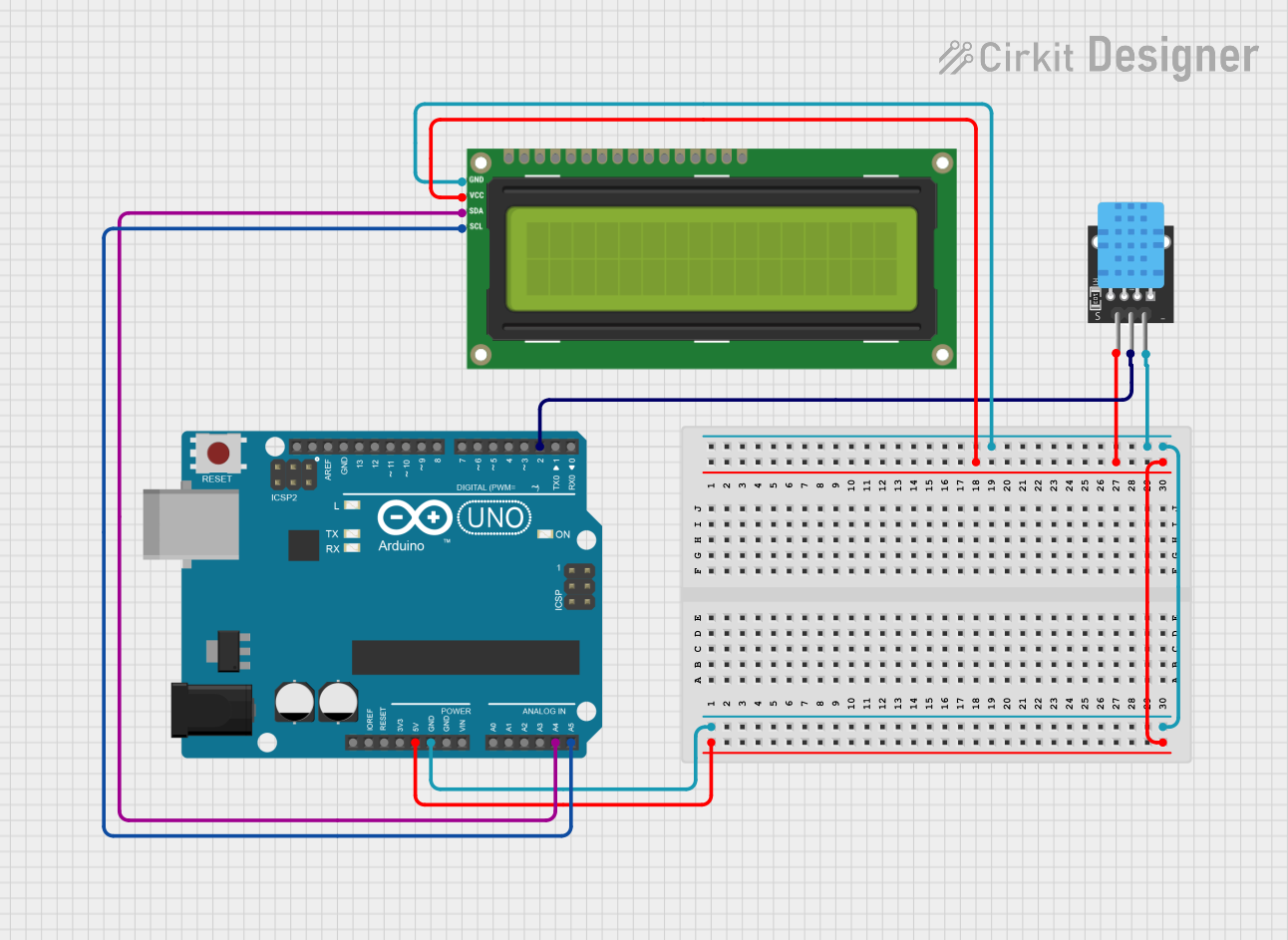
Circuit Documentation
Summary
This circuit integrates an Arduino UNO microcontroller with an I2C LCD 16x2 Screen and a KY-015 DHT11 temperature and humidity sensor. The Arduino UNO serves as the central processing unit, controlling the LCD display via the I2C communication protocol and reading environmental data from the DHT11 sensor. The LCD screen displays the temperature and humidity readings obtained from the DHT11 sensor.
Component List
Arduino UNO
- Description: A microcontroller board based on the ATmega328P.
- Purpose: Acts as the central controller for interfacing with the LCD screen and the DHT11 sensor.
- Pins Used:
5V,GND,A4,A5,D2.
I2C LCD 16x2 Screen
- Description: A 16x2 character LCD display with an I2C communication interface.
- Purpose: Displays the temperature and humidity data read from the DHT11 sensor.
- Pins Used:
SCL,SDA,VCC (5V),GND.
KY-015 DHT11
- Description: A basic, ultra-low-cost digital temperature and humidity sensor.
- Purpose: Measures the ambient temperature and humidity.
- Pins Used:
5V,S,GND.
Wiring Details
Arduino UNO
5Vto I2C LCD ScreenVCC (5V)and DHT115VGNDto I2C LCD ScreenGNDand DHT11GNDA4to I2C LCD ScreenSDAA5to I2C LCD ScreenSCLD2to DHT11S
I2C LCD 16x2 Screen
VCC (5V)to Arduino UNO5VGNDto Arduino UNOGNDSDAto Arduino UNOA4SCLto Arduino UNOA5
KY-015 DHT11
5Vto Arduino UNO5VSto Arduino UNOD2GNDto Arduino UNOGND
Documented Code
#include <Wire.h>
#include <LiquidCrystal_I2C.h>
#include <DHT.h>

// Set up the LCD display with I2C address (usually 0x27) and 16x2 character size
LiquidCrystal_I2C lcd(0x27, 16, 2);

// DHT sensor setup
#define DHTPIN 2           // Pin connected to the DHT11 data pin
#define DHTTYPE DHT11      // Use DHT11 sensor (can be changed to DHT22 if using a DHT22 sensor)

DHT dht(DHTPIN, DHTTYPE);

void setup() {
  // Initialize the LCD and turn on the backlight
  lcd.begin(16, 2);  // Corrected to include the number of columns and rows
  lcd.backlight();

  // Start the DHT sensor
  dht.begin();

  // Print initial message
  lcd.setCursor(0, 0);    // Set cursor to column 0, row 0
  lcd.print("Temp & Humidity");
  delay(2000);
  lcd.clear();
}

void loop() {
  // Read temperature in Celsius
  float temperature = dht.readTemperature();
  // Read humidity percentage
  float humidity = dht.readHumidity();

  // Check if the readings are valid (i.e., not NaN)
  if (isnan(temperature) || isnan(humidity)) {
    lcd.setCursor(0, 0);
    lcd.print("Error reading");
    lcd.setCursor(0, 1);
    lcd.print("sensor data");
    return;
  }

  // Display the temperature on the LCD
  lcd.setCursor(0, 0);
  lcd.print("Temp: ");
  lcd.print(temperature);
  lcd.print(" C");

  // Display the humidity on the LCD
  lcd.setCursor(0, 1);
  lcd.print("Hum: ");
  lcd.print(humidity);
  lcd.print(" %");

  // Delay for a second before refreshing data
  delay(1000);
}
This code initializes the I2C LCD screen and the DHT11 sensor. It reads temperature and humidity data from the DHT11 sensor and displays it on the LCD. If the sensor data is not valid, an error message is displayed. The temperature is displayed in Celsius, and the humidity is shown as a percentage. The display is updated every second.