
Arduino and ESP32-Based Solar-Powered IoT Roof Water Sprinkler System
View and Edit Project In Cirkit Designer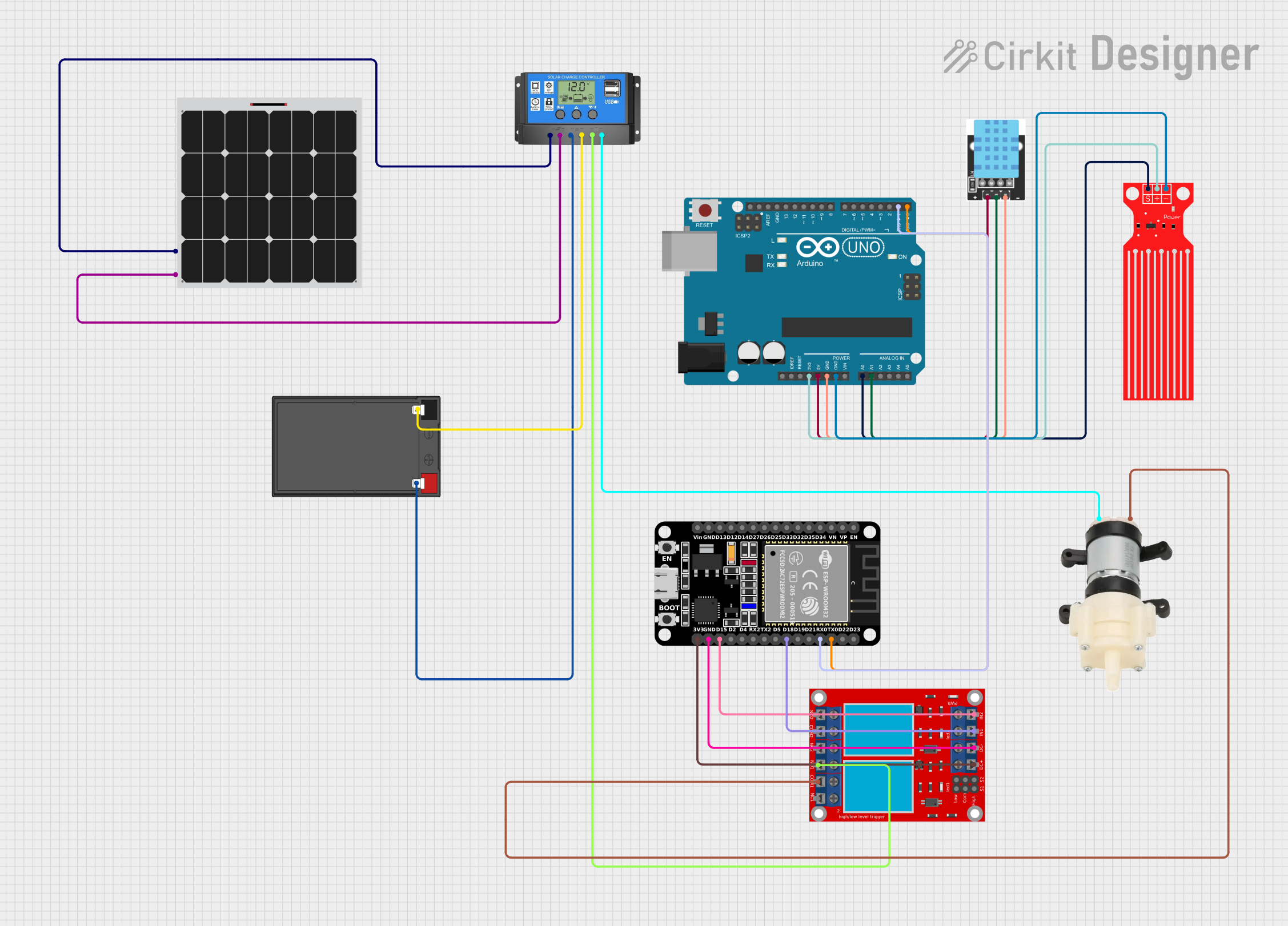
IoT-Based Solar Powered Roof Water Sprinkler
Summary
This project is an IoT-based solar-powered roof water sprinkler system. It utilizes an Arduino UNO and an ESP32 microcontroller to monitor temperature, humidity, and water levels. The system is powered by a solar panel and a 12V battery, managed by a solar charge controller. The ESP32 communicates with a Blynk app to provide real-time updates and control. The system automatically controls a water pump based on the sensor data.
Component List
Arduino UNO
- Description: Microcontroller board based on the ATmega328P.
- Pins: UNUSED, IOREF, Reset, 3.3V, 5V, GND, Vin, A0, A1, A2, A3, A4, A5, SCL, SDA, AREF, D13, D12, D11, D10, D9, D8, D7, D6, D5, D4, D3, D2, D1, D0
12V 7Ah Battery
- Description: Rechargeable battery for power storage.
- Pins: 12v +, 12v -
Solar Charge Controller
- Description: Manages the charging of the battery from the solar panel.
- Pins: Solar Cell +, Solar Cell -, Battery +, Battery -, Load +, Load -
Solar Panel
- Description: Converts sunlight into electrical energy.
- Pins: +, -
ESP32 (30 pin)
- Description: Microcontroller with Wi-Fi and Bluetooth capabilities.
- Pins: EN, VP, VN, D34, D35, D32, D33, D25, D26, D27, D14, D12, D13, GND, Vin, D23, D22, TX0, RX0, D21, D19, D18, D5, TX2, RX2, D4, D2, D15, 3V3
Water Level Sensor
- Description: Measures the water level in the tank.
- Pins: SIG, VCC, GND
Mini Diaphragm Water Pump
- Description: Pumps water for the sprinkler system.
- Pins: Positive (+), Negative (-)
KY-015 DHT11 Temperature-Humidity Sensor Module
- Description: Measures temperature and humidity.
- Pins: VCC, GND, DOUT
2 Channel Relay Module
- Description: Controls the water pump and other high-power devices.
- Pins: N.O. 2, COM 2, N.C. 2, N.O. 1, COM 1, N.C. 1, pin 7, pin 8, pin 9, pin 10, pin 11, pin 12, VCC+, VCC- (GND), IN 1, IN 2
Wiring Details
Arduino UNO
- 3.3V to Water Level Sensor VCC
- 5V to KY-015 DHT11 Temperature-Humidity Sensor Module VCC
- GND to KY-015 DHT11 Temperature-Humidity Sensor Module GND
- GND to Water Level Sensor GND
- A0 to Water Level Sensor SIG
- A1 to KY-015 DHT11 Temperature-Humidity Sensor Module DOUT
- D1 to ESP32 RX0
- D0 to ESP32 TX0
12V 7Ah Battery
- 12v + to Solar Charge Controller Battery +
- 12v - to Solar Charge Controller Battery -
Solar Charge Controller
- Solar Cell + to Solar Panel +
- Solar Cell - to Solar Panel -
- Load + to 2 Channel Relay Module N.O. 1
- Load - to Mini Diaphragm Water Pump Negative (-)
Solar Panel
- + to Solar Charge Controller Solar Cell +
- - to Solar Charge Controller Solar Cell -
ESP32 (30 pin)
- RX0 to Arduino UNO D1
- TX0 to Arduino UNO D0
- D18 to 2 Channel Relay Module IN 1
- D15 to 2 Channel Relay Module IN 2
- GND to 2 Channel Relay Module VCC- (GND)
- 3V3 to 2 Channel Relay Module VCC+
Water Level Sensor
- VCC to Arduino UNO 3.3V
- GND to Arduino UNO GND
- SIG to Arduino UNO A0
Mini Diaphragm Water Pump
- Positive (+) to 2 Channel Relay Module COM 1
- Negative (-) to Solar Charge Controller Load -
KY-015 DHT11 Temperature-Humidity Sensor Module
- VCC to Arduino UNO 5V
- GND to Arduino UNO GND
- DOUT to Arduino UNO A1
2 Channel Relay Module
- N.O. 1 to Solar Charge Controller Load +
- IN 1 to ESP32 D18
- IN 2 to ESP32 D15
- VCC- (GND) to ESP32 GND
- VCC+ to ESP32 3V3
- COM 1 to Mini Diaphragm Water Pump Positive (+)
Documented Code
Arduino UNO Code
/*
 * IoT-Based Solar Powered Roof Water Sprinkler
 * This Arduino sketch reads data from a DHT11 temperature-humidity sensor and a
 * water level sensor. It sends the data to an ESP32 via Serial communication.
 * The ESP32 controls a water pump based on the received data and sends updates
 * to a Blynk app.
 */

#include <DHT.h>

// Define the DHT11 pin and type
#define DHTPIN A1       // Pin connected to the DHT11
#define DHTTYPE DHT11   // DHT11 sensor

// Define the water level sensor pin
const int waterLevelSensorPin = A0; // Analog pin for water level sensor

// Initialize the DHT sensor
DHT dht(DHTPIN, DHTTYPE);

// Variables for non-blocking timing
unsigned long previousMillis = 0;
const unsigned long dhtInterval = 2000; // DHT11 sampling period (2 seconds)

void setup() {
  // Start the DHT sensor
  dht.begin();

  // Start Serial communication with ESP32
  Serial.begin(115200);
}

void loop() {
  unsigned long currentMillis = millis();

  // Read DHT11 sensor data every 2 seconds
  if (currentMillis - previousMillis >= dhtInterval) {
    previousMillis = currentMillis;

    float temperature = dht.readTemperature();
    float humidity = dht.readHumidity();

    // Check if readings are valid
    if (!isnan(temperature) && !isnan(humidity)) {
      // Send temperature to ESP32
      Serial.print("T:");
      Serial.println(temperature);
    } else {
      Serial.println("Error reading DHT11 sensor!");
    }
  }

  // Simulate water level sensor
  int waterLevel = analogRead(waterLevelSensorPin);
  int waterLevelPercentage = map(waterLevel, 0, 1023, 0, 100);

  // Send water level data to ESP32
  Serial.print("W:");
  Serial.println(waterLevelPercentage);

  delay(500); // Small delay for stability
}
ESP32 Code
/*
 * IoT-Based Solar Powered Roof Water Sprinkler
 * This Arduino sketch controls a water pump based on temperature and water
 * level data received from an Arduino UNO. It also sends updates to a Blynk
 * app and handles notifications for low water levels and sensor errors.
 */

#define BLYNK_TEMPLATE_ID "TMPL6Peoo1Mnk"
#define BLYNK_TEMPLATE_NAME "Rooftop water Sprinkler solar powered"
#define BLYNK_AUTH_TOKEN "ygmW7VZVNytrWJ3yvIihC8EX56Ejja7J"

#include <WiFi.h>
#include <BlynkSimpleEsp32.h>

// WiFi credentials
char auth[] = BLYNK_AUTH_TOKEN;
char ssid[] = "RumahKami";
char pass[] = "Selamat000";

// Define motor and relay pins
const int motorPin = 16;
const int relayPin = 15;

// Variables to store data from Arduino Uno
float temperature = 0;
int waterLevel = 0;
bool motorState = false;

// Define thresholds
const int lowWaterLevelThreshold = 10; // Water level threshold for low level
const unsigned long sensorTimeout = 10000; // 10 seconds for sensor detection

// Timing variables
unsigned long lastTemperatureUpdate = 0;
unsigned long lastWaterLevelUpdate = 0;

// Create a timer instance
BlynkTimer timer;

// Function to turn off the motor after 5 minutes
void turnOff