
Arduino Nano RFID Access Control System with LCD Display and Servo Mechanism
View and Edit Project In Cirkit Designer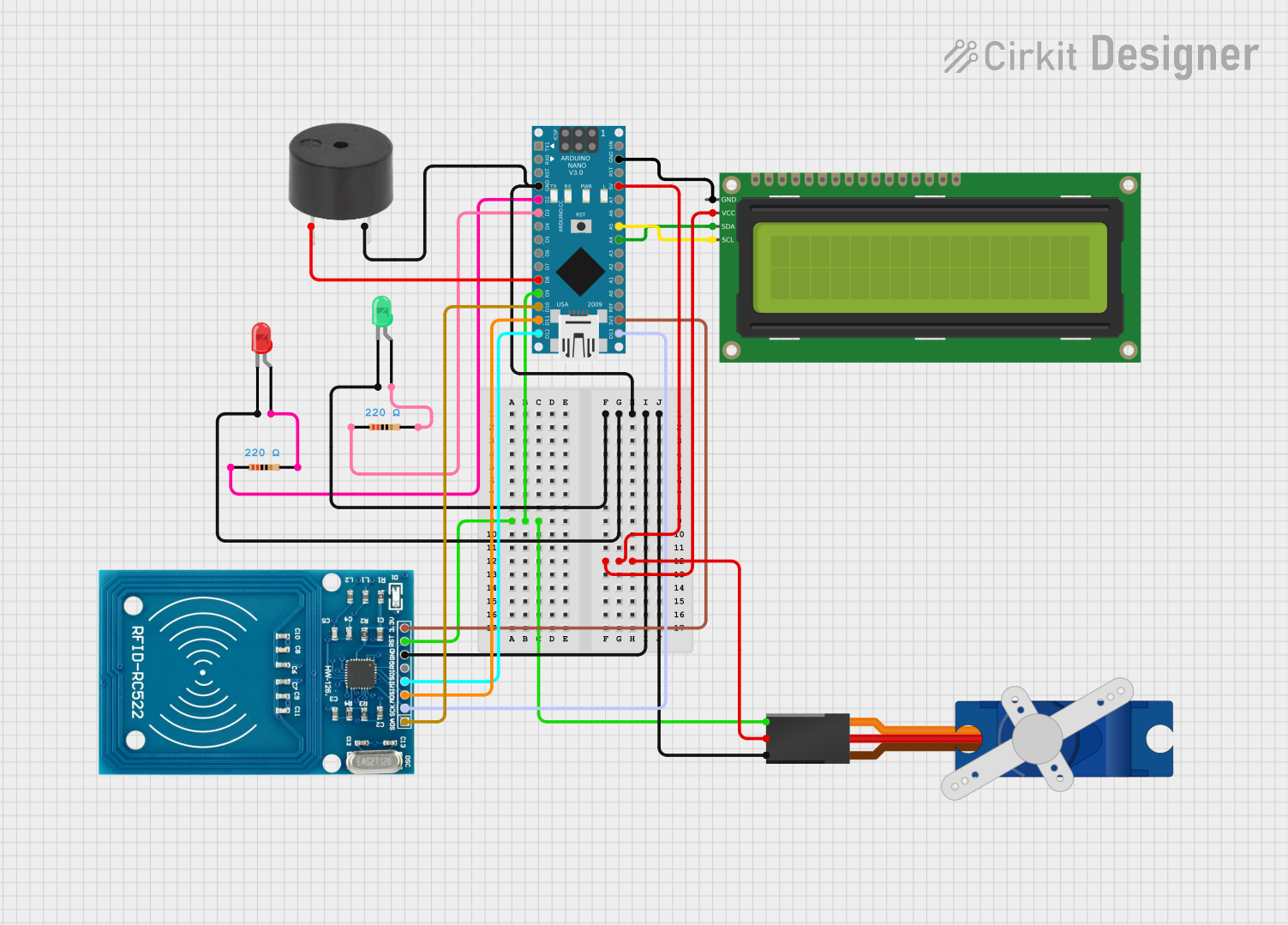
Circuit Documentation
Summary
This circuit involves an Arduino Nano microcontroller interfacing with various components including LEDs, a servo motor, an RFID reader, an I2C LCD, and a buzzer. The circuit is designed to demonstrate basic input/output operations, control of a servo motor, and communication with an RFID reader and an LCD display.
Component List
Arduino Nano
- Description: A small, complete, and breadboard-friendly board based on the ATmega328P.
- Pins: D1/TX, D0/RX, RESET, GND, D2, D3, D4, D5, D6, D7, D8, D9, D10, D11/MOSI, D12/MISO, VIN, 5V, A7, A6, A5, A4, A3, A2, A1, A0, AREF, 3V3, D13/SCK
LED: Two Pin (red)
- Description: A red LED with two pins.
- Pins: cathode, anode
LED: Two Pin (green)
- Description: A green LED with two pins.
- Pins: cathode, anode
Tower Pro SG90 servo
- Description: A small servo motor used for precise control of angular position.
- Pins: Signal, +5V, GND
Resistor (220 Ohms)
- Description: A resistor with a resistance of 220 Ohms.
- Pins: pin1, pin2
RFID-RC522
- Description: An RFID reader module used for reading RFID tags.
- Pins: VCC (3.3V), RST, GND, IRQ, MISO, MOSI, SCK, SDA
16x2 I2C LCD
- Description: A 16x2 character LCD display with I2C interface.
- Pins: GND, VCC, SDA, SCL
Buzzer
- Description: A simple buzzer for sound output.
- Pins: PIN, GND
Wiring Details
Arduino Nano
GND connected to:
- RFID-RC522 (GND)
- Tower Pro SG90 servo (GND)
- LED: Two Pin (red) (cathode)
- LED: Two Pin (green) (cathode)
- Buzzer (GND)
- 16x2 I2C LCD (GND)
D9 connected to:
- Tower Pro SG90 servo (Signal)
- RFID-RC522 (RST)
5V connected to:
- Tower Pro SG90 servo (+5V)
- 16x2 I2C LCD (VCC)
D2 connected to:
- Resistor (pin1)
D3 connected to:
- Resistor (pin1)
D8 connected to:
- Buzzer (PIN)
D10 connected to:
- RFID-RC522 (SDA)
D11/MOSI connected to:
- RFID-RC522 (MOSI)
D12/MISO connected to:
- RFID-RC522 (MISO)
A5 connected to:
- 16x2 I2C LCD (SCL)
A4 connected to:
- 16x2 I2C LCD (SDA)
3V3 connected to:
- RFID-RC522 (VCC (3.3V))
D13/SCK connected to:
- RFID-RC522 (SCK)
LED: Two Pin (red)
- cathode connected to:
- Arduino Nano (GND)
- anode connected to:
- Resistor (pin2)
LED: Two Pin (green)
- cathode connected to:
- Arduino Nano (GND)
- anode connected to:
- Resistor (pin2)
Tower Pro SG90 servo
- Signal connected to:
- Arduino Nano (D9)
- RFID-RC522 (RST)
- +5V connected to:
- Arduino Nano (5V)
- 16x2 I2C LCD (VCC)
- GND connected to:
- Arduino Nano (GND)
- RFID-RC522 (GND)
Resistor (220 Ohms)
- pin1 connected to:
- Arduino Nano (D2)
- Arduino Nano (D3)
- pin2 connected to:
- LED: Two Pin (red) (anode)
- LED: Two Pin (green) (anode)
RFID-RC522
- GND connected to:
- Arduino Nano (GND)
- Tower Pro SG90 servo (GND)
- RST connected to:
- Arduino Nano (D9)
- Tower Pro SG90 servo (Signal)
- VCC (3.3V) connected to:
- Arduino Nano (3V3)
- SDA connected to:
- Arduino Nano (D10)
- MOSI connected to:
- Arduino Nano (D11/MOSI)
- MISO connected to:
- Arduino Nano (D12/MISO)
- SCK connected to:
- Arduino Nano (D13/SCK)
16x2 I2C LCD
- GND connected to:
- Arduino Nano (GND)
- VCC connected to:
- Arduino Nano (5V)
- Tower Pro SG90 servo (+5V)
- SDA connected to:
- Arduino Nano (A4)
- SCL connected to:
- Arduino Nano (A5)
Buzzer
- PIN connected to:
- Arduino Nano (D8)
- GND connected to:
- Arduino Nano (GND)
Documented Code
Arduino Nano Code (sketch.ino)
void setup() {
  // put your setup code here, to run once:

}

void loop() {
  // put your main code here, to run repeatedly:

}
Additional Documentation (documentation.txt)