
Arduino UNO Controlled Solar-Powered DC Motor with Directional and Limit Switches
View and Edit Project In Cirkit Designer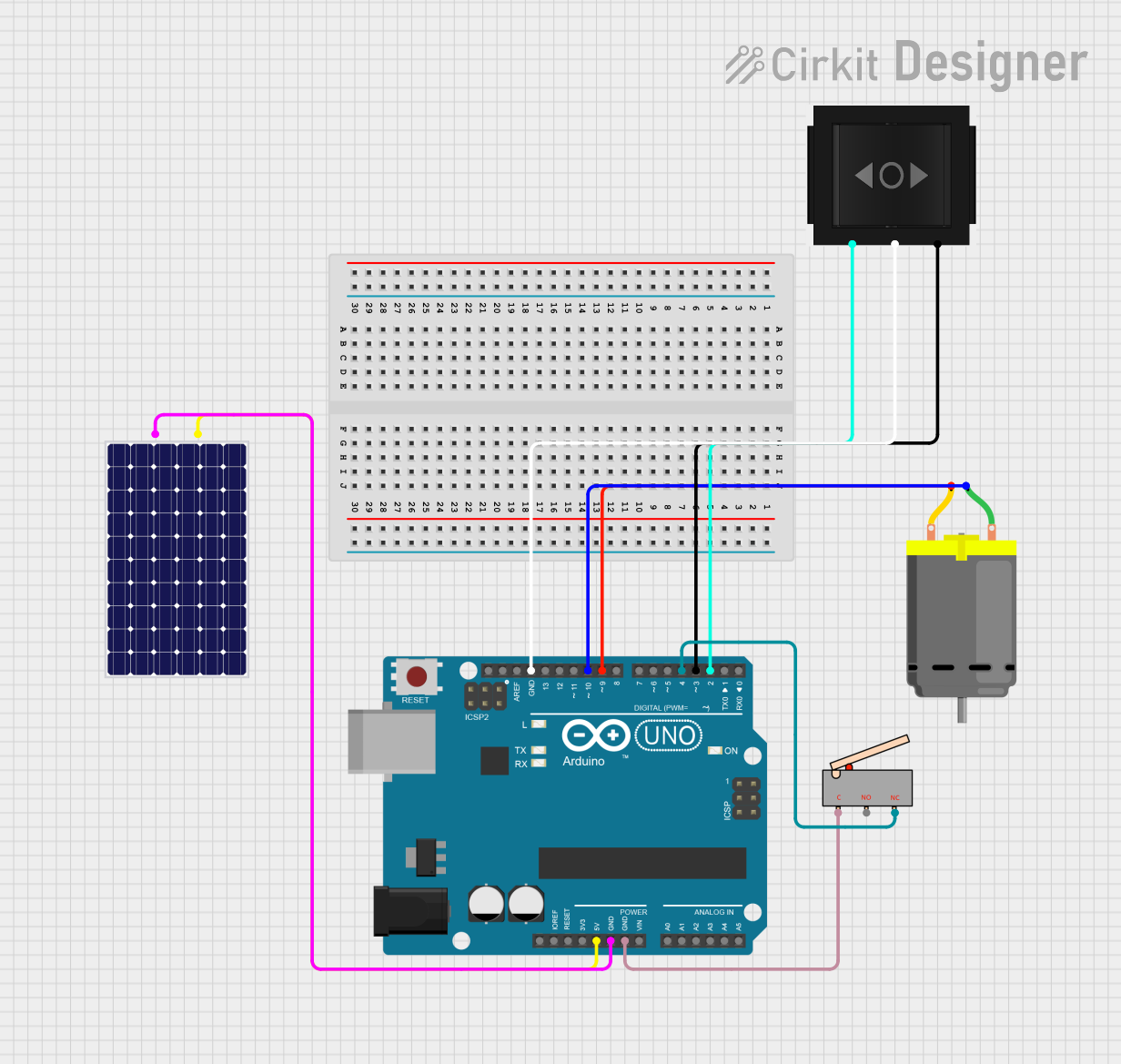
Circuit Documentation
Summary
The circuit in question is designed to control a DC motor using an Arduino UNO microcontroller, with power supplied by a solar panel. The system includes a directional switch to control the motor's direction and a limit switch to stop the motor when a certain position is reached. The Arduino UNO is programmed to manage the motor's operation based on the switch states, simulating a cleaning cycle.
Component List
Arduino UNO
- Description: A microcontroller board based on the ATmega328P.
- Purpose: Acts as the central controller for the circuit, managing power distribution, reading switch states, and controlling the DC motor.
DC Motor
- Description: An electric motor that runs on direct current (DC) electricity.
- Purpose: Performs mechanical work, such as driving a cleaning mechanism.
Solar Panel
- Description: A panel designed to absorb the sun's rays as a source of energy for generating electricity.
- Purpose: Provides power to the Arduino UNO and the rest of the circuit.
Directional Switch
- Description: A switch with two output states to control the direction of the motor.
- Purpose: Allows the user to set the direction of the motor's rotation.
Limit Switch
- Description: A switch that is actuated by the motion of a machine part or presence of an object.
- Purpose: Used to stop the motor when a certain position is reached.
Wiring Details
Arduino UNO
- 5V connected to Solar Panel
+ - GND connected to Solar Panel
-, Limit SwitchC, and Directional SwitchIN - D10 connected to DC Motor
pin 1 - D9 connected to DC Motor
pin 2 - D4 connected to Limit Switch
NC - D3 connected to Directional Switch
Out 2 - D2 connected to Directional Switch
Out 1
DC Motor
- pin 1 connected to Arduino UNO
D10 - pin 2 connected to Arduino UNO
D9
Solar Panel
- + connected to Arduino UNO
5V - - connected to Arduino UNO
GND
Directional Switch
- Out 2 connected to Arduino UNO
D3 - IN connected to Arduino UNO
GND - Out 1 connected to Arduino UNO
D2
Limit Switch
- C connected to Arduino UNO
GND - NO not connected
- NC connected to Arduino UNO
D4
Documented Code
sketch.ino
#include <iostream>
#include <thread>
#include <chrono>

// Mock functions to simulate hardware interactions
bool OnOffSwitch = false; // Initially off
bool LeftSwitch = false;
bool RightSwitch = false;
bool LimitSwitch = false;
bool MotorActive = false;

// Function prototypes
void CleaningCycle();
void ActivateMotor(const std::string &direction);
void DeactivateMotor();
bool IsLeftSwitchActivated();
bool IsRightSwitchActivated();
bool IsLimitSwitchActivated();
bool EndOfCleaningCycle();
void StandbyMode();
void SystemPowerOff();

int main() {
    std::cout << "System Power On" << std::endl;

    while (true) {
        if (OnOffSwitch) {
            CleaningCycle();
        } else {
            StandbyMode();
        }
    }

    return 0;
}

void CleaningCycle() {
    while (true) {
        if (IsLeftSwitchActivated()) {
            ActivateMotor("Leftward");
        } else if (IsRightSwitchActivated()) {
            ActivateMotor("Rightward");
        } else {
            std::cout << "Duster remains stationary" << std::endl;
        }

        while (MotorActive) {
            if (IsLimitSwitchActivated()) {
                DeactivateMotor();
                std::cout << "Duster reached desired position, waiting for further user input..." << std::endl;
                break;
            } else {
                std::cout << "Duster continues movement" << std::endl;
                std::this_thread::sleep_for(std::chrono::seconds(1));  // Simulate motor operation
            }
        }

        if (EndOfCleaningCycle()) {
            if (!OnOffSwitch) {
                SystemPowerOff();
                break;
            } else {
                continue;
            }
        } else {
            continue;
        }
    }
}

void ActivateMotor(const std::string &direction) {
    MotorActive = true;
    std::cout << "Motor activated, moving " << direction << std::endl;
}

void DeactivateMotor() {
    MotorActive = false;
    std::cout << "Motor deactivated" << std::endl;
}

bool IsLeftSwitchActivated() {
    // Simulate reading the Left switch
    return LeftSwitch;
}

bool IsRightSwitchActivated() {
    // Simulate reading the Right switch
    return RightSwitch;
}

bool IsLimitSwitchActivated() {
    // Simulate reading the Limit switch
    return LimitSwitch;
}

bool EndOfCleaningCycle() {
    // Simulate end of cleaning cycle condition (e.g., user input or timeout)
    std::this_thread::sleep_for(std::chrono::seconds(3));  // Simulate a delay
    return true;  // Placeholder for actual condition
}

void StandbyMode() {
    std::cout << "System in standby mode, waiting for user input..." << std::endl;
    std::this_thread::sleep_for(std::chrono::seconds(3));  // Simulate waiting for user input
}

void SystemPowerOff() {
    std::cout << "System Power Off" << std::endl;
    exit(0);
}
Note: The provided code is a mock-up and simulates the hardware interactions for demonstration purposes. Actual embedded code would interact with the hardware using specific libraries and functions for the Arduino platform.