
ESP32 and DHT11 Wi-Fi Connected Temperature and Humidity Web Server
View and Edit Project In Cirkit Designer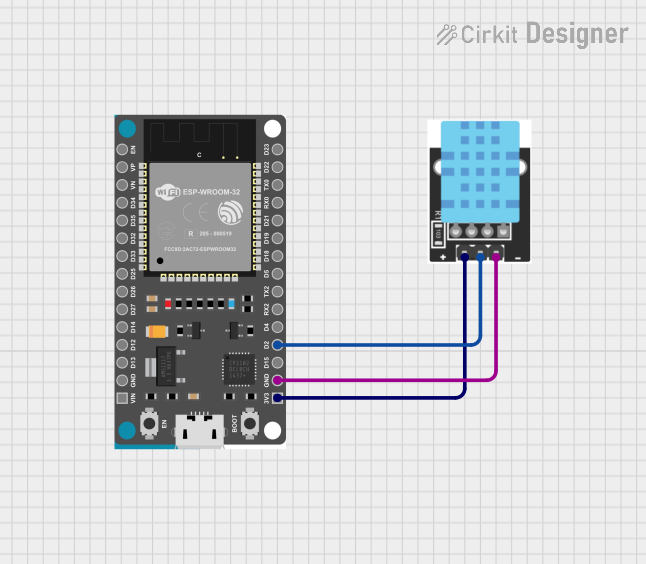
Circuit Documentation
Summary
This circuit involves an ESP32 Devkit V1 microcontroller connected to a KY-015 DHT11 Temperature-Humidity sensor module. The ESP32 reads temperature and humidity data from the DHT11 sensor and serves this data via a web server.
Component List
ESP32 Devkit V1
- Description: A powerful microcontroller with built-in WiFi and Bluetooth capabilities.
- Pins: 3V3, GND, D15, D2, D4, RX2, TX2, D5, D18, D19, D21, RX0, TX0, D22, D23, EN, VP, VN, D34, D35, D32, D33, D25, D26, D27, D14, D12, D13, VIN
KY-015 DHT11 Temperature-Humidity Sensor Module
- Description: A sensor module that measures temperature and humidity.
- Pins: VCC, GND, DOUT
Wiring Details
ESP32 Devkit V1
- 3V3: Connected to VCC of the KY-015 DHT11 Temperature-Humidity sensor module.
- GND: Connected to GND of the KY-015 DHT11 Temperature-Humidity sensor module.
- D2: Connected to DOUT of the KY-015 DHT11 Temperature-Humidity sensor module.
KY-015 DHT11 Temperature-Humidity Sensor Module
- VCC: Connected to 3V3 of the ESP32 Devkit V1.
- GND: Connected to GND of the ESP32 Devkit V1.
- DOUT: Connected to D2 of the ESP32 Devkit V1.
Code Documentation
/*
 * ESP32 Web Server with DHT11 Sensor
 * This code reads temperature and humidity data from a DHT11 sensor
 * connected to an ESP32 Devkit V1 and serves the data via a web server.
 */

#include <WiFi.h>
#include <WebServer.h>
#include <DHT.h>

#define DHTPIN 2     // DHT11 data pin connected to ESP32 pin D2
#define DHTTYPE DHT11

const char* ssid = "your_SSID";
const char* password = "your_PASSWORD";

DHT dht(DHTPIN, DHTTYPE);
WebServer server(80);

void setup() {
  Serial.begin(115200);
  dht.begin();
  WiFi.begin(ssid, password);
  while (WiFi.status() != WL_CONNECTED) {
    delay(1000);
    Serial.println("Connecting to WiFi...");
  }
  Serial.println("Connected to WiFi");
  server.on("/", handleRoot);
  server.begin();
  Serial.println("HTTP server started");
}

void loop() {
  server.handleClient();
}

void handleRoot() {
  float h = dht.readHumidity();
  float t = dht.readTemperature();
  if (isnan(h) || isnan(t)) {
    server.send(500, "text/plain", "Failed to read from DHT sensor!");
    return;
  }
  String message = "Temperature: " + String(t) + " °C\n";
  message += "Humidity: " + String(h) + " %";
  server.send(200, "text/plain", message);
}
This code initializes the ESP32 to connect to a WiFi network and sets up a web server. The DHT11 sensor is read periodically, and the temperature and humidity data are served via the web server.