
Arduino UNO Based Automated Parking System with IR Sensors and Servo Control
View and Edit Project In Cirkit Designer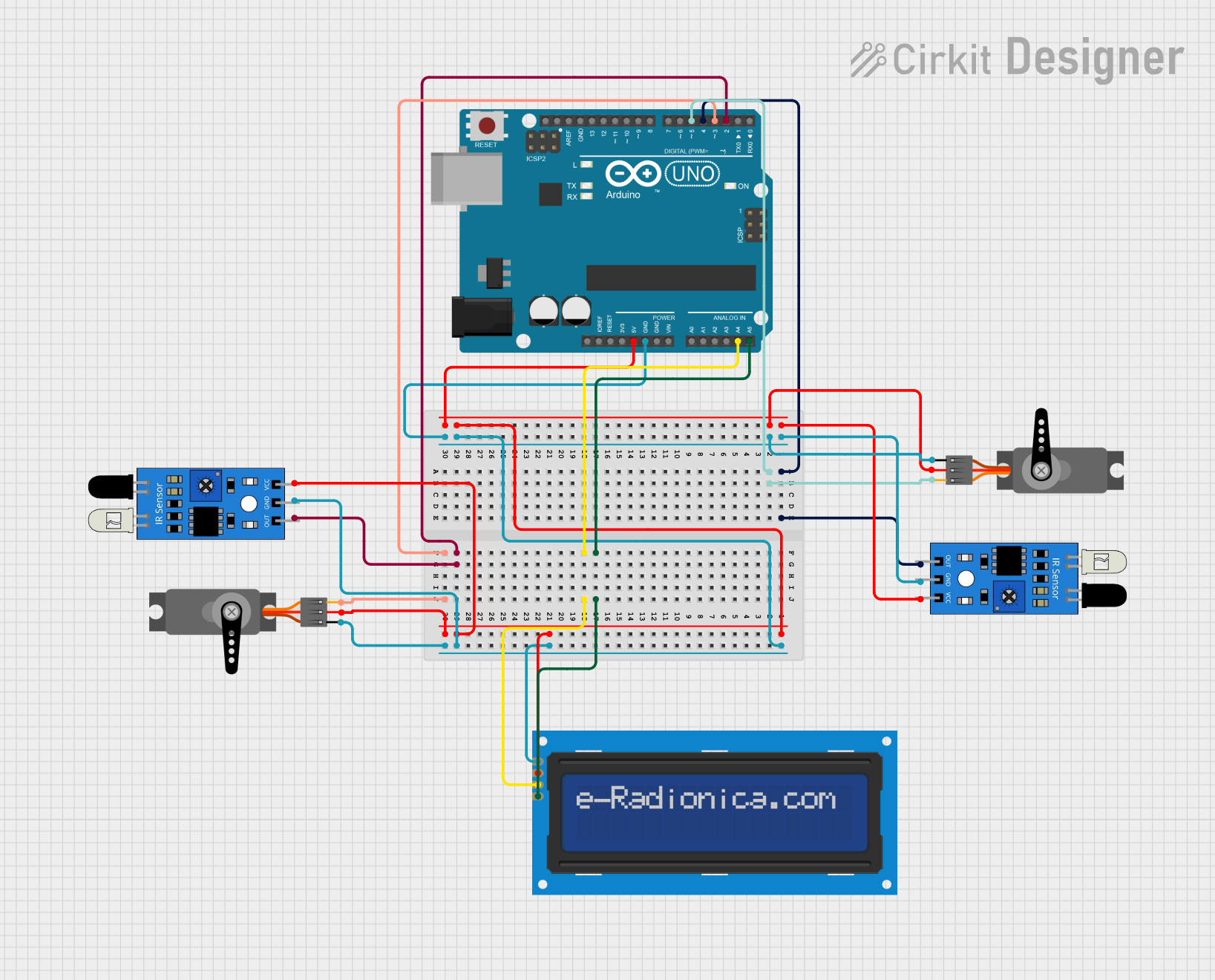
Circuit Documentation
Summary
The circuit in question is designed to implement an Arduino-based parking system. It utilizes an Arduino UNO as the central processing unit, interfacing with two IR sensors for vehicle detection, two servos for gate control, and an LCD screen for user interface and display. The Arduino UNO is responsible for controlling the servos based on the input from the IR sensors and updating the parking availability status on the LCD screen.
Component List
Arduino UNO
- Microcontroller board based on the ATmega328P
- It has 14 digital input/output pins, 6 analog inputs, a 16 MHz quartz crystal, a USB connection, a power jack, an ICSP header, and a reset button.
IR Sensor (2x)
- An infrared sensor capable of detecting obstacles and measuring distances
- Typically includes a transmitter and receiver pair
- Used for detecting the presence or absence of a vehicle
LCD Screen 16x2 I2C
- A 16x2 character LCD display with an I2C interface
- Used for displaying information such as parking availability
Servo (2x)
- A rotary actuator or linear actuator that allows for precise control of angular or linear position
- Used for controlling the entry and exit gates of the parking system
Wiring Details
Arduino UNO
- 5V pin connected to the VCC pins of both IR sensors, both servos, and the LCD screen
- GND pin connected to the GND pins of both IR sensors, both servos, and the LCD screen
- A4 (SDA) pin connected to the SDA pin of the LCD screen
- A5 (SCL) pin connected to the SCL pin of the LCD screen
- D5 pin connected to the PWM pin of one of the servos
- D4 pin connected to the output pin of one of the IR sensors
- D3 pin connected to the PWM pin of the other servo
- D2 pin connected to the output pin of the other IR sensor
IR Sensor
- out pin connected to the D4 or D2 pin of the Arduino UNO (depending on the sensor)
- gnd pin connected to the GND pin of the Arduino UNO
- vcc pin connected to the 5V pin of the Arduino UNO
LCD Screen 16x2 I2C
- SCL pin connected to the A5 pin of the Arduino UNO
- SDA pin connected to the A4 pin of the Arduino UNO
- VCC pin connected to the 5V pin of the Arduino UNO
- GND pin connected to the GND pin of the Arduino UNO
Servo
- PWM pin connected to the D5 or D3 pin of the Arduino UNO (depending on the servo)
- VCC pin connected to the 5V pin of the Arduino UNO
- GND pin connected to the GND pin of the Arduino UNO
Documented Code
#include <Wire.h>
#include <LiquidCrystal_I2C.h>
#include <Servo.h>

LiquidCrystal_I2C lcd(0x27, 16, 2);
Servo servoIn;
Servo servoOut;

int IRIn = 2;
int IROut = 4;
int Slot = 4;           // Total number of parking Slots
int flag1 = 0;
int flag2 = 0;

void setup() {
  Serial.begin(9600);
  lcd.init();            // Initialize the LCD
  lcd.backlight();       // Turn on the backlight

  pinMode(IRIn, INPUT);
  pinMode(IROut, INPUT);

  servoIn.attach(3);
  servoOut.attach(5);
  servoIn.write(90);     // Start the servo at stop position
  servoOut.write(90);

  lcd.setCursor(0, 0);
  lcd.print("     ARDUINO    ");
  lcd.setCursor(0, 1);
  lcd.print(" PARKING SYSTEM ");
  delay(2000);
  lcd.clear();
}

void loop() {
  if (digitalRead(IRIn) == LOW && flag1 == 0) {
    flag1 = 1;
    Slot += 1;  // Increase Slot count on IR1 detection

    servoIn.write(180);  // Open servo on pin 4
    delay(200);         // Delay to keep the servo open
    servoIn.write(90); // Close servo
    delay(2000);
    servoIn.write(0);
    delay(200);
    servoIn.write(90); // Close servo
  }

  if (digitalRead(IROut) == LOW && flag2 == 0) {
    flag2 = 1;

    // Only decrease slot if it's greater than 0 to prevent negative slots
    if (Slot > 0) {
      Slot -= 1;  // Decrease Slot count on IR2 detection
    }

    servoOut.write(0);  // Open servo on pin 5
    delay(200);         // Delay to keep the servo open
    servoOut.write(90); // Close servo
    delay(2000);
    servoOut.write(180);
    delay(200);
    servoOut.write(90); // Close servo
  }

  if (flag1 == 1 && digitalRead(IRIn) == HIGH) {
    flag1 = 0;
  }
  if (flag2 == 1 && digitalRead(IROut) == HIGH) {
    flag2 = 0;
  }

  if (Slot == 0) {  // Check if parking is full
    lcd.setCursor(0, 0);
    lcd.print("    SORRY :(    ");
    lcd.setCursor(0, 1);
    lcd.print("  Parking Full  ");
    delay(3000);
    lcd.clear();
  } else {
    lcd.setCursor(0, 0);
    lcd.print("    WELCOME!    ");
    lcd.setCursor(0, 1);
    lcd.print("Slot Left: ");
    lcd.print(Slot);
  }
}
This code is designed to run on the Arduino UNO and controls the parking system. It initializes the LCD and servos, reads the IR sensors to detect vehicle presence, and updates the parking slot count accordingly. The LCD displays the parking status, and the servos act as gates that open or close based on vehicle detection.