
Arduino UNO Based Soil Moisture Monitoring and Water Pump Control System
View and Edit Project In Cirkit Designer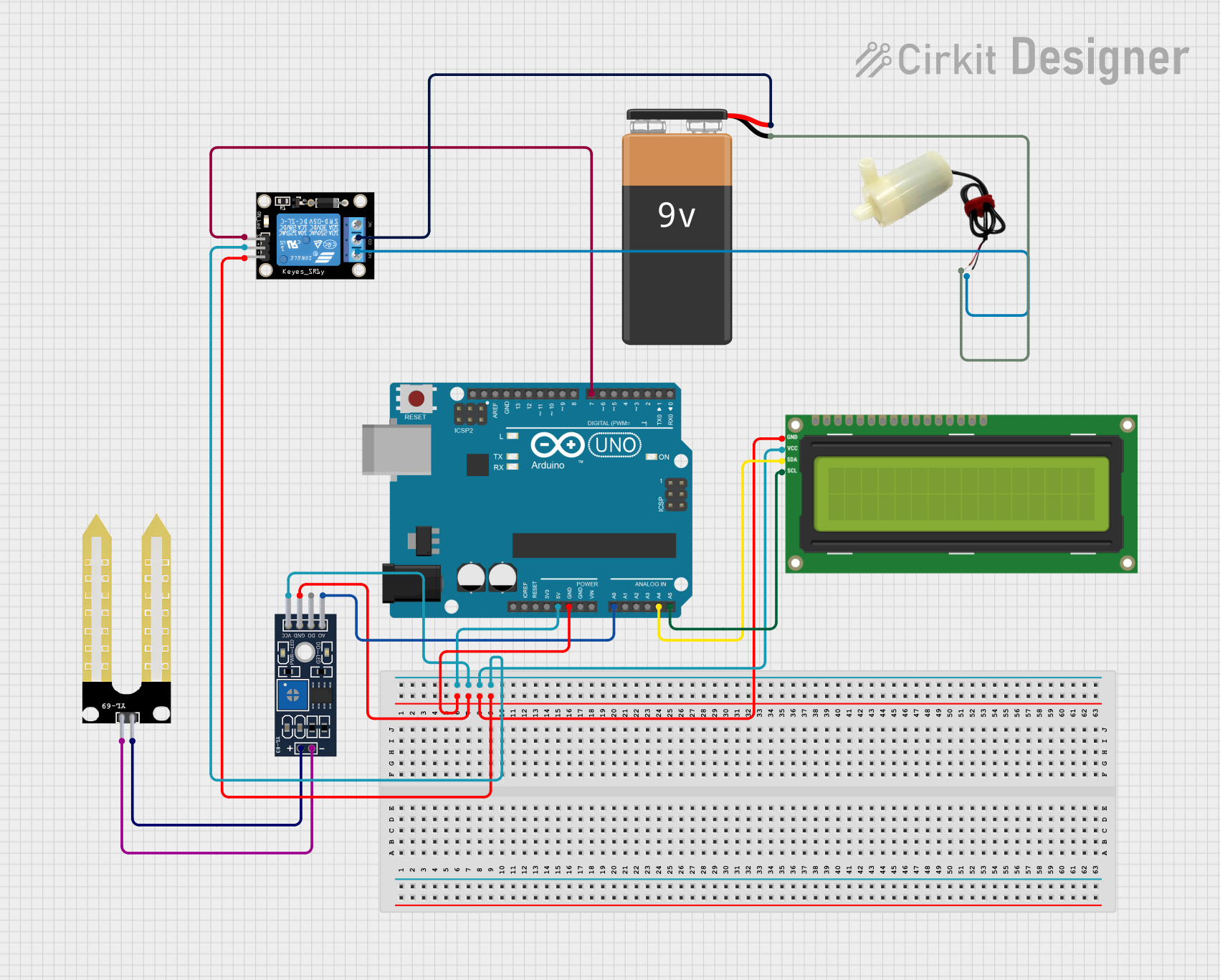
Circuit Documentation
Summary
This circuit is designed to monitor soil moisture levels using a YL-69 soil moisture sensor and control a 5V mini water pump via a KY-019 relay module based on the moisture data. The Arduino UNO serves as the central processing unit, reading the sensor data, driving the relay, and displaying information on an I2C LCD 16x2 screen. The system is powered by a 9V battery, and the relay module interfaces with the water pump to turn it on or off depending on the soil's moisture content.
Component List
Arduino UNO
- Microcontroller board based on the ATmega328P
- Provides I/O pins for interfacing with various components
- Powers the circuit and processes sensor data
KY-019 Relay Module 1 Channel
- A single-channel relay module for controlling high power devices
- Acts as an electrically operated switch to control the water pump
YL-69 Soil Moisture Sensor (Sonda)
- Detects the moisture level in the soil
- Provides analog output that can be read by the Arduino
YL-83 Module LM393
- A comparator module that interfaces with the YL-69 sensor
- Outputs digital and analog signals based on moisture levels
I2C LCD 16x2 Screen
- An alphanumeric LCD display with I2C communication
- Displays the status of the soil moisture and water pump
9V Battery
- Provides power to the circuit
5V Mini Water Pump
- Pumps water when activated by the relay module
- Operates at 5V, suitable for small-scale irrigation
Wiring Details
Arduino UNO
- GND connected to the ground pins of YL-83 Module LM393, I2C LCD Screen, and KY-019 Relay Module
- 5V supplies power to the VCC pins of YL-83 Module LM393, I2C LCD Screen, and KY-019 Relay Module
- A0 reads the analog output from YL-83 Module LM393
- A4 (SDA) and A5 (SCL) are connected to the SDA and SCL pins of the I2C LCD Screen for communication
- D7 controls the signal pin of the KY-019 Relay Module
KY-019 Relay Module 1 Channel
- GND connected to the ground of the Arduino UNO
- 5V receives power from the Arduino UNO
- S receives control signal from Arduino UNO pin D7
- COM connected to the positive terminal of the 9V Battery
- NO normally open contact connected to the positive pin of the 5V mini water pump
YL-69 Soil Moisture Sensor (Sonda)
- + connected to the positive pin of YL-83 Module LM393
- - connected to the negative pin of YL-83 Module LM393
YL-83 Module LM393
- GND and VCC connected to the ground and 5V pins of Arduino UNO, respectively
- A0 connected to the Arduino UNO A0 pin
- + and - connected to the corresponding pins of the YL-69 Soil Moisture Sensor
I2C LCD 16x2 Screen
- GND and VCC (5V) connected to the ground and 5V pins of Arduino UNO, respectively
- SDA and SCL connected to the Arduino UNO A4 and A5 pins
9V Battery
- + connected to the COM pin of the KY-019 Relay Module
- - connected to the negative pin of the 5V mini water pump
5V Mini Water Pump
- Positive pin connected to the NO pin of the KY-019 Relay Module
- Negative pin connected to the negative terminal of the 9V Battery
Documented Code
#include <LiquidCrystal_I2C.h>

LiquidCrystal_I2C lcd(0x27,16,2);

int sensor_pin = A0;
int relay_pin = 7;

void setup() {
  Serial.begin(9600);
  lcd.begin(16,2);
  lcd.backlight();
  lcd.setBacklight(HIGH);

  pinMode(sensor_pin,INPUT);
  pinMode(relay_pin,OUTPUT);

}

void loop() {
  int sensor_data = analogRead(sensor_pin);
  Serial.print("Sensor_data: ");
  Serial.print(sensor_data);
  Serial.print("\t | ");

  if(sensor_data > 950){
    Serial.print("No Moisture, Soil is Dry");
    digitalWrite(relay_pin, HIGH);

    lcd.setCursor(0,0);
    lcd.print("Soil is Dry");
    lcd.setCursor(0,1);
    lcd.print("Motor On");
  }
  else if(sensor_data >= 400 && sensor_data <=950){
    Serial.print("There is Some Moisture, Soil is Stable");
    digitalWrite(relay_pin, LOW);

    lcd.setCursor(0,0);
    lcd.print("Soil is Stable");
    lcd.setCursor(0,1);
    lcd.print("Motor Off");
  }
  else if(sensor_data < 400){
    Serial.print("Soil is Wet");
    digitalWrite(relay_pin, LOW);

    lcd.setCursor(0,0);
    lcd.print("Soil is Wet");
    lcd.setCursor(0,1);
    lcd.print("Motor Off");
  }

  delay(100);

}
This code is designed to run on the Arduino UNO. It initializes the LCD screen and sets up the sensor and relay pins. In the main loop, it reads the moisture sensor data and prints it to the serial monitor. Depending on the moisture level, it updates the LCD display and controls the relay to turn the water pump on or off.