
Arduino UNO-Based Temperature and Humidity Monitor with DHT11 and I2C LCD
View and Edit Project In Cirkit Designer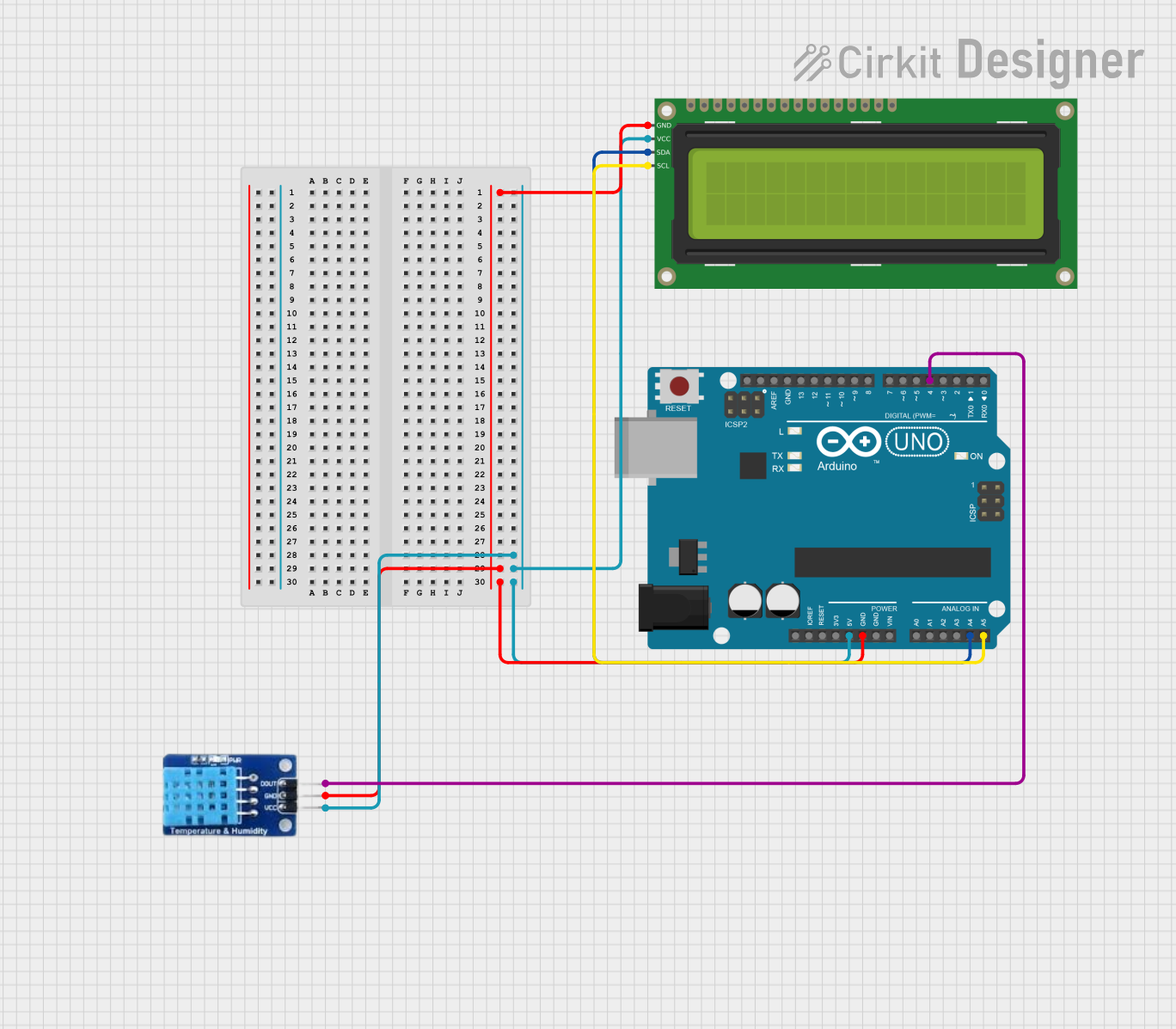
Circuit Documentation
Summary
This circuit is designed to measure temperature and humidity using a DHT11 sensor and display the readings on a 16x2 I2C LCD. The circuit is controlled by an Arduino UNO microcontroller, which reads data from the DHT11 sensor and updates the LCD display accordingly.
Component List
Arduino UNO
- Description: A microcontroller board based on the ATmega328P.
- Pins: UNUSED, IOREF, Reset, 3.3V, 5V, GND, Vin, A0, A1, A2, A3, A4, A5, SCL, SDA, AREF, D13, D12, D11, D10, D9, D8, D7, D6, D5, D4, D3, D2, D1, D0
DHT11
- Description: A basic, low-cost digital temperature and humidity sensor.
- Pins: DATA, GND, VCC
16x2 I2C LCD
- Description: A 16x2 character LCD display with I2C interface.
- Pins: GND, VCC, SDA, SCL
Wiring Details
Arduino UNO
- 5V: Connected to VCC of DHT11 and 16x2 I2C LCD
- GND: Connected to GND of DHT11 and 16x2 I2C LCD
- A4: Connected to SDA of 16x2 I2C LCD
- A5: Connected to SCL of 16x2 I2C LCD
- D4: Connected to DATA of DHT11
DHT11
- VCC: Connected to 5V of Arduino UNO
- GND: Connected to GND of Arduino UNO
- DATA: Connected to D4 of Arduino UNO
16x2 I2C LCD
- VCC: Connected to 5V of Arduino UNO
- GND: Connected to GND of Arduino UNO
- SDA: Connected to A4 of Arduino UNO
- SCL: Connected to A5 of Arduino UNO
Code Documentation
// by Druhi Chakraborty
#include "DHT.h"

#define DHTPIN 4 // you can use
#define DHTTYPE DHT11 // #define DHTTYPE DHT21
                      // #define DHTTYPE DHT22

DHT dht(DHTPIN, DHTTYPE); // you can also use pins 3, 4, 5, 12, 13 or 14
                          // Pin 15 can work but DHT must be disconnected during program upload

#include <LiquidCrystal_I2C.h>
LiquidCrystal_I2C lcd(0x27, 16, 2);

void setup() {
  dht.begin(); // initialize the sensor
  lcd.backlight(); // turn on lcd backlight
  lcd.init(); // initialize lcd
}

void loop() {
  lcd.clear();
  lcd.setCursor(0, 0); // set the cursor on the first row and column
  lcd.print("Humidity=");
  lcd.print((float)dht.readHumidity()); // print the humidity
  lcd.print("%");
  lcd.setCursor(0, 1); // set the cursor on the second row and first column
  lcd.print("Temp=");
  lcd.print((float)dht.readTemperature()); // print the temperature
  lcd.print("Celsius");
  delay(2000);
  lcd.clear();
}
This code initializes the DHT11 sensor and the 16x2 I2C LCD. In the setup function, the sensor and LCD are initialized. In the loop function, the humidity and temperature readings are obtained from the DHT11 sensor and displayed on the LCD. The display is updated every 2 seconds.