
Arduino Nano Controlled Joystick Interface with Audio Playback
View and Edit Project In Cirkit Designer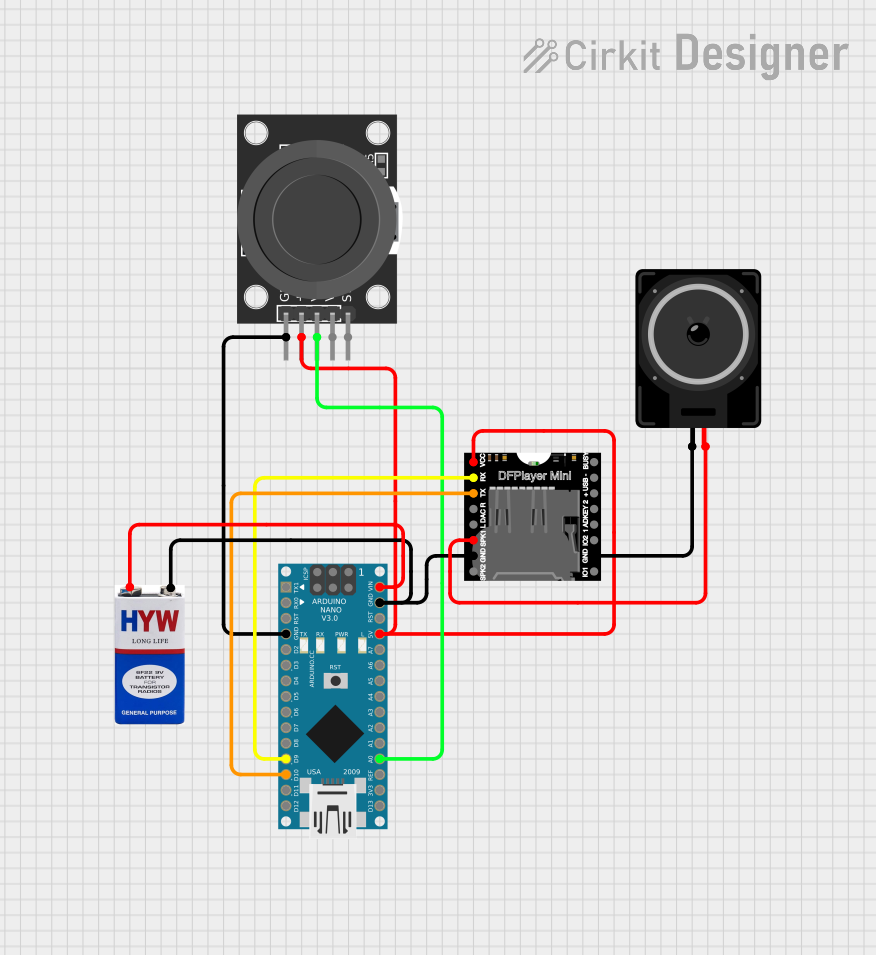
Circuit Documentation
Summary
This circuit integrates an Arduino Nano microcontroller with a KY-023 Dual Axis Joystick Module, a DFPlayer MINI MP3 player module, a loudspeaker, and a 9V battery. The Arduino Nano serves as the central processing unit, interfacing with the joystick for input and controlling the DFPlayer MINI for audio output. The DFPlayer MINI drives the loudspeaker to produce sound. The 9V battery provides power to the circuit.
Component List
Arduino Nano
- Microcontroller board based on the ATmega328P
- It has a variety of digital and analog I/O pins
- Can be powered via the USB connection or with an external power supply
KY-023 Dual Axis Joystick Module
- A module that provides a two-axis thumb joystick
- It has an integrated push-button switch
- Outputs analog signals corresponding to the X and Y positions of the joystick
DFPlayer MINI
- A small and low-cost MP3 module with a simplified output directly to the speaker
- Supports a micro SD card for storing audio files
- Can be controlled by the Arduino Nano via serial communication
Loudspeaker
- An electroacoustic transducer that converts an electrical audio signal into a corresponding sound
- Typically requires an amplifier; in this case, the DFPlayer MINI provides the necessary drive capability
9V Battery
- Provides the power supply for the circuit
- Commonly used in portable electronics
Wiring Details
Arduino Nano
- VIN connected to the positive terminal of the 9V battery
- GND connected to the negative terminal of the 9V battery, the GND of the KY-023 Joystick Module, and the GND of the DFPlayer MINI
- D9 connected to the RX of the DFPlayer MINI
- D10 connected to the TX of the DFPlayer MINI
- 5V output providing power to the DFPlayer MINI and the KY-023 Joystick Module
- A0 connected to the VRx of the KY-023 Joystick Module
KY-023 Dual Axis Joystick Module
- GND connected to the GND of the Arduino Nano
- +5V connected to the 5V of the Arduino Nano
- VRx connected to the A0 of the Arduino Nano
DFPlayer MINI
- VCC connected to the 5V of the Arduino Nano
- GND connected to the GND of the Arduino Nano and one pin of the Loudspeaker
- RX connected to the D9 of the Arduino Nano
- TX connected to the D10 of the Arduino Nano
- SPK1 connected to one pin of the Loudspeaker
Loudspeaker
- One pin connected to the SPK1 of the DFPlayer MINI
- The other pin connected to the GND of the DFPlayer MINI
9V Battery
- Positive terminal connected to the VIN of the Arduino Nano
- Negative terminal connected to the GND of the Arduino Nano
Documented Code
Arduino Nano Code (sketch.ino)
void setup() {
  // put your setup code here, to run once:

}

void loop() {
  // put your main code here, to run repeatedly:

}
Note: The provided code is a template and does not contain any functional code. It needs to be populated with the setup and loop functions to control the DFPlayer MINI and read the joystick inputs.