
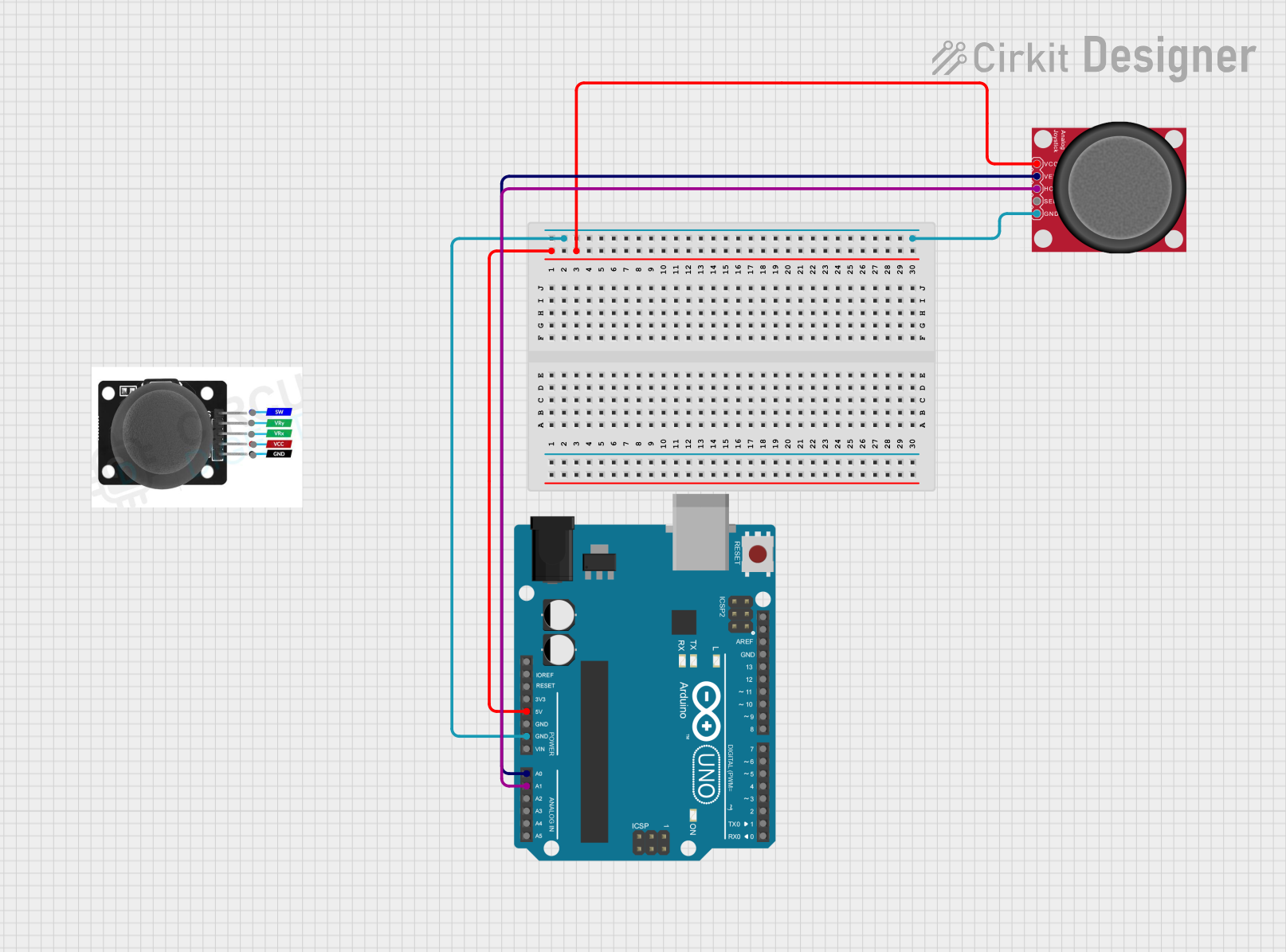
Circuit Documentation
Summary of the Circuit
This circuit consists of an Arduino UNO microcontroller board interfaced with an Analog Joystick (Wokwi Compatible). The joystick provides two-dimensional input to the Arduino, which reads the analog values corresponding to the X (horizontal) and Y (vertical) axes of the joystick. The Arduino is programmed to read these values and output them to the Serial Monitor. This setup can be used for various control applications, such as robotics or game controllers.
Component List
Arduino UNO
- Description: A microcontroller board based on the ATmega328P.
- Purpose: Acts as the central processing unit of the circuit, reading joystick inputs and sending data to the Serial Monitor.
- Pins: UNUSED, IOREF, Reset, 3.3V, 5V, GND, Vin, A0-A5, SCL, SDA, AREF, D0-D13.
Joystick Module
- Description: A module that provides analog input based on the position of the joystick.
- Purpose: To provide a two-dimensional input to the Arduino.
- Pins: SW, VRY, VRX, VCC, GND.
Analog Joystick (Wokwi Compatible)
- Description: A joystick that provides analog signals corresponding to the X and Y positions.
- Purpose: To capture user input in the form of analog signals.
- Pins: VCC, VERT, HORZ, SEL, GND.
Wiring Details
Arduino UNO
- 5V connected to Joystick VCC.
- GND connected to Joystick GND.
- A0 connected to Joystick VERT.
- A1 connected to Joystick HORZ.
Joystick Module
- VCC connected to Arduino 5V.
- GND connected to Arduino GND.
- VERT connected to Arduino A0.
- HORZ connected to Arduino A1.
- SEL not connected.
Documented Code
// Code for Arduino UNO to read joystick values and print to Serial Monitor

const int xPin = A0, yPin = A1; // Joystick pins connected to Arduino's analog pins
float xValue, yValue; // Variables to store joystick values

void setup() {
  pinMode(xPin, INPUT); // Set the joystick pins as input
  pinMode(yPin, INPUT);
  Serial.begin(9600); // Start serial communication at 9600 baud rate
}

void loop() {
  xValue = analogRead(xPin); // Read the horizontal joystick value
  yValue = analogRead(yPin); // Read the vertical joystick value

  // Print the joystick values to the Serial Monitor
  Serial.print("Value of x-axis: ");
  Serial.println(xValue);
  Serial.print("Value of y-axis: ");
  Serial.println(yValue);

  delay(100); // Wait for 100 milliseconds before reading the values again
}
Note: The code provided is for the Arduino UNO microcontroller. It initializes the serial communication, reads the analog values from the joystick, and prints them to the Serial Monitor. The delay(100) function call is used to limit the rate of data output to the Serial Monitor.