
Circuit Documentation
Summary
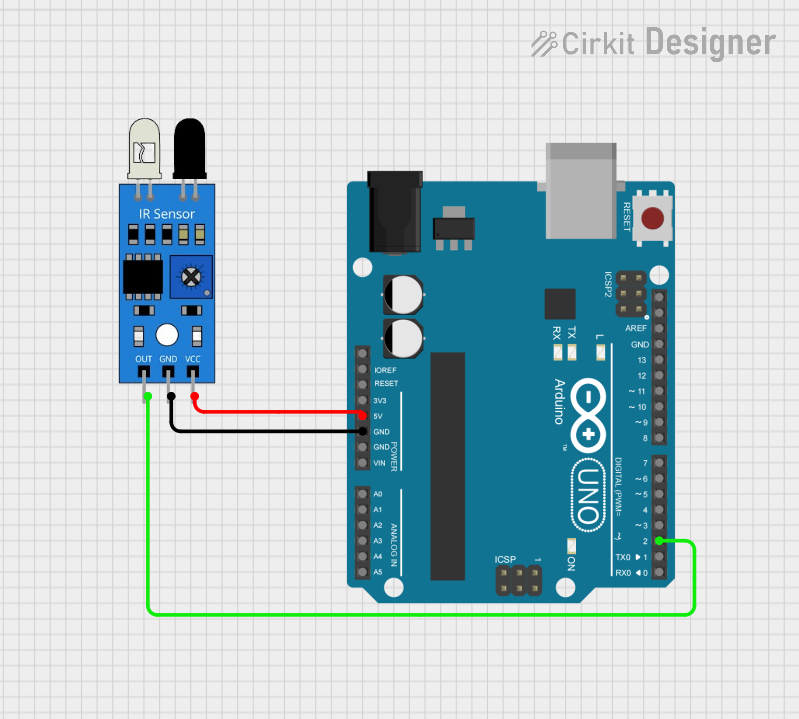
This document provides a detailed overview of a simple circuit involving an IR sensor and an Arduino UNO microcontroller. The IR sensor is used to detect infrared light, and the Arduino UNO processes the sensor's output. The circuit is powered by the Arduino UNO, which also handles the ground connection.
Component List
IR Sensor
- Component Name: IR Sensor
- Description: An infrared sensor used to detect infrared light.
- Pins:
out: Output signalgnd: Groundvcc: Power supply
Arduino UNO
- Component Name: Arduino UNO
- Description: A microcontroller board based on the ATmega328P.
- Pins:
UNUSEDIOREFReset3.3V5VGNDVinA0toA5SCLSDAAREFD0toD13
Wiring Details
IR Sensor
- Pin
outis connected to Arduino UNO PinD2. - Pin
gndis connected to Arduino UNO PinGND. - Pin
vccis connected to Arduino UNO Pin5V.
Arduino UNO
- Pin
D2is connected to IR Sensor Pinout. - Pin
GNDis connected to IR Sensor Pingnd. - Pin
5Vis connected to IR Sensor Pinvcc.
Documented Code
Arduino UNO Code
void setup() {
  // put your setup code here, to run once:

}

void loop() {
  // put your main code here, to run repeatedly:

}
This code is a basic template for the Arduino UNO. The setup function is where you initialize your settings, and the loop function is where the main code runs repeatedly.
This concludes the documentation for the circuit involving the IR sensor and Arduino UNO.