
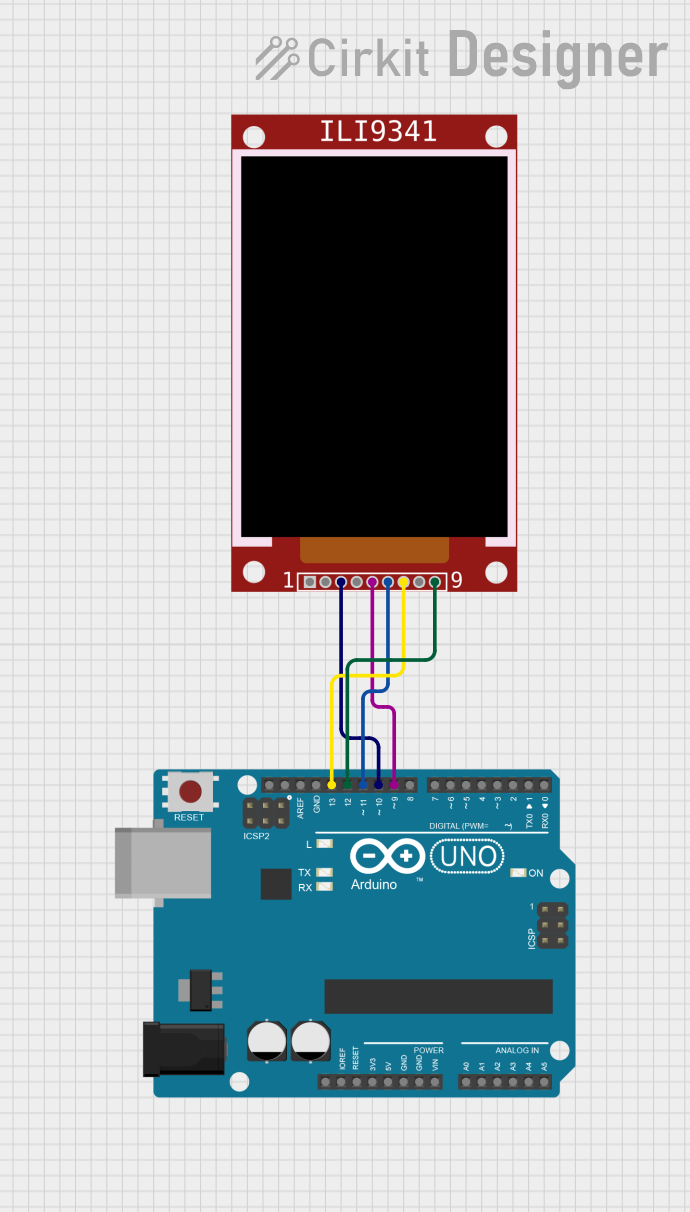
Circuit Documentation
Summary
This circuit involves an Arduino UNO microcontroller interfacing with an ILI9341 TFT display. The Arduino UNO communicates with the ILI9341 display using the SPI protocol. The provided code initializes the display and runs a series of graphical tests to demonstrate its capabilities.
Component List
ILI9341
- Description: TFT LCD display module
- Pins: VCC, GND, CS, RST, D/C, MOSI, SCK, LED, MISO
- Purpose: Display graphical information
Arduino UNO
- Description: Microcontroller board based on the ATmega328P
- Pins: UNUSED, IOREF, Reset, 3.3V, 5V, GND, Vin, A0, A1, A2, A3, A4, A5, SCL, SDA, AREF, D13, D12, D11, D10, D9, D8, D7, D6, D5, D4, D3, D2, D1, D0
- Purpose: Control and interface with the ILI9341 display
Wiring Details
ILI9341
- CS: Connected to Arduino UNO pin D10
- D/C: Connected to Arduino UNO pin D9
- MOSI: Connected to Arduino UNO pin D11
- SCK: Connected to Arduino UNO pin D13
- MISO: Connected to Arduino UNO pin D12
Arduino UNO
- D10: Connected to ILI9341 pin CS
- D9: Connected to ILI9341 pin D/C
- D11: Connected to ILI9341 pin MOSI
- D13: Connected to ILI9341 pin SCK
- D12: Connected to ILI9341 pin MISO
Code Documentation
Code Summary
The provided code initializes the ILI9341 display and runs a series of graphical tests. These tests include filling the screen with colors, drawing text, lines, rectangles, circles, triangles, and rounded rectangles. The code uses the Adafruit GFX and ILI9341 libraries to interface with the display.
Code Listing
/***************************************************
  This is our GFX example for the Adafruit ILI9341 Breakout and Shield
  ----> http://www.adafruit.com/products/1651

  Check out the links above for our tutorials and wiring diagrams
  These displays use SPI to communicate, 4 or 5 pins are required to
  interface (RST is optional)
  Adafruit invests time and resources providing this open source code,
  please support Adafruit and open-source hardware by purchasing
  products from Adafruit!

  Written by Limor Fried/Ladyada for Adafruit Industries.
  MIT license, all text above must be included in any redistribution
 ****************************************************/

#include "SPI.h"
#include "Adafruit_GFX.h"
#include "Adafruit_ILI9341.h"

// For the Adafruit shield, these are the default.
#define TFT_DC 9
#define TFT_CS 10

// Use hardware SPI (on Uno, #13, #12, #11) and the above for CS/DC
Adafruit_ILI9341 tft = Adafruit_ILI9341(TFT_CS, TFT_DC);
// If using the breakout, change pins as desired
//Adafruit_ILI9341 tft = Adafruit_ILI9341(TFT_CS, TFT_DC, TFT_MOSI, TFT_CLK, TFT_RST, TFT_MISO);

void setup() {
  Serial.begin(9600);
  Serial.println("ILI9341 Test!");

  tft.begin();

  // read diagnostics (optional but can help debug problems)
  uint8_t x = tft.readcommand8(ILI9341_RDMODE);
  Serial.print("Display Power Mode: 0x"); Serial.println(x, HEX);
  x = tft.readcommand8(ILI9341_RDMADCTL);
  Serial.print("MADCTL Mode: 0x"); Serial.println(x, HEX);
  x = tft.readcommand8(ILI9341_RDPIXFMT);
  Serial.print("Pixel Format: 0x"); Serial.println(x, HEX);
  x = tft.readcommand8(ILI9341_RDIMGFMT);
  Serial.print("Image Format: 0x"); Serial.println(x, HEX);
  x = tft.readcommand8(ILI9341_RDSELFDIAG);
  Serial.print("Self Diagnostic: 0x"); Serial.println(x, HEX);

  Serial.println(F("Benchmark                Time (microseconds)"));
  delay(10);
  Serial.print(F("Screen fill              "));
  Serial.println(testFillScreen());
  delay(500);

  Serial.print(F("Text                     "));
  Serial.println(testText());
  delay(3000);

  Serial.print(F("Lines                    "));
  Serial.println(testLines(ILI9341_CYAN));
  delay(500);

  Serial.print(F("Horiz/Vert Lines         "));
  Serial.println(testFastLines(ILI9341_RED, ILI9341_BLUE));
  delay(500);

  Serial.print(F("Rectangles (outline)     "));
  Serial.println(testRects(ILI9341_GREEN));
  delay(500);

  Serial.print(F("Rectangles (filled)      "));
  Serial.println(testFilledRects(ILI9341_YELLOW, ILI9341_MAGENTA));
  delay(500);

  Serial.print(F("Circles (filled)         "));
  Serial.println(testFilledCircles(10, ILI9341_MAGENTA));

  Serial.print(F("Circles (outline)        "));
  Serial.println(testCircles(10, ILI9341_WHITE));
  delay(500);

  Serial.print(F("Triangles (outline)      "));
  Serial.println(testTriangles());
  delay(500);

  Serial.print(F("Triangles (filled)       "));
  Serial.println(testFilledTriangles());
  delay(500);

  Serial.print(F("Rounded rects (outline)  "));
  Serial.println(testRoundRects());
  delay(500);

  Serial.print(F("Rounded rects (filled)   "));
  Serial.println(testFilledRoundRects());
  delay(500);

  Serial.println(F("Done!"));
}

void loop(void) {
  for(uint8_t rotation=0; rotation<4; rotation++) {
    tft.setRotation(rotation);
    testText();
    delay(1000);
  }
}

unsigned long testFillScreen() {
  unsigned long start = micros();

  yield();
  tft.fillScreen(ILI9341_RED);
  yield();
  tft.fillScreen(ILI9341_GREEN);
  yield();
  tft.fillScreen(ILI9341_BLUE);
  yield();
  tft.fillScreen(ILI9341_BLACK);
  yield();
  return micros() - start;
}

unsigned long testText() {
  tft.fillScreen(ILI9341_BLACK);
  unsigned long start = micros();
  tft.setCursor(0, 0);
  tft.setTextColor(ILI9341_WHITE);  tft.setTextSize(1);
  tft.println("Hello World!");
  tft.setTextColor(ILI9341_YELLOW); tft.setTextSize(2);
  tft.println(1234.56);
  tft.setTextColor(ILI9341_RED);    tft.setTextSize(3);
  tft.println(0xDEADBEEF, HEX);
  tft.println();
  tft.setTextColor(ILI9341_GREEN);
  tft.setTextSize(5);
  tft.println("Groop");
  tft.setTextSize(2);
  tft.println("I implore thee,");
  tft.setTextSize(1);
  tft.println("my foonting turlingdromes.");
  tft.println("And hooptiously drangle me");
  tft.println("with crinkly bindlewurdles,");
  tft.println("Or I will rend thee");
  tft.println("in the gobberwarts");
  tft.println("with my blurglecruncheon,");
  tft.println("see if I don't!");
  return micros() - start;
}

unsigned long testLines(uint16_t color) {
  unsigned long start, t;
  int           x1, y1, x2, y2,
                w = tft.width(),
                h = tft.height();

  tft.fillScreen(ILI9341_BLACK);
  yield();

  x1 = y1 = 0;
  y2    = h - 1;
  start = micros();
  for(x2=0; x2<w; x2+=6) tft.drawLine(x1, y1, x2, y2, color);
  x2    = w - 1;
  for(y2=0; y2<h; y2+=6) tft.drawLine(x1, y1, x2, y2, color);
  t     = micros() - start; // fillScreen doesn't count against timing

  yield();
  tft.fillScreen(ILI9341_BLACK);
  yield();

  x1    = w - 1;
  y1    = 0;
  y2    = h - 1;
  start = micros();
  for(x2=0; x2<w; x2+=6) tft.drawLine(x1, y1,