
ESP32-Based Smart Greenhouse Monitoring System with Wi-Fi Control
View and Edit Project In Cirkit Designer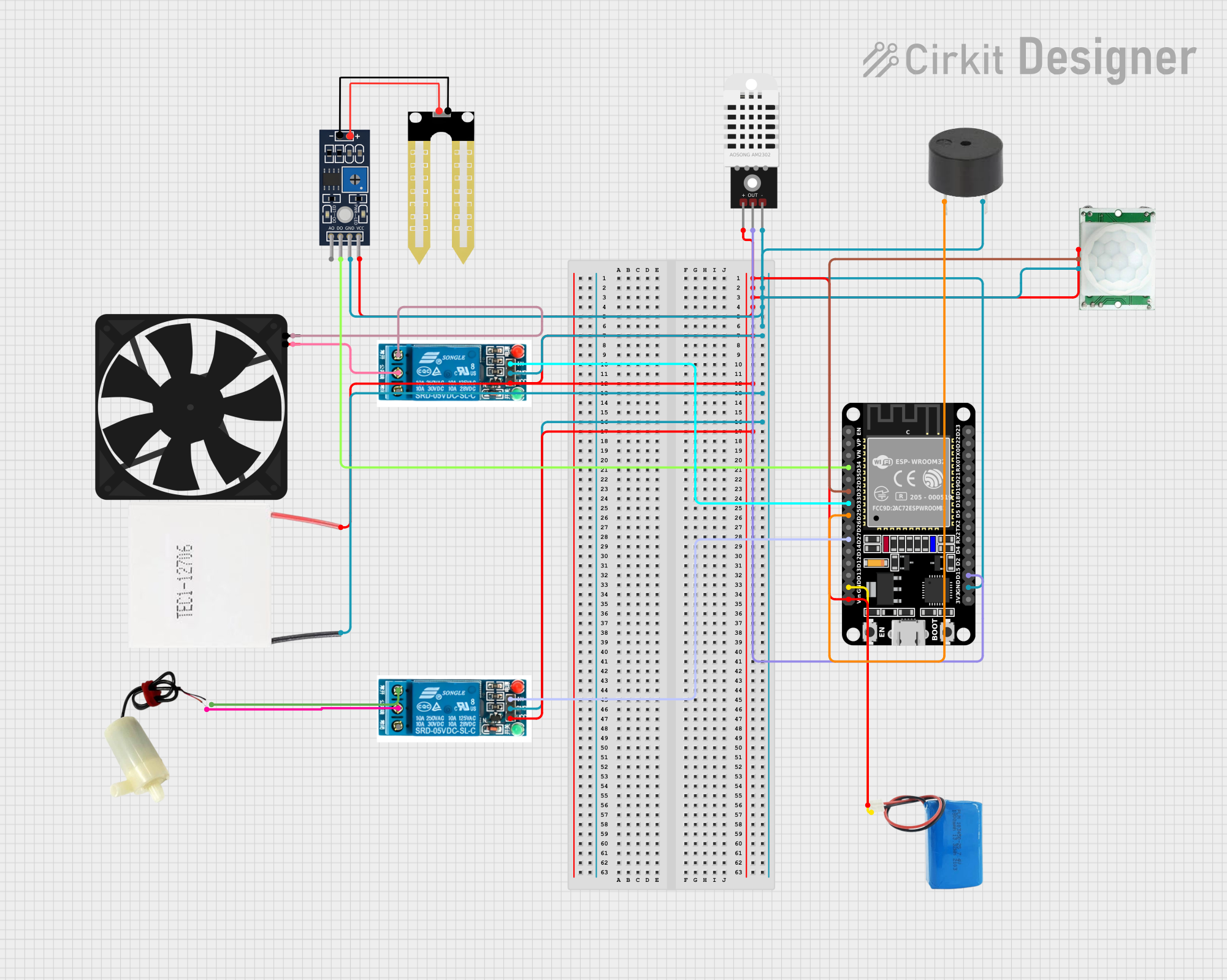
Smart Green House Monitoring System
Summary
The Smart Green House Monitoring System is designed to automate and monitor various environmental parameters within a greenhouse. The system uses an ESP32 microcontroller to read data from sensors, control actuators, and communicate with a cloud service for remote monitoring and control. The system includes sensors for humidity, temperature, and soil moisture, as well as actuators like a water pump, fan, and buzzer. The system is powered by a 5V battery and uses relays to control the actuators.
Component List
Humidity YL-69
- Pins: A0, D0, GND, VCC
- Description: Measures soil moisture levels.
- Purpose in Circuit: Provides soil moisture data to the ESP32.
5V Mini Water Pump
- Pins: Positive pin, Negative pin
- Description: Pumps water to the plants.
- Purpose in Circuit: Controlled by a relay to water the plants based on soil moisture levels.
Fan
- Pins: GND, 5V
- Description: Provides ventilation.
- Purpose in Circuit: Controlled by a relay to regulate temperature.
5V Battery
- Pins: Positive, Negative
- Description: Provides power to the circuit.
- Purpose in Circuit: Main power source for the system.
ESP32 (30 pin)
- Pins: EN, VP, VN, D34, D35, D32, D33, D25, D26, D27, D14, D12, D13, GND, Vin, D23, D22, TX0, RX0, D21, D19, D18, D5, TX2, RX2, D4, D2, D15, 3V3
- Description: Microcontroller.
- Purpose in Circuit: Central control unit for reading sensors, controlling actuators, and communicating with the cloud.
DHT22
- Pins: +, Out, -
- Description: Measures temperature and humidity.
- Purpose in Circuit: Provides temperature and humidity data to the ESP32.
PIR/Motion Sensor
- Pins: GND, OUTPUT, VCC
- Description: Detects motion.
- Purpose in Circuit: Provides motion detection data to the ESP32.
Peltier Module
- Pins: Negative, Positive
- Description: Provides heating or cooling.
- Purpose in Circuit: Controlled by the ESP32 for temperature regulation.
5V Relay
- Pins: Normally Open, Common terminal, Normally Closed, In, GND, VCC
- Description: Switches high-power devices.
- Purpose in Circuit: Controls the water pump and fan.
Buzzer
- Pins: PIN, GND
- Description: Provides audible alerts.
- Purpose in Circuit: Controlled by the ESP32 for notifications.
Wiring Details
Humidity YL-69
- VCC to 5V Battery Positive
- GND to ESP32 GND
- D0 to ESP32 D34
5V Mini Water Pump
- Positive pin to 5V Relay Common terminal
- Negative pin to 5V Relay Normally Open
Fan
- 5V to 5V Relay Common terminal
- GND to 5V Relay Normally Open
5V Battery
- Positive to ESP32 Vin
- Negative to ESP32 GND
ESP32 (30 pin)
- Vin to 5V Battery Positive
- GND to 5V Battery Negative
- D34 to Humidity YL-69 D0
- D32 to PIR/Motion Sensor OUTPUT
- D33 to 5V Relay In
- D25 to Buzzer PIN
- D27 to 5V Relay In
- D15 to DHT22 Out
DHT22
- + to 5V Battery Positive
- - to ESP32 GND
- Out to ESP32 D15
PIR/Motion Sensor
- VCC to 5V Battery Positive
- GND to ESP32 GND
- OUTPUT to ESP32 D32
Peltier Module
- Positive to 5V Battery Positive
- Negative to ESP32 GND
5V Relay
- VCC to 5V Battery Positive
- GND to ESP32 GND
- In to ESP32 D33
- Common terminal to 5V Mini Water Pump Positive pin
- Normally Open to 5V Mini Water Pump Negative pin
Buzzer
- PIN to ESP32 D25
- GND to ESP32 GND
Documented Code
#define BLYNK_TEMPLATE_ID "TMPL6o0woVv00"
#define BLYNK_TEMPLATE_NAME "Smart Green House Monitoring System"
#define BLYNK_AUTH_TOKEN "AToqA3zayEOBl25VyE-lmPJIqbo1qABA"

#include <DHT.h>                  // Include the DHT library
#include <BlynkSimpleEsp32.h>    // Include the Blynk library
#include <WiFi.h>                // Include the WiFi library
#include <FirebaseESP32.h>       // Include Firebase library

// Firebase credentials
#define FIREBASE_HOST "smartgreenhouseprojectgroup05-default-rtdb.asia-southeast1.firebasedatabase.app"
#define FIREBASE_AUTH "ekbPCRO9qRZ8GBJI72HzHPoVKRRaf4E9i4IGVwwp" // Use your actual database secret

// Your Wi-Fi credentials
const char* ssid = "Maleesha";       // Replace with your Wi-Fi SSID
const char* password = "03022001";  // Replace with your Wi-Fi password

#define DHTPIN 5                    // DHT11 sensor connected to pin D5
#define DHTTYPE DHT11               // DHT 11 type
#define SOIL_MOISTURE_PIN 35        // Soil moisture sensor connected to pin D35
#define RELAY_PIN 15                // Relay is connected to pin D15
#define FAN_PIN 32                  // Fan is connected to pin D32

DHT dht(DHTPIN, DHTTYPE);             // Create a DHT object

int soilMoistureValue = 0;
const int soilMoistureThreshold = 2500;  // Threshold for dry soil (adjust as needed)
String waterPumpState = "OFF";             // Variable to track water pump state
String fanState = "OFF";                   // Variable to track fan state
const float fanTemperatureThreshold = 27.0; // Fan activation temperature threshold

// Firebase and Blynk data
FirebaseData firebaseData; // Firebase object
FirebaseConfig config;     // Firebase configuration
FirebaseAuth auth;         // Firebase authentication object

void setup() {
    // Initialize the serial monitor for debugging
    Serial.begin(115200);

    // Set pin modes
    pinMode(SOIL_MOISTURE_PIN, INPUT);
    pinMode(RELAY_PIN, OUTPUT);
    pinMode(FAN_PIN, OUTPUT);

    // Initially turn off relay and fan
    digitalWrite(RELAY_PIN, HIGH);  // HIGH turns OFF the pump
    digitalWrite(FAN_PIN, HIGH);     // HIGH turns OFF the fan

    // Initialize DHT sensor
    dht.begin();

    // Initialize Blynk with Wi-Fi credentials
    Blynk.begin(BLYNK_AUTH_TOKEN, ssid, password);

    // Initialize Firebase
    config.host = FIREBASE_HOST;
    config.signer.tokens.legacy_token = FIREBASE_AUTH;

    Firebase.begin(&config, &auth);   // Initialize Firebase with config and auth
    Firebase.reconnectWiFi(true);     // Reconnect Wi-Fi if disconnected

    Serial.println("System Initialized - Water pump OFF, Fan OFF");
}

void loop() {
    // Read the soil moisture level
    soilMoistureValue = analogRead(SOIL_MOISTURE_PIN);
    Serial.print("Soil Moisture Value: ");
    Serial.println(soilMoistureValue);

    // Control the water pump based on soil moisture
    if (soilMoistureValue > soilMoistureThreshold) {
        digitalWrite(RELAY_PIN, LOW);  // Turn ON the pump
        waterPumpState = "ON";
        Serial.println("Soil is dry, turning water pump ON");
        Blynk.virtualWrite(V3, 255);   // Update virtual LED on V3
    } else {
        digitalWrite(RELAY_PIN, HIGH);  // Turn OFF the pump
        waterPumpState = "OFF";
        Serial.println("Soil is moist, turning water pump OFF");
        Blynk.virtualWrite(V3, 0);      // Update virtual LED on V3
    }

    // Read humidity and temperature from the DHT sensor
    float humidity = dht.readHumidity();
    float temperature = dht.readTemperature();

    // Check for valid readings
    if (isnan(humidity) || isnan(temperature)) {
        Serial.println("Failed to