
ESP32-Based Smart Garbage Monitoring System with Ultrasonic Sensor and Traffic Light Indicators
View and Edit Project In Cirkit Designer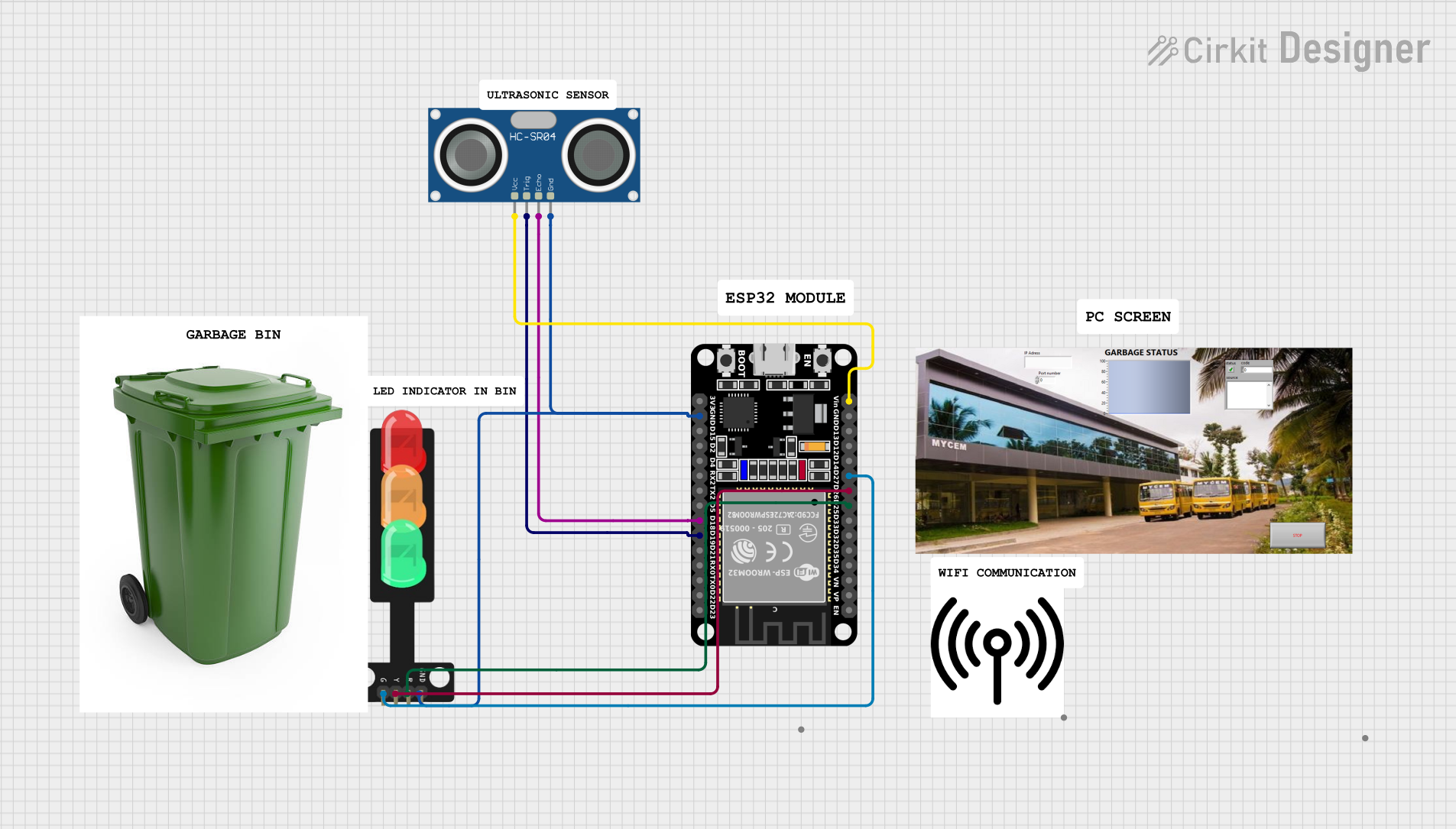
Circuit Documentation
Summary
This circuit is a Smart Garbage Maintaining System that uses an ESP32 microcontroller to monitor the fill level of a garbage bin using an HC-SR04 Ultrasonic Sensor. The system also includes a traffic light module to indicate the status of the bin and a buzzer for alerts. The data is sent to a Blynk application for remote monitoring.
Component List
ESP32 (30 pin)
- Description: A powerful microcontroller with built-in WiFi and Bluetooth capabilities.
- Pins: EN, VP, VN, D34, D35, D32, D33, D25, D26, D27, D14, D12, D13, GND, Vin, D23, D22, TX0, RX0, D21, D19, D18, D5, TX2, RX2, D4, D2, D15, 3V3
HC-SR04 Ultrasonic Sensor
- Description: A sensor used to measure distance by using ultrasonic waves.
- Pins: VCC, TRIG, ECHO, GND
Traffic Light
- Description: A module with three LEDs (Red, Yellow, Green) used to indicate different statuses.
- Pins: Green, Yellow, Red, GND
PC Screen
- Description: A screen used for displaying information.
- Pins: HDMI, 220V AC IN
GARBAGE BIN
- Description: A physical garbage bin used in the system.
- Pins: None
WIFI
- Description: Provides WiFi connectivity for the system.
- Pins: None
Comment
- Description: Used for adding comments in the circuit design.
- Pins: None
Wiring Details
ESP32 (30 pin)
- D25: Connected to Traffic Light (Red)
- D26: Connected to Traffic Light (Yellow)
- D27: Connected to Traffic Light (Green)
- Vin: Connected to HC-SR04 Ultrasonic Sensor (VCC)
- D19: Connected to HC-SR04 Ultrasonic Sensor (TRIG)
- D18: Connected to HC-SR04 Ultrasonic Sensor (ECHO)
- GND: Connected to HC-SR04 Ultrasonic Sensor (GND) and Traffic Light (GND)
HC-SR04 Ultrasonic Sensor
- VCC: Connected to ESP32 (Vin)
- TRIG: Connected to ESP32 (D19)
- ECHO: Connected to ESP32 (D18)
- GND: Connected to ESP32 (GND)
Traffic Light
- Red: Connected to ESP32 (D25)
- Yellow: Connected to ESP32 (D26)
- Green: Connected to ESP32 (D27)
- GND: Connected to ESP32 (GND)
Code Documentation
#define BLYNK_TEMPLATE_ID "TMPL3_mZ5JXni"
#define BLYNK_TEMPLATE_NAME "Smart Garbage Maintaining System"
#define BLYNK_AUTH_TOKEN "yrA62Lf3TT-rvYpnep6P5okcO-021lWy"
#define PIN_RED    25 // The ESP32 pin GPIO25 connected to R pin of traffic light module
#define PIN_YELLOW 26 // The ESP32 pin GPIO26 connected to Y pin of traffic light module
#define PIN_GREEN  27

#define RED_TIME     500 // RED time in millisecond
#define YELLOW_TIME  500 // YELLOW time in millisecond
#define GREEN_TIME   500 // GREEN time in millisecond

#include <LiquidCrystal_I2C.h>
#include <Wire.h>
#include <WiFi.h>
#include <WiFiClient.h>
#include <BlynkSimpleEsp32.h>
#include <NewPing.h>
#define TRIGGER_PIN  19  // Arduino pin tied to trigger pin on the ultrasonic sensor.
#define ECHO_PIN     18  // Arduino pin tied to echo pin on the ultrasonic sensor.
#define MAX_DISTANCE 200 // Maximum distance we want to ping for (in centimeters). Maximum sensor distance is rated at 400-500cm.
BlynkTimer timer; // Creating a timer object

char ssid[] = "Training Hall_EXT";
char pass[] = "IRDT#1982";

LiquidCrystal_I2C lcd(0x27, 20, 4);  // set the LCD address to 0x27 for a 16 chars and 2 line display
NewPing sonar(TRIGGER_PIN, ECHO_PIN, MAX_DISTANCE); // NewPing setup of pins and maximum distance.

const int buzzerPin = 23;
int bucketFilledUpto = 0;

void setup() {
  Serial.begin(115200); // Starts the serial communication

  lcd.init();
  lcd.backlight();
  show(0);
  pinMode(buzzerPin, OUTPUT);
  digitalWrite(buzzerPin, HIGH);
  timer.setInterval(1000L, myTimerEvent); //Staring a timer
  Blynk.begin(BLYNK_AUTH_TOKEN,ssid,pass);
  pinMode(PIN_RED, OUTPUT);
  pinMode(PIN_YELLOW, OUTPUT);
  pinMode(PIN_GREEN, OUTPUT);
}

void myTimerEvent() // This loop defines what happens when timer is triggered
{
  Blynk.virtualWrite(V0,bucketFilledUpto);
}

void loop() {
  delay(50);                     // Wait 50ms between pings (about 20 pings/sec). 29ms should be the shortest delay between pings.
  float distanceCm=sonar.ping_cm();

  Serial.print(bucketFilledUpto);
  Serial.print("Ping: ");
  Serial.print(distanceCm); // Send ping, get distance in cm and print result (0 = outside set distance range)
  Serial.println("cm");
  digitalWrite(PIN_RED, LOW);    // turn off
  digitalWrite(PIN_YELLOW, LOW); // turn off
  // digitalWrite(PIN_GREEN, HIGH); // turn on
  // delay(GREEN_TIME);
  bucketFilledUpto = ((18-distanceCm)*100)/18;
  show(bucketFilledUpto);
  if(distanceCm <= 5){
    digitalWrite(buzzerPin, LOW);
    digitalWrite(PIN_RED, HIGH);    // turn off
    digitalWrite(PIN_YELLOW, LOW); // turn off
    digitalWrite(PIN_GREEN, LOW); // turn on
    delay(500);
  } else {
    digitalWrite(buzzerPin, HIGH);
    digitalWrite(PIN_RED, LOW);    // turn off
    digitalWrite(PIN_YELLOW, LOW); // turn off
    digitalWrite(PIN_GREEN, HIGH); // turn on
    delay(500);
  }

  Blynk.run();
  timer.run();
}

void show(float d){
  lcd.setCursor(0,0);
  lcd.print("Name : Anand,Anshu");
  lcd.setCursor(0,1);
  lcd.print("Member: 3");
  lcd.setCursor(0,2);
  lcd.print("Project Name: GMS");
  lcd.setCursor(0,3);
  lcd.print("Status :");
  lcd.setCursor(10, 3);
  lcd.print(d);
  lcd.print("%");
}
This code initializes the ESP32, sets up the ultrasonic sensor, traffic light, and buzzer, and continuously monitors the fill level of the garbage bin. The status is displayed on an LCD and sent to a Blynk application for remote monitoring.