
Arduino UNO-Based LED Brightness Controller with Potentiometer
View and Edit Project In Cirkit Designer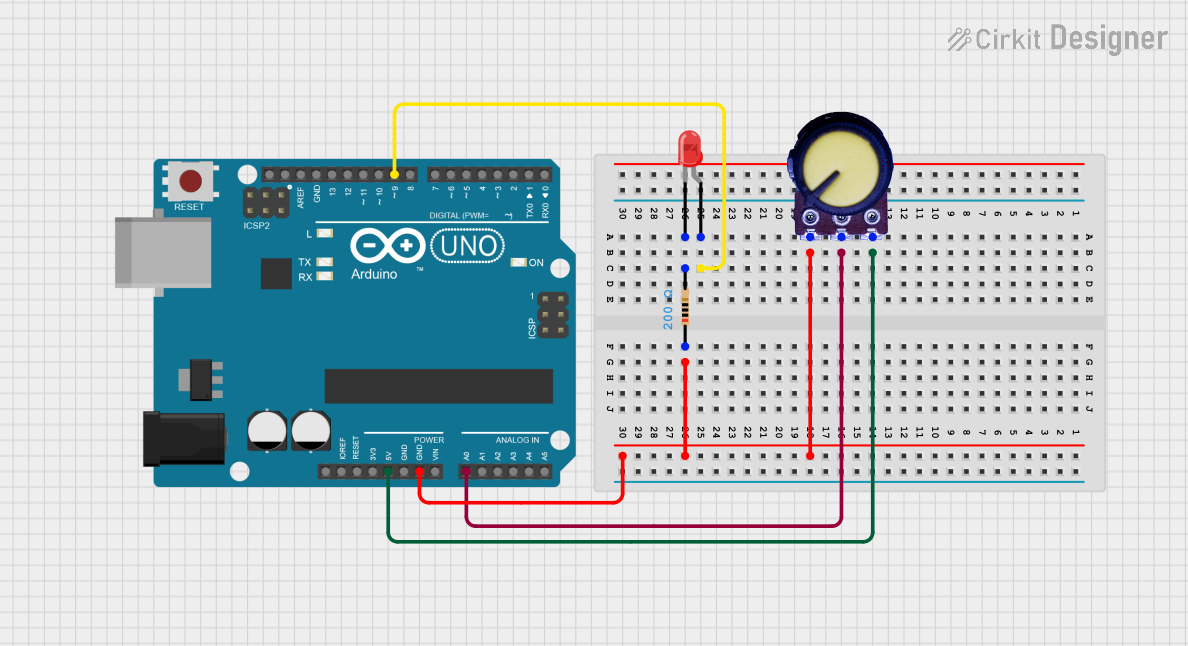
Circuit Documentation
Summary
This circuit consists of an Arduino UNO microcontroller, a red LED, a resistor, and a potentiometer. The Arduino UNO is used to control the LED and read the analog value from the potentiometer. The resistor is used to limit the current through the LED.
Component List
Arduino UNO
- Description: A microcontroller board based on the ATmega328P.
- Pins: UNUSED, IOREF, Reset, 3.3V, 5V, GND, Vin, A0, A1, A2, A3, A4, A5, SCL, SDA, AREF, D13, D12, D11, D10, D9, D8, D7, D6, D5, D4, D3, D2, D1, D0
- Purpose in Circuit: Acts as the main controller for the circuit, reading the potentiometer value and controlling the LED.
LED: Two Pin (red)
- Description: A red light-emitting diode.
- Pins: cathode, anode
- Purpose in Circuit: Provides visual feedback by lighting up when powered.
Resistor
- Description: A passive electrical component that limits the current flow.
- Pins: pin1, pin2
- Properties:
- Resistance: 200 Ohms
- Purpose in Circuit: Limits the current through the LED to prevent damage.
Potentiometer
- Description: A three-terminal resistor with an adjustable center connection.
- Pins: GND, Output, VCC
- Purpose in Circuit: Provides an adjustable voltage divider to the Arduino's analog input.
Wiring Details
Arduino UNO
- 5V: Connected to VCC of the Potentiometer.
- GND: Connected to GND of the Potentiometer and pin1 of the Resistor.
- A0: Connected to Output of the Potentiometer.
- D9: Connected to anode of the LED.
LED: Two Pin (red)
- anode: Connected to D9 of the Arduino UNO.
- cathode: Connected to pin2 of the Resistor.
Resistor
- pin1: Connected to GND of the Arduino UNO.
- pin2: Connected to cathode of the LED.
Potentiometer
- VCC: Connected to 5V of the Arduino UNO.
- GND: Connected to GND of the Arduino UNO.
- Output: Connected to A0 of the Arduino UNO.
Code Documentation
Arduino UNO Code
sketch.ino
void setup() {
  // put your setup code here, to run once:

}

void loop() {
  // put your main code here, to run repeatedly:

}
documentation.txt
This document provides a comprehensive overview of the circuit, including a summary, detailed component descriptions, wiring details, and the code used in the Arduino UNO.