
Arduino UNO-Based Secure Access Control System with Keypad and Solenoid Lock
View and Edit Project In Cirkit Designer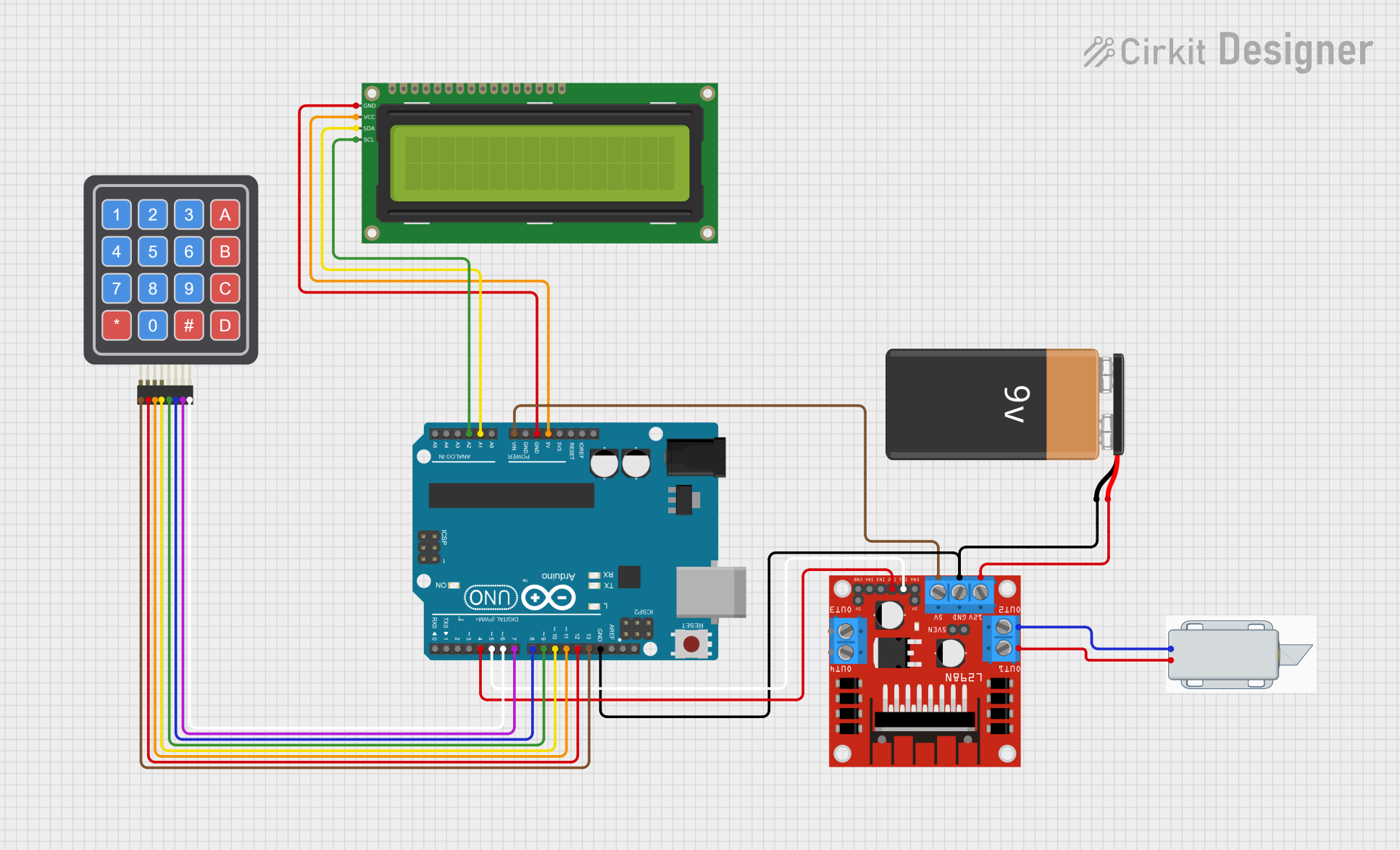
Circuit Documentation
Summary
This project involves an Arduino Uno interfacing with a 4x4 Keypad, a 16x2 I2C LCD, and a 12V Solenoid Lock via an L298N motor driver. The system is designed to enhance security features for residential door locks by allowing secure access control using a keypad input.
Component List
12V Solenoid Lock
- Description: An electromechanical lock that operates on 12V.
- Pins:
-,+ - Purpose: Used to lock and unlock the door.
9V Battery
- Description: A power source providing 9V.
- Pins:
-,+ - Purpose: Supplies power to the circuit.
4x4 Keypad (Simulator)
- Description: A matrix keypad with 4 rows and 4 columns.
- Pins:
R1,C4,R2,C2,R3,R4,C1,C3 - Purpose: Used for user input to enter the password.
16x2 I2C LCD
- Description: A 16x2 character LCD with I2C interface.
- Pins:
GND,VCC,SDA,SCL - Purpose: Displays messages to the user.
L298N DC Motor Driver
- Description: A dual H-bridge motor driver.
- Pins:
OUT1,OUT2,12V,GND,5V,OUT3,OUT4,5V-ENA-JMP-I,5V-ENA-JMP-O,+5V-J1,+5V-J2,ENA,IN1,IN2,IN3,IN4,ENB - Purpose: Controls the 12V Solenoid Lock.
Arduino UNO
- Description: A microcontroller board based on the ATmega328P.
- Pins:
UNUSED,IOREF,Reset,3.3V,5V,GND,Vin,A0,A1,A2,A3,A4,A5,SCL,SDA,AREF,D13,D12,D11,D10,D9,D8,D7,D6,D5,D4,D3,D2,D1,D0 - Purpose: Acts as the main controller for the circuit.
Wiring Details
12V Solenoid Lock
-connected toOUT2of L298N DC Motor Driver+connected toOUT1of L298N DC Motor Driver
9V Battery
-connected toGNDof L298N DC Motor Driver andGNDof Arduino UNO+connected to12Vof L298N DC Motor Driver
4x4 Keypad (Simulator)
R1connected toD13of Arduino UNOR2connected toD12of Arduino UNOR3connected toD11of Arduino UNOR4connected toD10of Arduino UNOC1connected toD9of Arduino UNOC2connected toD8of Arduino UNOC3connected toD7of Arduino UNOC4connected toD6of Arduino UNO
16x2 I2C LCD
GNDconnected toGNDof Arduino UNOVCCconnected to5Vof Arduino UNOSDAconnected toA1of Arduino UNOSCLconnected toA2of Arduino UNO
L298N DC Motor Driver
5Vconnected toVinof Arduino UNOGNDconnected toGNDof Arduino UNO and-of 9V BatteryIN1connected toD5of Arduino UNOIN2connected toD4of Arduino UNO
Documented Code
/*
 * Project: Assessing the Efficacy of Arduino Uno in Enhancing Security Features
 *          for Residential Door Locks
 * Description: This Arduino sketch interfaces with a 4x4 Keypad, 16x2 I2C LCD,
 *              and a 12V Solenoid Lock via an L298N motor driver. The system
 *              allows for secure access control using a keypad input.
 */

#include <Wire.h>
#include <LiquidCrystal_I2C.h>
#include <Keypad.h>

// LCD setup
LiquidCrystal_I2C lcd(0x27, 16, 2);

// Keypad setup
const byte ROWS = 4; // Four rows
const byte COLS = 4; // Four columns
char keys[ROWS][COLS] = {
  {'1','2','3','A'},
  {'4','5','6','B'},
  {'7','8','9','C'},
  {'*','0','#','D'}
};
byte rowPins[ROWS] = {13, 12, 11, 10}; // Connect to the row pinouts of the keypad
byte colPins[COLS] = {9, 8, 7, 6}; // Connect to the column pinouts of the keypad
Keypad keypad = Keypad(makeKeymap(keys), rowPins, colPins, ROWS, COLS);

// L298N motor driver pins
const int solenoidPin1 = 5; // IN1
const int solenoidPin2 = 4; // IN2

// Password setup
String password = "1234";
String inputPassword = "";

void setup() {
  // Initialize LCD
  lcd.begin();
  lcd.backlight();
  lcd.setCursor(0, 0);
  lcd.print("Enter Password:");

  // Initialize solenoid pins
  pinMode(solenoidPin1, OUTPUT);
  pinMode(solenoidPin2, OUTPUT);
  digitalWrite(solenoidPin1, LOW);
  digitalWrite(solenoidPin2, LOW);
}

void loop() {
  char key = keypad.getKey();
  if (key) {
    lcd.setCursor(inputPassword.length(), 1);
    lcd.print('*');
    inputPassword += key;

    if (inputPassword.length() == password.length()) {
      if (inputPassword == password) {
        lcd.clear();
        lcd.setCursor(0, 0);
        lcd.print("Access Granted");
        unlockDoor();
      } else {
        lcd.clear();
        lcd.setCursor(0, 0);
        lcd.print("Access Denied");
        delay(2000);
        lcd.clear();
        lcd.setCursor(0, 0);
        lcd.print("Enter Password:");
      }
      inputPassword = "";
    }
  }
}

void unlockDoor() {
  digitalWrite(solenoidPin1, HIGH);
  digitalWrite(solenoidPin2, LOW);
  delay(5000); // Keep the door unlocked for 5 seconds
  digitalWrite(solenoidPin1, LOW);
  digitalWrite(solenoidPin2, LOW);
  lcd.clear();
  lcd.setCursor(0, 0);
  lcd.print("Enter Password:");
}
This code initializes the LCD and keypad, sets up the solenoid lock control pins, and implements a simple password-based access control system. When the correct password is entered, the solenoid lock is activated to unlock the door for 5 seconds.