
Arduino UNO-Based Dual IR Sensor Controlled Servo Motor System
View and Edit Project In Cirkit Designer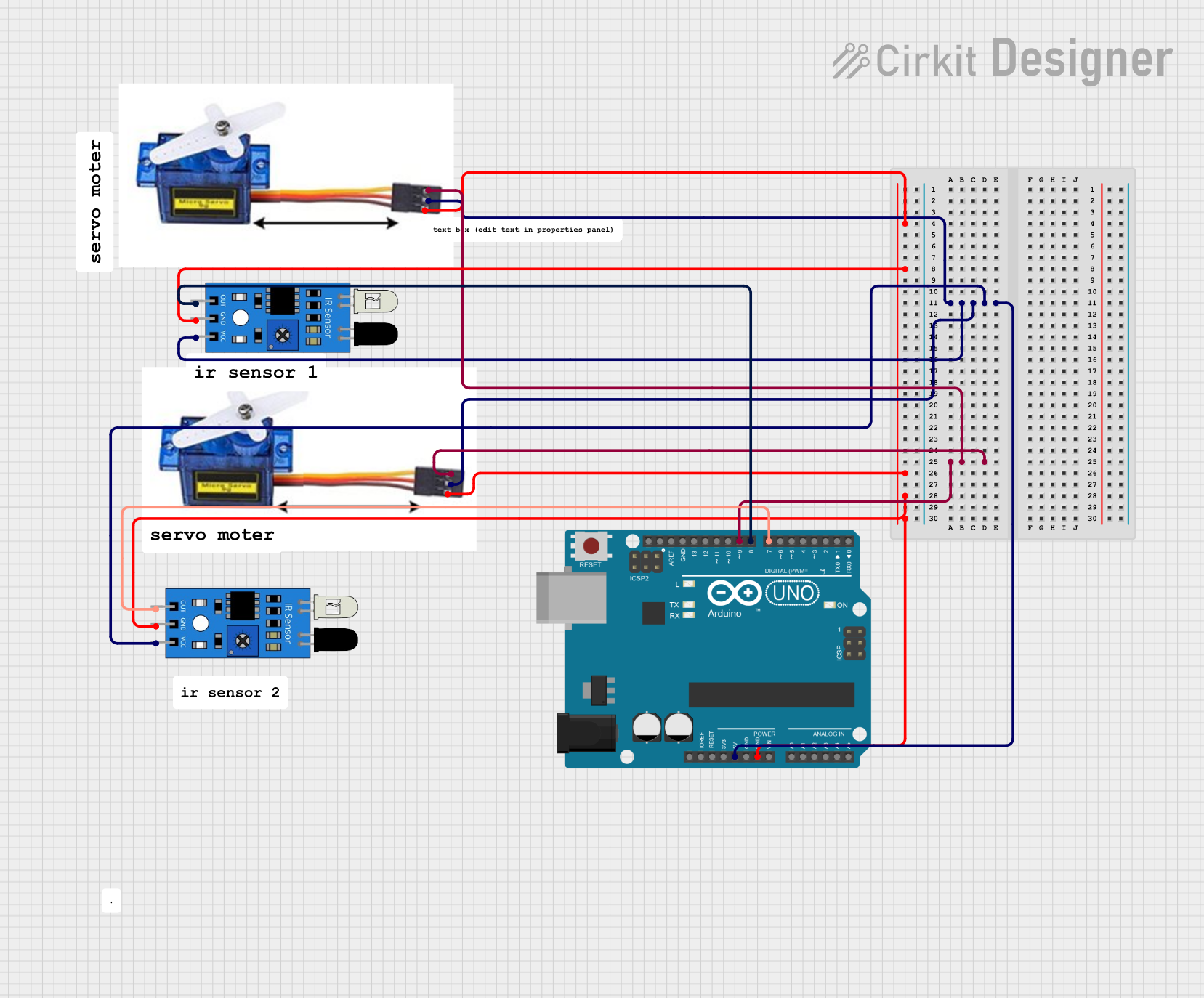
Circuit Documentation
Summary
This circuit utilizes an Arduino UNO microcontroller to control two servo motors based on input from two IR sensors. The IR sensors detect obstacles, and depending on which sensor is triggered, the servo motors will either open or close. The circuit is powered by the 5V supply from the Arduino UNO.
Component List
Arduino UNO
- Description: A microcontroller board based on the ATmega328P.
- Pins: UNUSED, IOREF, Reset, 3.3V, 5V, GND, Vin, A0, A1, A2, A3, A4, A5, SCL, SDA, AREF, D13, D12, D11, D10, D9, D8, D7, D6, D5, D4, D3, D2, D1, D0
Servo Motor 9G (x2)
- Description: A small servo motor used for precise control of angular position.
- Pins: VCC 5V, PMW, GND
IR Sensor (x2)
- Description: An infrared sensor used to detect obstacles.
- Pins: out, gnd, vcc
Wiring Details
Arduino UNO
- 5V: Connected to VCC 5V of both Servo Motors and vcc of both IR Sensors.
- GND: Connected to GND of both Servo Motors and gnd of both IR Sensors.
- D9: Connected to PMW of both Servo Motors.
- D8: Connected to out of the second IR Sensor.
- D7: Connected to out of the first IR Sensor.
Servo Motor 9G (1)
- VCC 5V: Connected to 5V of Arduino UNO.
- PMW: Connected to D9 of Arduino UNO.
- GND: Connected to GND of Arduino UNO.
Servo Motor 9G (2)
- VCC 5V: Connected to 5V of Arduino UNO.
- PMW: Connected to D9 of Arduino UNO.
- GND: Connected to GND of Arduino UNO.
IR Sensor (1)
- vcc: Connected to 5V of Arduino UNO.
- gnd: Connected to GND of Arduino UNO.
- out: Connected to D7 of Arduino UNO.
IR Sensor (2)
- vcc: Connected to 5V of Arduino UNO.
- gnd: Connected to GND of Arduino UNO.
- out: Connected to D8 of Arduino UNO.
Code Documentation
/*
 * This Arduino sketch controls a servo motor based on input from two IR sensors.
 * When the first IR sensor detects an obstacle, the servo motor closes.
 * When the second IR sensor detects an obstacle (distance under 10 cm),
 * the servo motor opens.
 */

#include <Servo.h>

// Define pin connections
const int irSensor1Pin = 7;
const int irSensor2Pin = 8;
const int servoPin = 9;

// Create servo object
Servo myServo;

void setup() {
  // Initialize serial communication
  Serial.begin(9600);

  // Attach the servo to the pin
  myServo.attach(servoPin);

  // Set IR sensor pins as input
  pinMode(irSensor1Pin, INPUT);
  pinMode(irSensor2Pin, INPUT);
}

void loop() {
  // Read IR sensor values
  int irSensor1State = digitalRead(irSensor1Pin);
  int irSensor2State = digitalRead(irSensor2Pin);

  // Check if the first IR sensor detects an obstacle
  if (irSensor1State == HIGH) {
    // Close the servo
    myServo.write(0); // Adjust angle as needed
    Serial.println("IR Sensor 1 detected obstacle: Closing servo");
  }
  // Check if the second IR sensor detects an obstacle
  else if (irSensor2State == HIGH) {
    // Open the servo
    myServo.write(90); // Adjust angle as needed
    Serial.println("IR Sensor 2 detected obstacle: Opening servo");
  }
  delay(100); // Small delay to debounce sensor readings
}
This code initializes the servo motor and IR sensors, reads the sensor values, and controls the servo motor based on the sensor inputs. When the first IR sensor detects an obstacle, the servo motor closes. When the second IR sensor detects an obstacle, the servo motor opens.