
Arduino UNO WiFi Weather Station with AHT10 Sensor and Rain/Wind Detection
View and Edit Project In Cirkit Designer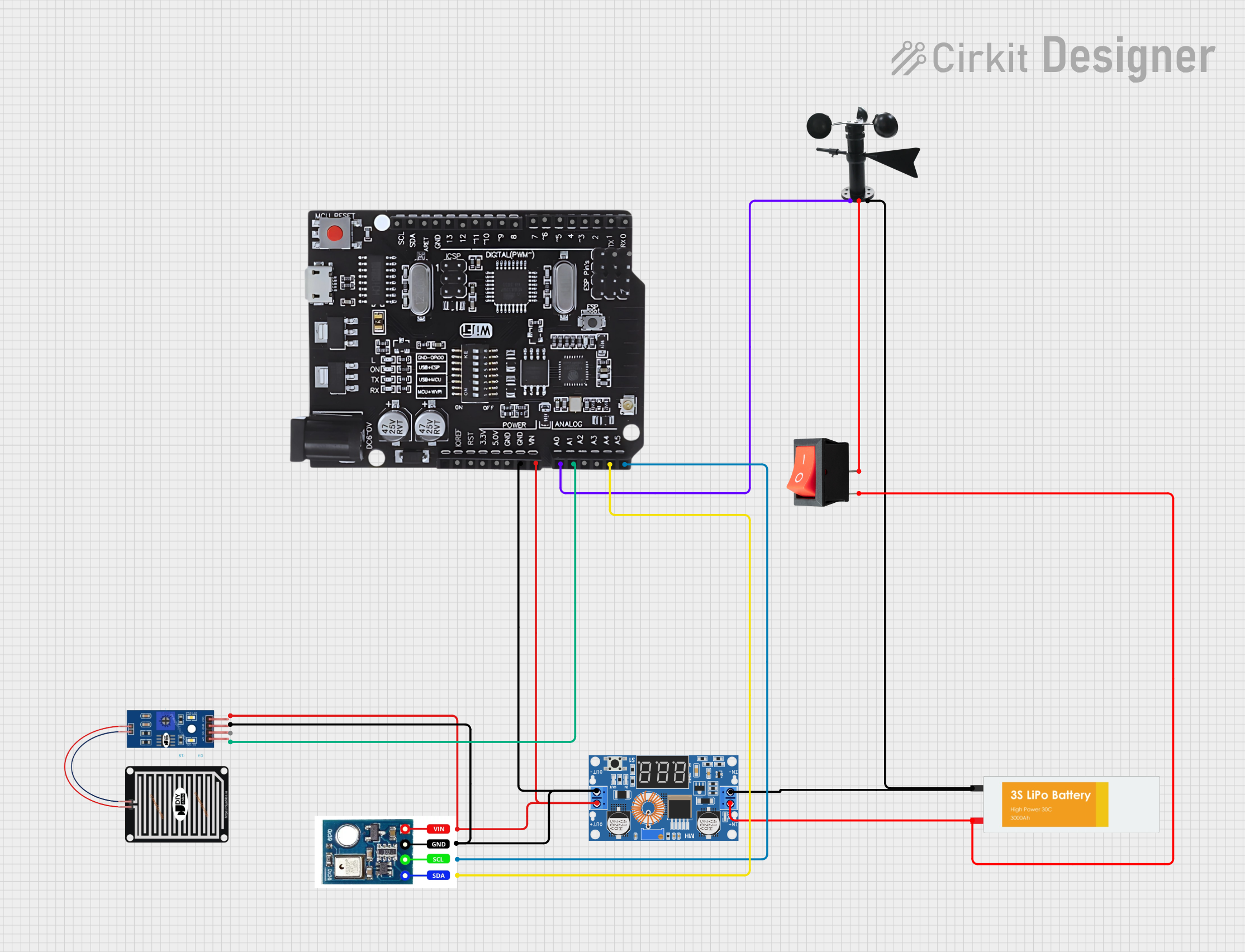
Circuit Documentation
Summary
This circuit is designed to measure environmental parameters such as temperature, humidity, rainfall, and wind speed. It utilizes an Arduino UNO with WiFi R3 ATmega328P+Node MCU ESP8266 as the central microcontroller to interface with various sensors including the AHT10 for temperature and humidity, a rain sensor for detecting rainfall, and a wind vane for measuring wind speed. The circuit is powered by a Lipo Battery, which is regulated by an XL4015 5A DC Buck Step-down module. A rocker switch is included to control the power supply to the circuit.
Component List
Arduino UNO+WiFi R3 ATmega328P+Node MCU ESP8266
- Microcontroller board with integrated WiFi capability.
- Provides analog and digital I/O pins for interfacing with sensors and other peripherals.
XL4015 5A DC Buck Step-down
- Voltage regulator module that steps down the input voltage to a lower output voltage.
- Used to regulate the power from the Lipo Battery to the required levels for the circuit.
Lipo Battery
- Rechargeable battery that provides power to the circuit.
- Typically has a high energy density and is lightweight.
RAIN SENSOR
- Sensor for detecting rainfall.
- Outputs an analog signal that varies with the amount of rainfall.
Wind Vane
- Sensor for measuring wind direction and speed.
- Outputs an analog signal that varies with the wind speed.
Rocker Switch
- Mechanical switch used to control the power supply to the circuit.
- Can be toggled on or off to enable or disable the flow of current.
AHT10
- Sensor for measuring temperature and humidity.
- Communicates with the microcontroller via I2C protocol.
Wiring Details
Arduino UNO+WiFi R3 ATmega328P+Node MCU ESP8266
- GND connected to the ground of the circuit.
- VIN connected to the positive voltage supply.
- A0 connected to the Wind Vane sensor.
- A1 connected to the Rain Sensor.
- A4 (SDA) connected to the SDA pin of the AHT10 sensor.
- A5 (SCL) connected to the SCL pin of the AHT10 sensor.
XL4015 5A DC Buck Step-down
- Output + connected to the VIN of the Arduino and Vcc of the sensors.
- Output - connected to the GND of the Arduino and ground of the sensors.
- Input + connected to the Lipo Battery through the rocker switch.
- Input - connected to the ground of the Lipo Battery.
Lipo Battery
- VCC connected to the input of the XL4015 module through the rocker switch.
- GND connected to the ground of the circuit.
RAIN SENSOR
- AO connected to A1 on the Arduino.
- VCC connected to the positive voltage supply.
- GRD connected to the ground of the circuit.
Wind Vane
- A0 connected to A0 on the Arduino.
- VCC connected to the positive voltage supply through the rocker switch.
- GND connected to the ground of the circuit.
Rocker Switch
- Input connected to the VCC of the Lipo Battery.
- Output connected to the input of the XL4015 module and VCC of the Wind Vane.
AHT10
- Vcc connected to the positive voltage supply.
- Gnd connected to the ground of the circuit.
- SCL connected to A5 (SCL) on the Arduino.
- SDA connected to A4 (SDA) on the Arduino.
Documented Code
/*
 * This Arduino Sketch measures temperature, humidity, rainfall, and windspeed
 * using various sensors connected to an Arduino UNO with WiFi R3 ATmega328P+Node MCU ESP8266.
 * The sensors used are AHT10 for temperature and humidity, a rain sensor for rainfall,
 * and a wind vane for windspeed.
 */

#include <Wire.h>
#include <Adafruit_AHTX0.h>

Adafruit_AHTX0 aht;

const int rainSensorPin = A1; // Rain sensor connected to A1
const int windVanePin = A0;  // Wind vane connected to A0

void setup() {
  Serial.begin(9600);
  if (!aht.begin()) {
    Serial.println("Could not find AHT10 sensor!");
    while (1) delay(10);
  }
  pinMode(rainSensorPin, INPUT);
  pinMode(windVanePin, INPUT);
}

void loop() {
  sensors_event_t humidity, temp;
  aht.getEvent(&humidity, &temp);

  int rainValue = analogRead(rainSensorPin);
  int windValue = analogRead(windVanePin);

  Serial.print("Temperature: ");
  Serial.print(temp.temperature);
  Serial.println(" degrees C");

  Serial.print("Humidity: ");
  Serial.print(humidity.relative_humidity);
  Serial.println("%");

  Serial.print("Rainfall: ");
  Serial.print(rainValue);
  Serial.println(" (analog value)");

  Serial.print("Windspeed: ");
  Serial.print(windValue);
  Serial.println(" (analog value)");

  delay(2000); // Wait for 2 seconds before next reading
}
This code initializes the AHT10 sensor and reads the analog values from the rain sensor and wind vane. It then prints the temperature, humidity, rainfall, and windspeed to the serial monitor every two seconds.