
Arduino UNO Controlled Gas Detection and Alert System with Dual Servo Actuation
View and Edit Project In Cirkit Designer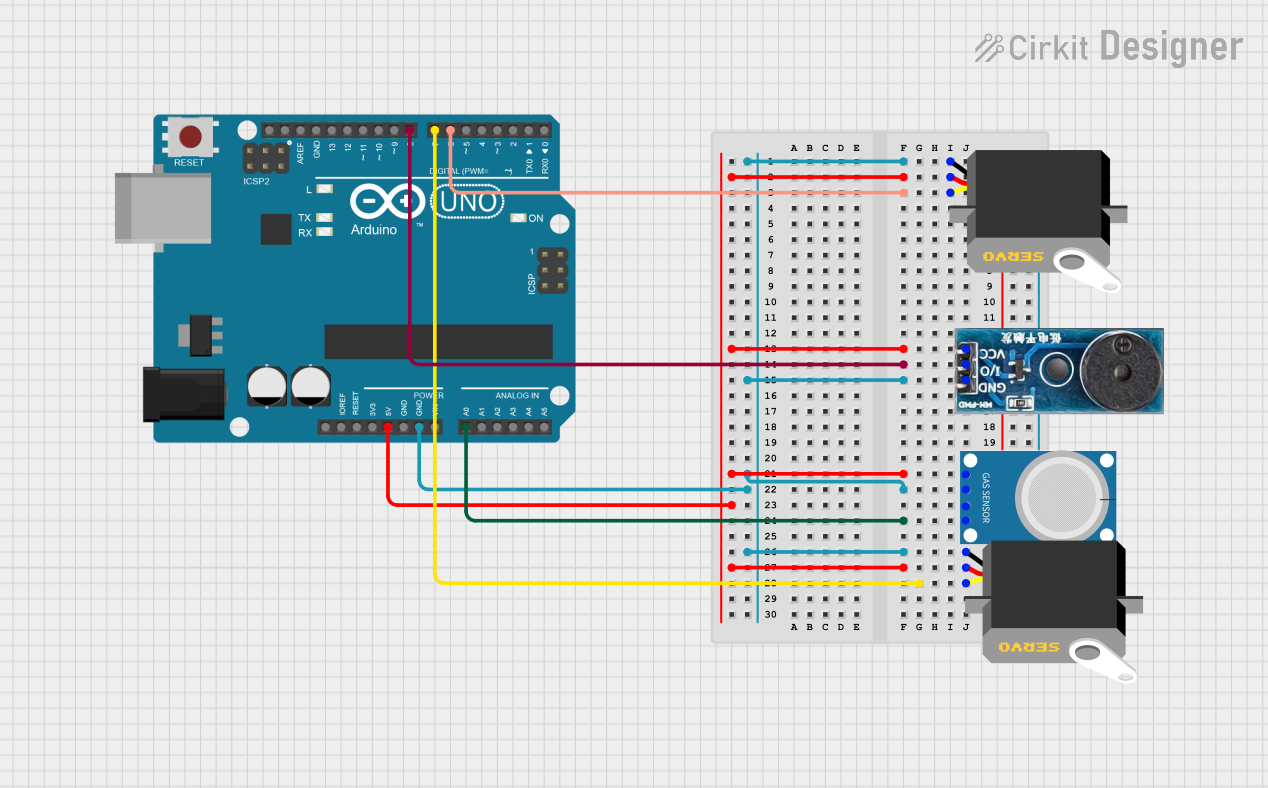
Circuit Documentation
Summary
The circuit in question is composed of an Arduino UNO microcontroller, a buzzer module, two servo motors, and an MQ-4 gas sensor. The Arduino UNO serves as the central processing unit, controlling the servos and reading data from the MQ-4 sensor, as well as driving the buzzer module. The servos are likely used for some form of mechanical actuation, the MQ-4 sensor for detecting methane or natural gas levels, and the buzzer for audible alerts or feedback.
Component List
Arduino UNO
- Description: A microcontroller board based on the ATmega328P.
- Pins: UNUSED, IOREF, Reset, 3.3V, 5V, GND, Vin, A0-A5, SCL, SDA, AREF, D0-D13.
Buzzer Module
- Description: An electronic buzzer for producing sound.
- Pins: GND, Vcc, I/O.
MQ-4 Gas Sensor
- Description: A gas sensor designed for detecting methane and natural gas concentrations in the air.
- Pins: A0, D0, GND, VCC.
Servo (2x)
- Description: A rotary actuator or linear actuator that allows for precise control of angular or linear position.
- Pins: gnd, vcc, pulse.
Wiring Details
Arduino UNO
- 5V connected to Vcc of Buzzer Module, VCC of MQ-4, and vcc of both Servos.
- GND connected to GND of Buzzer Module, GND of MQ-4, and gnd of both Servos.
- D6 connected to pulse of one Servo.
- D7 connected to pulse of the other Servo.
- D8 connected to I/O of Buzzer Module.
- A0 connected to A0 of MQ-4.
Buzzer Module
- Vcc connected to 5V of Arduino UNO.
- GND connected to GND of Arduino UNO.
- I/O connected to D8 of Arduino UNO.
MQ-4 Gas Sensor
- VCC connected to 5V of Arduino UNO.
- GND connected to GND of Arduino UNO.
- A0 connected to A0 of Arduino UNO.
Servo (1st instance)
- vcc connected to 5V of Arduino UNO.
- gnd connected to GND of Arduino UNO.
- pulse connected to D6 of Arduino UNO.
Servo (2nd instance)
- vcc connected to 5V of Arduino UNO.
- gnd connected to GND of Arduino UNO.
- pulse connected to D7 of Arduino UNO.
Documented Code
Arduino UNO Code (sketch.ino)
void setup() {
  // put your setup code here, to run once:

}

void loop() {
  // put your main code here, to run repeatedly:

}
Note: The provided code is a template and does not contain any functional code. It needs to be populated with instructions to control the buzzer, read the sensor data, and operate the servos based on the requirements of the project.