
Circuit Documentation
Summary of the Circuit
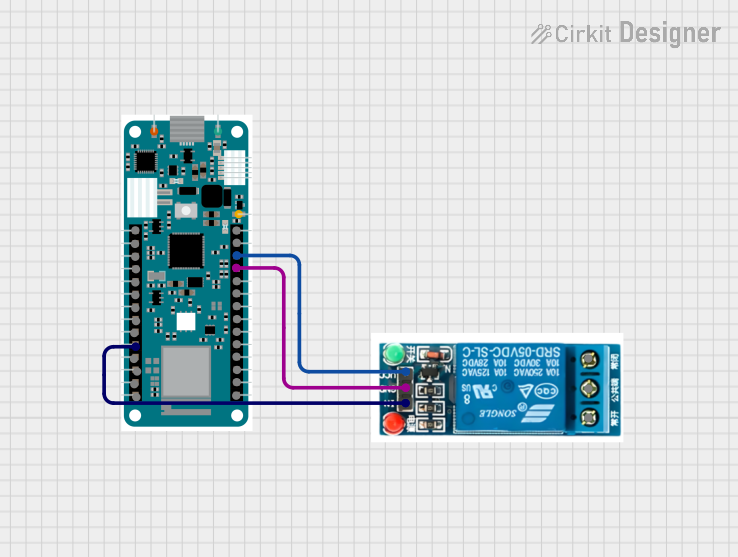
This circuit consists of an Arduino MKR WiFi 1010 microcontroller board interfaced with a 5V relay. The Arduino MKR WiFi 1010 is responsible for controlling the relay based on the data received from a LoRa communication module. The relay can switch a separate circuit on or off, which could be used for controlling power to an external device.
Component List
Arduino MKR WiFi 1010
- Description: A microcontroller board based on the ATSAMW25 SoC, which is part of the SmartConnect family of Microchip Wireless devices. It is designed for IoT projects and devices.
- Pins: A0, A1, A2, A3, A4, A5, A6, D0, D1, D2, D3, D4, D5, D6, D7, MOSI, SCK, MISO, SDA, SCL, RX, TX, RESET, GND, VCC, VIN, 5V
5V Relay
- Description: An electromechanical switch that allows a low-power circuit to switch a relatively high current or voltage on and off.
- Pins: Normally Open, Common terminal, Normally Closed, In, GND, VCC
Wiring Details
Arduino MKR WiFi 1010
- D2: Connected to the "In" pin of the 5V relay to control the relay operation.
- GND: Connected to the "GND" pin of the 5V relay to provide a common ground reference.
- VCC: Connected to the "VCC" pin of the 5V relay to supply power to the relay.
5V Relay
- In: Receives control signal from D2 pin of Arduino MKR WiFi 1010.
- GND: Connected to the GND pin of Arduino MKR WiFi 1010.
- VCC: Powered by the VCC pin of Arduino MKR WiFi 1010.
Documented Code
#include <SPI.h>
#include <LoRa.h>

String contents = "";
String buttonPress = "button pressed";
bool x;

int led = 2;

void setup() {
  pinMode(led, OUTPUT);
  Serial.begin(9600);
  while (!Serial);
  Serial.println("LoRa Receiver");

  if (!LoRa.begin(868E6)) {
    Serial.println("Starting LoRa failed!");
    while (1);
  }
}

void loop() {
  int packetSize = LoRa.parsePacket();
  if (packetSize) {
    Serial.print("Received packet '");

    while (LoRa.available()) {
      contents += (char)LoRa.read();
    }

    Serial.println(contents);
    Serial.print("' with RSSI ");
    Serial.println(LoRa.packetRssi());

    if(contents.equals(buttonPress)){
      x = !x;
    }

    if(x == true) {
      digitalWrite(led, HIGH);
      Serial.println("led on");
    }
    else {
      digitalWrite(led, LOW);
      Serial.println("led off");
    }

    contents = "";
  }
}
Filename: sketch.ino
Description: This code is designed to run on the Arduino MKR WiFi 1010. It initializes a LoRa communication module and waits for incoming packets. When a packet is received, it checks if the packet content matches a predefined string "button pressed". If it does, it toggles the state of an LED connected to pin D2, which also controls the relay state. The code also prints the received message and the RSSI (Received Signal Strength Indicator) to the serial monitor.