
Arduino Nano-Based Air Quality Monitor with LCD Display and Fan Control
View and Edit Project In Cirkit Designer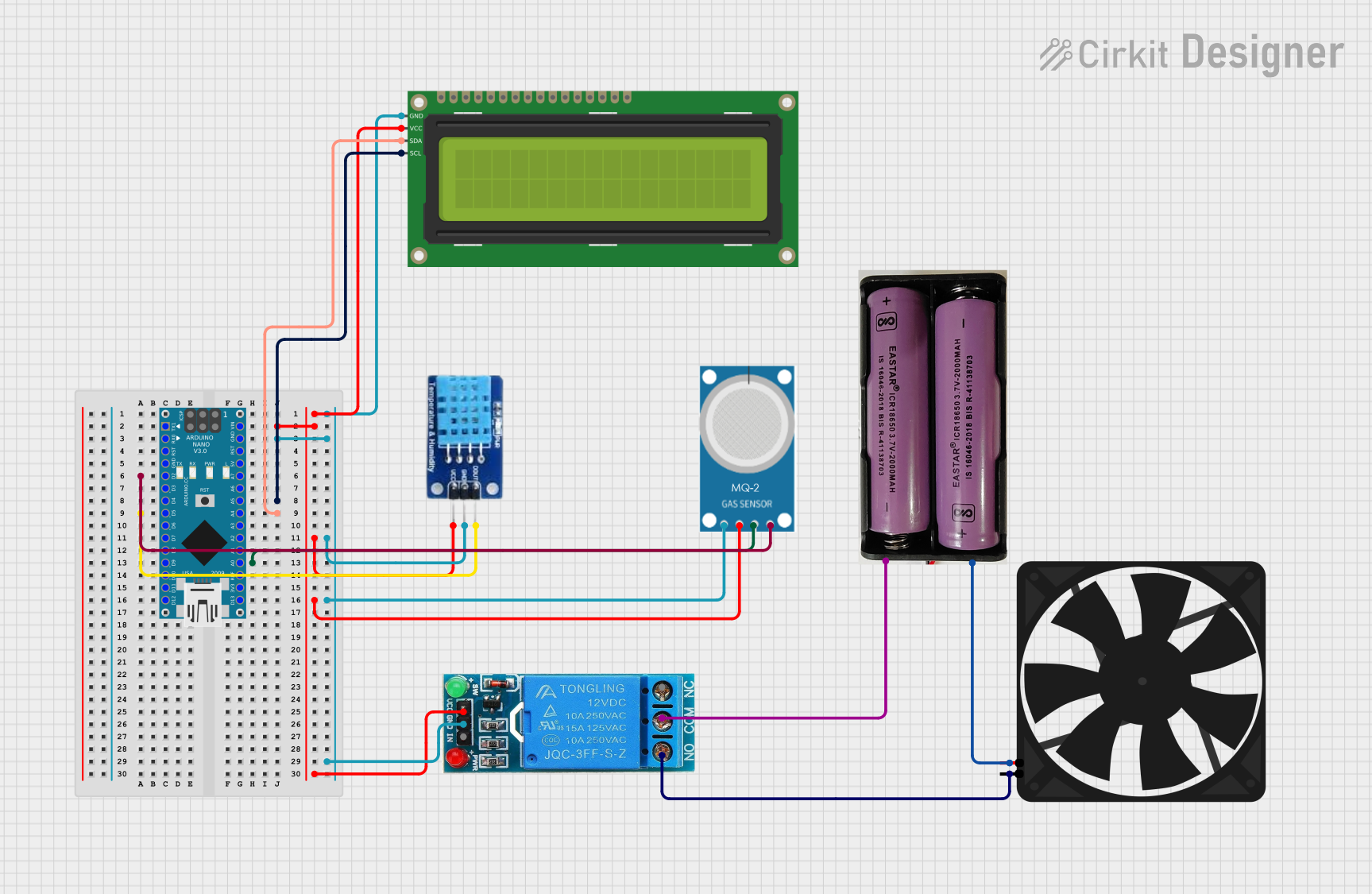
Circuit Documentation
Summary
This circuit is designed to monitor air quality using an MQ-2 gas sensor and a DHT11 temperature and humidity sensor. The data is displayed on a 16x2 I2C LCD. Additionally, a fan is controlled via a 12V single-channel relay based on the gas sensor readings. The entire system is managed by an Arduino Nano microcontroller.
Component List
16x2 I2C LCD
- Description: A 16x2 character LCD display with I2C interface.
- Pins: GND, VCC, SDA, SCL
Fan
- Description: A 5V fan used for ventilation.
- Pins: GND, 5V
Arduino Nano
- Description: A small, complete, and breadboard-friendly microcontroller board based on the ATmega328.
- Pins: D1/TX, D0/RX, RESET, GND, D2, D3, D4, D5, D6, D7, D8, D9, D10, D11/MOSI, D12/MISO, VIN, 5V, A7, A6, A5, A4, A3, A2, A1, A0, AREF, 3V3, D13/SCK
MQ-2
- Description: A gas sensor that detects LPG, i-butane, propane, methane, alcohol, hydrogen, and smoke.
- Pins: GND, VCC, ANALOG, Digital
12V Single Channel Relay
- Description: A relay module that allows control of high voltage devices.
- Pins: NC, COM, NO, IN, GND, VCC
DHT11
- Description: A temperature and humidity sensor.
- Pins: DATA, GND, VCC
7.4V Battery
- Description: A 7.4V power source.
- Pins: +, -
Wiring Details
16x2 I2C LCD
- GND connected to Arduino Nano GND
- VCC connected to Arduino Nano VIN
- SDA connected to Arduino Nano A4
- SCL connected to Arduino Nano A5
Fan
- GND connected to 12V Single Channel Relay NO
- 5V connected to 7.4V Battery +
Arduino Nano
- VIN connected to 16x2 I2C LCD VCC, DHT11 VCC, MQ-2 VCC, 12V Single Channel Relay VCC
- GND connected to 16x2 I2C LCD GND, DHT11 GND, MQ-2 GND, 12V Single Channel Relay GND
- D2 connected to MQ-2 Digital
- A5 connected to 16x2 I2C LCD SCL
- D5 connected to DHT11 DATA
- A4 connected to 16x2 I2C LCD SDA
- A0 connected to MQ-2 ANALOG
MQ-2
- GND connected to Arduino Nano GND
- VCC connected to Arduino Nano VIN
- ANALOG connected to Arduino Nano A0
- Digital connected to Arduino Nano D2
12V Single Channel Relay
- NC not connected
- COM connected to 7.4V Battery -
- NO connected to Fan GND
- IN not connected
- GND connected to Arduino Nano GND
- VCC connected to Arduino Nano VIN
DHT11
- DATA connected to Arduino Nano D5
- GND connected to Arduino Nano GND
- VCC connected to Arduino Nano VIN
7.4V Battery
- + connected to Fan 5V
- - connected to 12V Single Channel Relay COM
Code Documentation
#include <Wire.h>  // I2C library
#include <LiquidCrystal_I2C.h>  // LCD library
#include <DHT.h>  // DHT library

// Define I2C address of LCD module
#define LCD_I2C_ADDRESS 0x27

// Initialize LCD module
LiquidCrystal_I2C lcd(LCD_I2C_ADDRESS, 16, 2);  // 16 columns, 2 rows

// Define DHT sensor pin and type
#define DHT_PIN 5
#define DHT_TYPE DHT11

// Initialize DHT sensor
DHT dht(DHT_PIN, DHT_TYPE);

// Define MQ-2 sensor pins
#define MQ2_D0_PIN 2
#define MQ2_A0_PIN A0

// Define relay pin
#define RELAY_PIN 9

void setup() {
  // Initialize I2C communication
  Wire.begin();

  // Initialize LCD module
  lcd.init();
  lcd.backlight();

  // Initialize DHT sensor
  dht.begin();

  // Initialize serial communication for debugging
  Serial.begin(9600);

  // Set relay pin as output
  pinMode(RELAY_PIN, OUTPUT);
}

void loop() {
  // Read temperature and humidity from DHT sensor
  float temperature = dht.readTemperature();
  float humidity = dht.readHumidity();

  // Read gas sensor value from MQ-2 sensor
  int gasValue = analogRead(MQ2_A0_PIN);

  // Check if gas value exceeds 132
  if (gasValue > 120) {
    digitalWrite(RELAY_PIN, LOW); // Turn relay OFF
    // Display warning on LCD
    lcd.clear();
    lcd.setCursor(2, 0);  // Center "Air Monitor" (11 characters) on line 0
    // lcd.print("Air Monitor");
    lcd.print("Gas: ");
    lcd.print(gasValue);
    lcd.setCursor(2, 1);  // Center "Exhaust ON..." (12 characters) on line 1
    lcd.print("Exhaust ON...");
  } else {
    digitalWrite(RELAY_PIN, HIGH); // Turn relay ON

    // Display temperature and humidity on LCD
    lcd.clear();
    lcd.setCursor(0, 0);
    lcd.print("Temp: ");
    lcd.print(temperature);
    lcd.print("C");

    lcd.setCursor(0, 1);
    lcd.print("Hum: ");
    lcd.print(humidity);
    lcd.print("%");

    delay(2000);

    // Display gas value on LCD
    lcd.clear();
    lcd.setCursor(3, 0);  // Center "Air Monitor" (11 characters) on line 0
    lcd.print("Air Monitor");
    lcd.setCursor(3, 1);  // Center "Gas:" (5 characters) on line 1
    lcd.print("Gas: ");
    lcd.print(gasValue);
  }

  delay(2000);  // Add delay to allow time to view the display changes

  // Print data to serial monitor for debugging
  Serial.print("Temperature: ");
  Serial.print(temperature);
  Serial.println("C");

  Serial.print("Humidity: ");
  Serial.print(humidity);
  Serial.println("%");

  Serial.print("Gas Value: ");
  Serial.println(gasValue);

  delay(2000);  // Additional delay before the next loop cycle
}
This code initializes the sensors and the LCD, reads data from the sensors, and displays the data on the LCD. It also controls the relay to turn the fan on or off based on the gas sensor readings. The data is also printed to the serial monitor for debugging purposes.