
Battery-Powered Smart Safety Harness with ESP32 and IMU Sensor
View and Edit Project In Cirkit Designer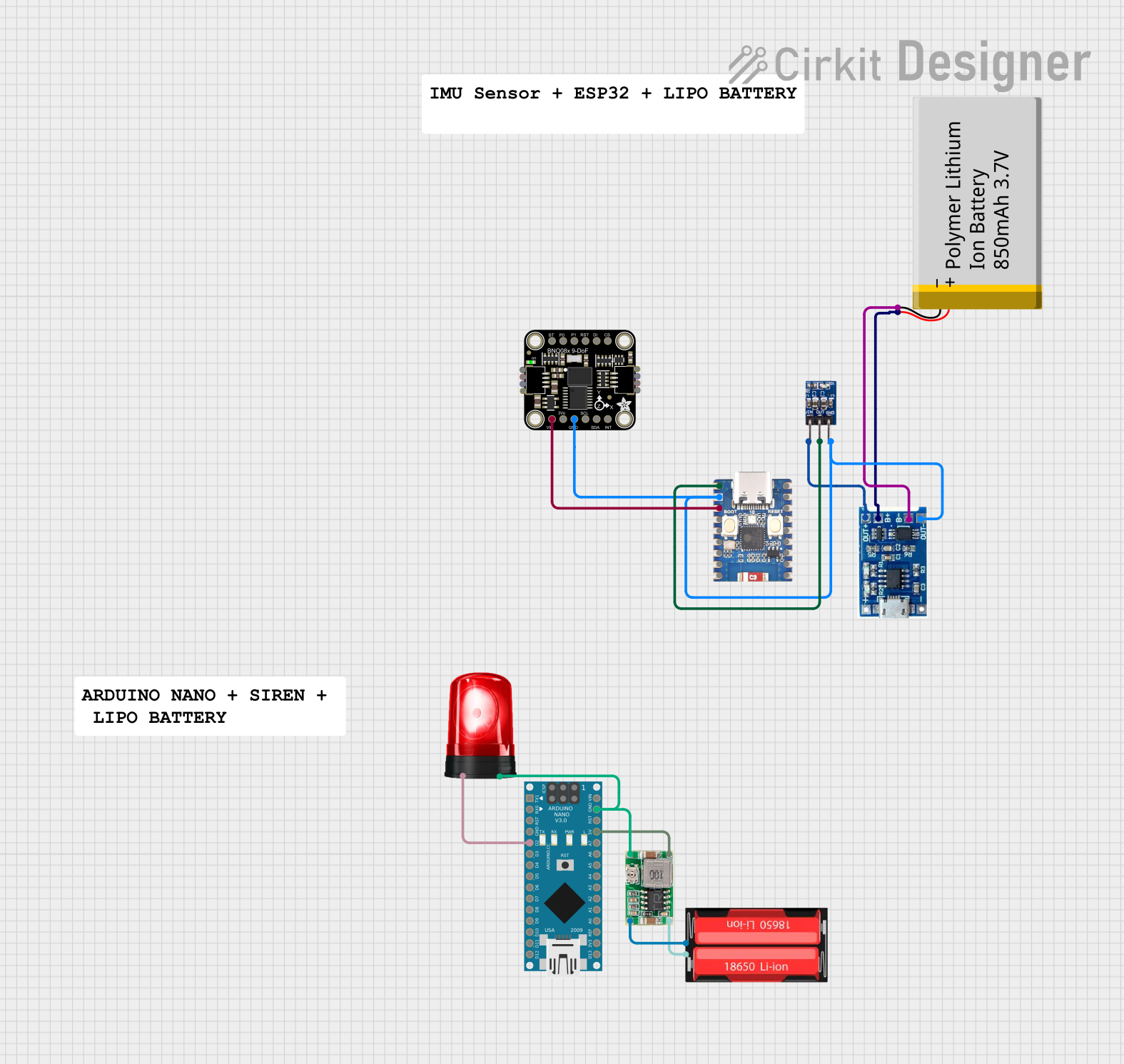
Circuit Documentation
Summary
This document provides a detailed overview of a smart safety harness project. The circuit includes various components such as an IMU sensor, ESP32 microcontroller, Arduino Nano, power management modules, and a siren. The ESP32 reads data from the IMU sensor and sends it wirelessly to the Arduino Nano, which processes the data to determine the hook's orientation. If the hook is not properly attached, a siren is activated.
Component List
Adafruit BNO085 9-DOF Orientation IMU Fusion
- Description: IMU sensor for orientation detection.
- Pins: VCC, 3.3V, GND, SCL/SCK/RX, SDA/MISO/TX, INT, BOOT, PS0, PS1, RST, MOSI, CS
ESP32-C3 Mini
- Description: Microcontroller with WiFi capabilities.
- Pins: 5V, GND, 21, 20, 3V3, 0, 1, 2, 3, 4, 5, 19, 18, 10, 9, 8, 7, 6
Lipo Battery Charger Module
- Description: Module for charging LiPo batteries.
- Pins: B-, B+, OUT-, OUT+
Polymer Lithium Ion Battery - 850mAh
- Description: Rechargeable battery.
- Pins: GND, VCC
AMS1117 3.3
- Description: Voltage regulator to provide 3.3V output.
- Pins: VIN, OUT, GND
Arduino Nano
- Description: Microcontroller for processing data.
- Pins: D1/TX, D0/RX, RESET, GND, D2, D3, D4, D5, D6, D7, D8, D9, D10, D11/MOSI, D12/MISO, VIN, 5V, A7, A6, A5, A4, A3, A2, A1, A0, AREF, 3V3, D13/SCK
18650 Li-Ion
- Description: Rechargeable Li-Ion battery.
- Pins: Positive, Negative
Siren
- Description: Alarm siren for alerting.
- Pins: Positive, Ground
Mini 360 Buck Converter
- Description: Buck converter for voltage regulation.
- Pins: IN-, OUT-, OUT+, IN+
Wiring Details
Adafruit BNO085 9-DOF Orientation IMU Fusion
- VCC connected to ESP32-C3 Mini 3V3
- GND connected to ESP32-C3 Mini GND
ESP32-C3 Mini
- 3V3 connected to Adafruit BNO085 9-DOF Orientation IMU Fusion VCC
- GND connected to Adafruit BNO085 9-DOF Orientation IMU Fusion GND, Lipo Battery Charger Module OUT-, AMS1117 3.3 GND
- 5V connected to AMS1117 3.3 OUT
Lipo Battery Charger Module
- B- connected to Polymer Lithium Ion Battery - 850mAh GND
- B+ connected to Polymer Lithium Ion Battery - 850mAh VCC
- OUT- connected to ESP32-C3 Mini GND
- OUT+ connected to AMS1117 3.3 VIN
Polymer Lithium Ion Battery - 850mAh
- GND connected to Lipo Battery Charger Module B-
- VCC connected to Lipo Battery Charger Module B+
AMS1117 3.3
- VIN connected to Lipo Battery Charger Module OUT+
- OUT connected to ESP32-C3 Mini 5V
- GND connected to ESP32-C3 Mini GND
Arduino Nano
- D2 connected to Siren Positive
- GND connected to Siren Ground, Mini 360 Buck Converter OUT-
- 5V connected to Mini 360 Buck Converter OUT+
18650 Li-Ion
- Positive connected to Mini 360 Buck Converter IN+
- Negative connected to Mini 360 Buck Converter IN-
Siren
- Positive connected to Arduino Nano D2
- Ground connected to Arduino Nano GND, Mini 360 Buck Converter OUT-
Mini 360 Buck Converter
- IN+ connected to 18650 Li-Ion Positive
- IN- connected to 18650 Li-Ion Negative
- OUT+ connected to Arduino Nano 5V
- OUT- connected to Arduino Nano GND, Siren Ground
Code Documentation
ESP32-C3 Mini Code
#include <Wire.h>
#include <WiFi.h>
#include <HTTPClient.h>
#include <Adafruit_BNO08x.h>
#include <Adafruit_Sensor.h>

#define IMU_SCL_PIN 21
#define IMU_SDA_PIN 20
#define IMU_INT_PIN 19

const char* ssid = "your_SSID";
const char* password = "your_PASSWORD";
const char* serverUrl = "http://yourserver.com/update";

Adafruit_BNO08x bno08x(BNO08X_RESET);

void setup() {
  // Initialize serial communication
  Serial.begin(115200);
  // Initialize I2C communication
  Wire.begin(IMU_SDA_PIN, IMU_SCL_PIN);

  // Initialize IMU sensor
  if (!bno08x.begin_I2C()) {
    Serial.println("Failed to find BNO08x chip");
    while (1) { delay(10); }
  }
  Serial.println("BNO08x Found!");

  // Enable accelerometer and gyroscope
  bno08x.enableReport(SH2_ACCELEROMETER);
  bno08x.enableReport(SH2_GYROSCOPE_CALIBRATED);

  // Initialize WiFi
  WiFi.begin(ssid, password);
  while (WiFi.status() != WL_CONNECTED) {
    delay(1000);
    Serial.println("Connecting to WiFi...");
  }
  Serial.println("Connected to WiFi");
}

void loop() {
  // Read data from IMU sensor
  sensors_event_t accel, gyro;
  readIMU(accel, gyro);

  // Send IMU data to Arduino Nano
  Serial.write((uint8_t*)&accel, sizeof(accel));
  Serial.write((uint8_t*)&gyro, sizeof(gyro));

  // Receive hook status from Arduino Nano
  bool hookAttached = Serial.read();

  // Send hook status to web server
  sendHookStatus(hookAttached);

  delay(1000);
}

void readIMU(sensors_event_t &accel, sensors_event_t &gyro) {
  // Read accelerometer data
  bno08x.getEvent(&accel, SH2_ACCELEROMETER);
  // Read gyroscope data
  bno08x.getEvent(&gyro, SH2_GYROSCOPE_CALIBRATED);
}

void sendHookStatus(bool status) {
  if (WiFi.status() == WL_CONNECTED) {
    HTTPClient http;
    http.begin(serverUrl);
    http.addHeader("Content-Type", "application/x-www-form-urlencoded");
    String postData = "hookStatus=" + String(status);
    int httpResponseCode = http.POST(postData);
    if (httpResponseCode > 0) {
      String response = http.getString();
      Serial.println(httpResponseCode);
      Serial.println(response);
    } else {
      Serial.print("Error on sending POST: ");
      Serial.println(httpResponseCode);
    }
    http.end();
  } else {
    Serial.println("WiFi Disconnected");
  }
}
Arduino Nano Code
/*
 * Smart Safety Harness Project
 * This Arduino Sketch interfaces with an IMU sensor and an ESP32 module.
 * The ESP32 sends IMU data wirelessly to the Arduino Nano, which processes
 * the data to determine the hook's orientation. If the hook is not properly
 * attached, a siren is activated.
 */

#define SIREN_PIN 2

void setup() {
  // Initialize the siren pin as an output
  pinMode(SIREN_PIN, OUTPUT);
  // Start serial communication for debugging
  Serial.begin(9600);
}

void loop() {
  // Placeholder for receiving data from ESP32
  // In a real implementation, this would involve reading from a serial port
  bool hookAttached = checkHookStatus();

  if (!hookAttached) {
    // Activate the siren if the hook is not attached
    digitalWrite(SIREN_PIN, HIGH);
  } else {
    // Deactivate the siren if the hook is attached
    digitalWrite(SIREN_PIN, LOW);
  }

  //