
Arduino UNO-Based Smart Home Automation System with LCD Display and RTC
View and Edit Project In Cirkit Designer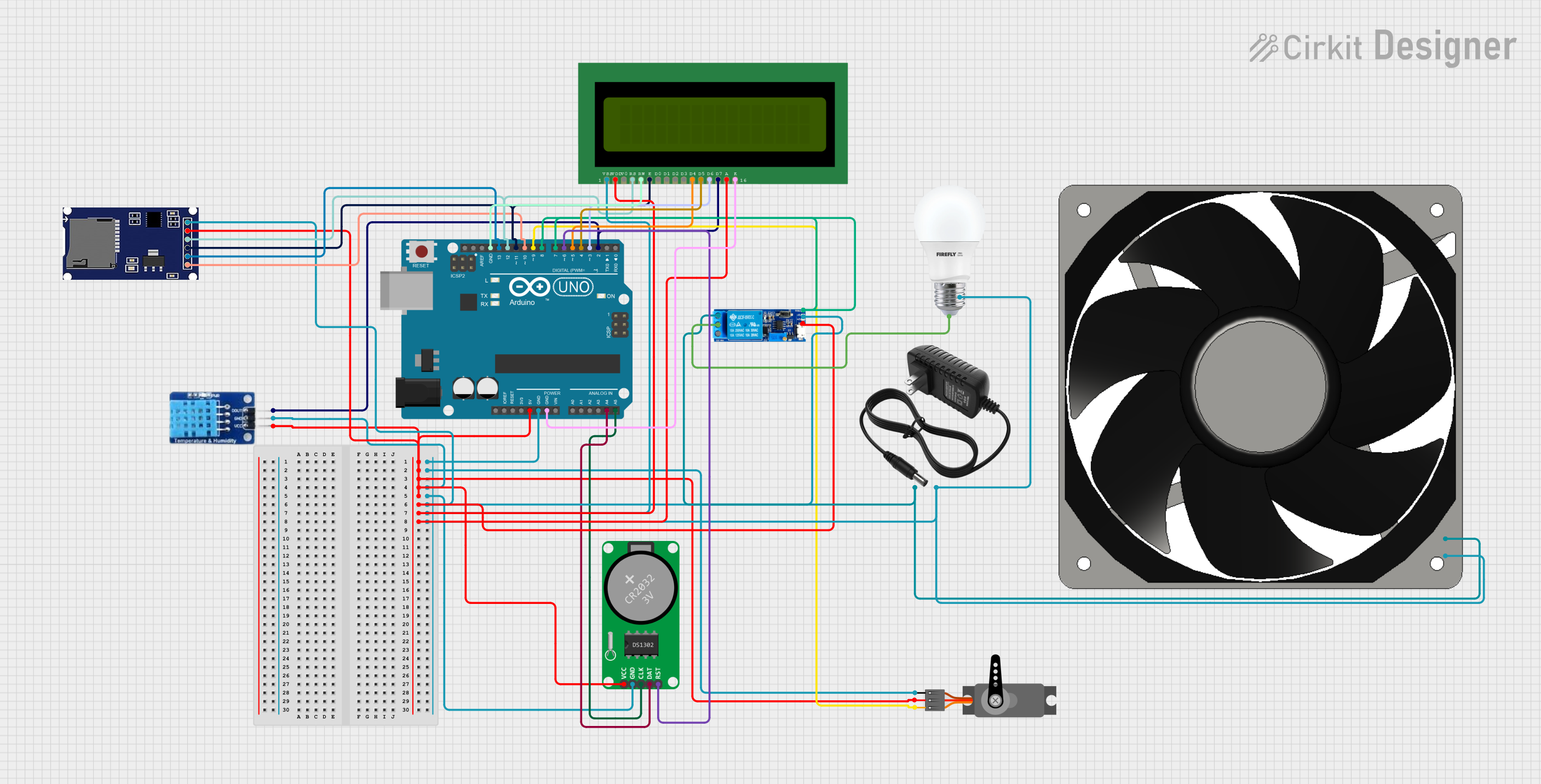
Circuit Documentation
Summary
This circuit involves an Arduino UNO microcontroller interfacing with various components including a DHT11 temperature and humidity sensor, an LCD display, a servo motor, an RTC module, a relay module, an SD card module, a 12V power supply, a bulb, and a 12V fan. The circuit is designed to read environmental data, display it, and control external devices based on the data.
Component List
Arduino UNO
- Description: A microcontroller board based on the ATmega328P.
- Pins: UNUSED, IOREF, Reset, 3.3V, 5V, GND, Vin, A0, A1, A2, A3, A4, A5, SCL, SDA, AREF, D13, D12, D11, D10, D9, D8, D7, D6, D5, D4, D3, D2, D1, D0
DHT11
- Description: A temperature and humidity sensor.
- Pins: DATA, GND, VCC
LCD 16x2 (Wokwi Compatible)
- Description: A 16x2 character LCD display.
- Pins: VSS, VDD, V0, RS, RW, E, D0, D1, D2, D3, D4, D5, D6, D7, A, K
Servo
- Description: A servo motor.
- Pins: GND, VCC, PWM
RTC-DS1302
- Description: A real-time clock module.
- Pins: Vcc, GND, CLK, DAT, RST
Relay module 5v-30v
- Description: A relay module for switching high voltage devices.
- Pins: common contact, normally open, normally closed, trigger, V-, V+
12v power supply
- Description: A 12V power supply.
- Pins: +, -
BULB
- Description: A light bulb.
- Pins: +, -
SDmodule
- Description: An SD card module.
- Pins: CS, SCK, MOSI, MISO, VCC, GND
120 fan 12v
- Description: A 12V fan.
- Pins: 12V+, GND
Wiring Details
Arduino UNO
5V connected to:
- DHT11 (VCC)
- Servo (VCC)
- RTC-DS1302 (Vcc)
- SDmodule (VCC)
- Relay module 5v-30v (V+)
- LCD 16x2 (Wokwi Compatible) (VDD, A)
GND connected to:
- Servo (GND)
- DHT11 (GND)
- RTC-DS1302 (GND)
- SDmodule (GND)
- Relay module 5v-30v (V-)
- LCD 16x2 (Wokwi Compatible) (VSS, RW, K)
- 12v power supply (-)
- BULB (-)
- 120 fan 12v (GND)
A4 connected to:
- RTC-DS1302 (DAT)
A5 connected to:
- RTC-DS1302 (CLK)
D13 connected to:
- SDmodule (SCK)
D12 connected to:
- SDmodule (MISO)
- LCD 16x2 (Wokwi Compatible) (RS)
D11 connected to:
- SDmodule (MOSI)
- LCD 16x2 (Wokwi Compatible) (E)
D10 connected to:
- SDmodule (CS)
D9 connected to:
- Servo (PWM)
D8 connected to:
- Relay module 5v-30v (trigger)
D7 connected to:
- Relay module 5v-30v (trigger)
D6 connected to:
- RTC-DS1302 (RST)
D5 connected to:
- LCD 16x2 (Wokwi Compatible) (D4)
D4 connected to:
- LCD 16x2 (Wokwi Compatible) (D5)
D3 connected to:
- LCD 16x2 (Wokwi Compatible) (D6)
D2 connected to:
- LCD 16x2 (Wokwi Compatible) (D7)
- DHT11 (DATA)
DHT11
VCC connected to:
- Arduino UNO (5V)
GND connected to:
- Arduino UNO (GND)
DATA connected to:
- Arduino UNO (D2)
LCD 16x2 (Wokwi Compatible)
VDD connected to:
- Arduino UNO (5V)
A connected to:
- Arduino UNO (5V)
VSS connected to:
- Arduino UNO (GND)
K connected to:
- Arduino UNO (GND)
RW connected to:
- Arduino UNO (GND)
RS connected to:
- Arduino UNO (D12)
E connected to:
- Arduino UNO (D11)
D4 connected to:
- Arduino UNO (D5)
D5 connected to:
- Arduino UNO (D4)
D6 connected to:
- Arduino UNO (D3)
D7 connected to:
- Arduino UNO (D2)
Servo
VCC connected to:
- Arduino UNO (5V)
GND connected to:
- Arduino UNO (GND)
PWM connected to:
- Arduino UNO (D9)
RTC-DS1302
Vcc connected to:
- Arduino UNO (5V)
GND connected to:
- Arduino UNO (GND)
DAT connected to:
- Arduino UNO (A4)
CLK connected to:
- Arduino UNO (A5)
RST connected to:
- Arduino UNO (D6)
Relay module 5v-30v
V+ connected to:
- Arduino UNO (5V)
V- connected to:
- Arduino UNO (GND)
trigger connected to:
- Arduino UNO (D8, D7)
common contact connected to:
- BULB (+)
normally open connected to:
- 12v power supply (+)
- 120 fan 12v (12V+)
12v power supply
+ connected to:
- Relay module 5v-30v (normally open)
- connected to:
- Arduino UNO (GND)
BULB
+ connected to:
- Relay module 5v-30v (common contact)
- connected to:
- Arduino UNO (GND)
SDmodule
VCC connected to:
- Arduino UNO (5V)
GND connected to:
- Arduino UNO (GND)
SCK connected to:
- Arduino UNO (D13)
MISO connected to:
- Arduino UNO (D12)
- LCD 16x2 (Wokwi Compatible) (RS)
MOSI connected to:
- Arduino UNO (D11)
- LCD 16x2 (Wokwi Compatible) (E)
CS connected to:
- Arduino UNO (D10)
120 fan 12v
12V+ connected to:
- Relay module 5v-30v (normally open)
GND connected to:
- Arduino UNO (GND)
Documented Code
Arduino UNO Code (sketch.ino)
void setup() {
  // put your setup code here, to run once:

}

void loop() {
  // put your main code here, to run repeatedly:

}
Documentation (documentation.txt)
This documentation provides a comprehensive overview of the circuit, including a summary, detailed component list, wiring details, and the code used in the Arduino UNO microcontroller.