
ESP32-Based Smart Lock System with RFID and Fingerprint Authentication
View and Edit Project In Cirkit Designer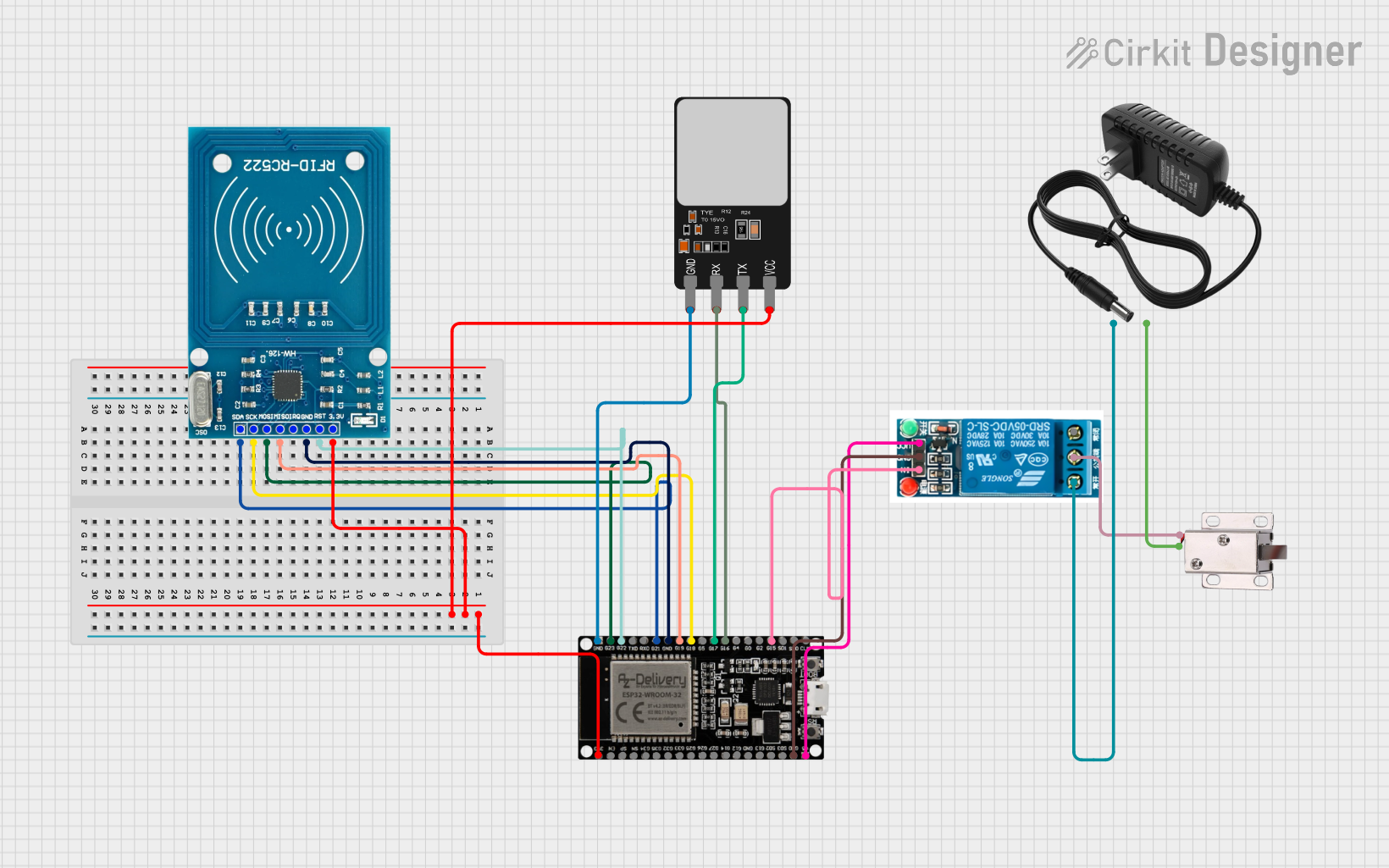
Circuit Documentation
Summary
This circuit is designed to control a 12V solenoid lock using an ESP32 microcontroller. The system integrates an RFID reader, a fingerprint scanner, and a relay to manage the lock. The ESP32 reads inputs from the RFID and fingerprint scanner, and based on the authentication, it triggers the relay to unlock the solenoid lock.
Component List
12V Solenoid Lock
- Pins: VCC, GND
- Description: An electromechanical lock that operates on 12V DC.
- Purpose: To lock and unlock based on authentication.
Fingerprint Scanner
- Pins: VCC, TX, RX, GND
- Description: A biometric sensor used to scan and verify fingerprints.
- Purpose: To provide biometric authentication.
12V Power Supply
- Pins: +, -
- Description: A power supply unit providing 12V DC.
- Purpose: To power the solenoid lock and other components.
RFID-RC522
- Pins: VCC (3.3V), RST, GND, IRQ, MISO, MOSI, SCK, SDA
- Description: An RFID reader module.
- Purpose: To read RFID tags for authentication.
ESP32 38 PINS
- Pins: GND, G23, G22, TXD, RXD, G21, G19, G18, G5, G17, G16, G4, G0, G2, G15, SDI, SD0, CLK, 3V3, EN, SP, SN, G34, G35, G32, 33, G25, G26, G27, G14, G12, G13, SD2, SD3, 5V
- Description: A microcontroller with Wi-Fi and Bluetooth capabilities.
- Purpose: To control the entire system, process inputs, and trigger the relay.
5V Relay
- Pins: Normally Open, Common terminal, Normally Closed, In, GND, VCC
- Description: An electromechanical relay that operates on 5V.
- Purpose: To switch the 12V solenoid lock on and off.
Wiring Details
12V Solenoid Lock
- VCC: Connected to the Common terminal of the 5V relay.
- GND: Connected to the - pin of the 12V power supply.
Fingerprint Scanner
- VCC: Connected to the 3V3 pin of the ESP32.
- TX: Connected to the G17 pin of the ESP32.
- RX: Connected to the G16 pin of the ESP32.
- GND: Connected to the GND pin of the ESP32.
12V Power Supply
- +: Connected to the Normally Open pin of the 5V relay.
- -: Connected to the GND pin of the 12V solenoid lock.
RFID-RC522
- VCC (3.3V): Connected to the 3V3 pin of the ESP32.
- RST: Connected to the G22 pin of the ESP32.
- GND: Connected to the GND pin of the ESP32.
- MISO: Connected to the G19 pin of the ESP32.
- MOSI: Connected to the G23 pin of the ESP32.
- SCK: Connected to the G18 pin of the ESP32.
- SDA: Connected to the G21 pin of the ESP32.
ESP32 38 PINS
- G15: Connected to the In pin of the 5V relay.
- GND: Connected to the GND pin of the 5V relay.
- 5V: Connected to the VCC pin of the 5V relay.
5V Relay
- Normally Open: Connected to the + pin of the 12V power supply.
- Common terminal: Connected to the VCC pin of the 12V solenoid lock.
- In: Connected to the G15 pin of the ESP32.
- GND: Connected to the GND pin of the ESP32.
- VCC: Connected to the 5V pin of the ESP32.
Documented Code
#include <SPI.h>
#include <MFRC522.h>
#include <Adafruit_Fingerprint.h>

#define SS_PIN 21           // RFID SDA pin
#define RST_PIN 22          // RFID RST pin
#define FINGERPRINT_RX 17   // AS608 RX to ESP32 GPIO 17
#define FINGERPRINT_TX 16   // AS608 TX to ESP32 GPIO 16
#define RELAY_PIN 15        // Relay control pin

MFRC522 rfid(SS_PIN, RST_PIN);         // Create MFRC522 instance
Adafruit_Fingerprint finger = Adafruit_Fingerprint(&Serial2); // Use Serial2 for the fingerprint sensor

void setup() {
  Serial.begin(115200);                // Initialize serial communications for ESP32
  delay(1000);                         // Small delay for Serial startup

  // Initialize RFID
  SPI.begin();                         // Init SPI bus
  rfid.PCD_Init();                     // Init MFRC522
  pinMode(RELAY_PIN, OUTPUT);          // Set relay pin as output
  digitalWrite(RELAY_PIN, HIGH);       // Ensure relay is off at startup
  Serial.println("Place your card on the reader...");

  // Initialize fingerprint sensor
  Serial2.begin(57600, SERIAL_8N1, FINGERPRINT_RX, FINGERPRINT_TX);
  finger.begin(57600);                 // Initialize fingerprint sensor
  delay(1000);                         // Allow sensor time to initialize

  // Check if the fingerprint sensor is responding
  if (finger.verifyPassword()) {
    Serial.println("Fingerprint sensor initialized successfully.");
  } else {
    Serial.println("Failed to initialize fingerprint sensor. Check wiring.");
    while (1); // Halt if initialization fails
  }

  Serial.println("System ready. Use 'E' to enroll fingerprint.");
}

void loop() {
  // Check for RFID
  if (rfid.PICC_IsNewCardPresent() && rfid.PICC_ReadCardSerial()) {
    // Card read successfully, trigger the relay
    Serial.print("Card UID: ");
    for (byte i = 0; i < rfid.uid.size; i++) {
      Serial.print(rfid.uid.uidByte[i] < 0x10 ? " 0" : " ");
      Serial.print(rfid.uid.uidByte[i], HEX);
    }
    Serial.println();

    // Trigger the relay to unlock the solenoid
    unlockSolenoid();

    rfid.PICC_HaltA();               // Halt PICC
    rfid.PCD_StopCrypto1();         // Stop encryption on PCD
  }

  // Check for serial commands for enrollment
  if (Serial.available()) {
    char command = Serial.read();
    if (command == 'E') {
      enrollFingerprint();
    }
  }

  // Automatically check for fingerprint verification
  int result = finger.getImage();
  if (result == FINGERPRINT_OK) {
    // Fingerprint detected, process it
    if (finger.image2Tz() == FINGERPRINT_OK) {
      result = finger.fingerFastSearch();
      if (result == FINGERPRINT_OK) {
        Serial.println("Fingerprint verified!");
        unlockSolenoid(); // Unlock solenoid after verification
      }
    }
  }
}

void unlockSolenoid() {
  digitalWrite(RELAY_PIN, LOW);    // Unlock the solenoid
  delay(2000);                      // Keep unlocked for 2 seconds
  digitalWrite(RELAY_PIN, HIGH);   // Lock the solenoid again
}

void enrollFingerprint() {
  int id;
  Serial.println("Enter ID for new fingerprint (1-127): ");
  while (!Serial.available());
  id = Serial.parseInt();

  Serial.print("Enrolling fingerprint with ID "); Serial.println(id);
  delay(1000);

  if (finger.getImage() != FINGERPRINT_OK) {
    Serial.println("Failed to capture fingerprint image.");
    return;
  }
  if (finger.image2Tz(1) != FINGERPRINT_OK) {
    Serial.println("Failed to convert image.");
    return;
  }

  Serial.println("Place the same finger again.");
  delay(2000);

  if (finger.getImage() != FINGERPRINT_OK) {
    Serial.println("Failed to capture fingerprint image.");
    return;
  }
  if (finger.image2Tz(2) != FINGERPRINT_OK) {
    Serial.println("Failed to convert image.");
    return;
  }

  if (finger.createModel() != FINGERPRINT_OK) {
    Serial.println("Failed to create fingerprint model.");
    return;
  }
  if (finger.storeModel(id) != FINGERPRINT_OK) {
    Serial.println("Failed to store fingerprint model.");
    return;
  }

  Serial.println("Fingerprint enrolled successfully.");
  unlockSolenoid(); // Unlock solenoid after enrollment
}
This code initializes the RFID reader, fingerprint scanner, and relay. It continuously checks for RFID cards and fingerprints,