
Arduino Mega 2560-Powered Multifunctional Robotic System with GPS and Environmental Sensing
View and Edit Project In Cirkit Designer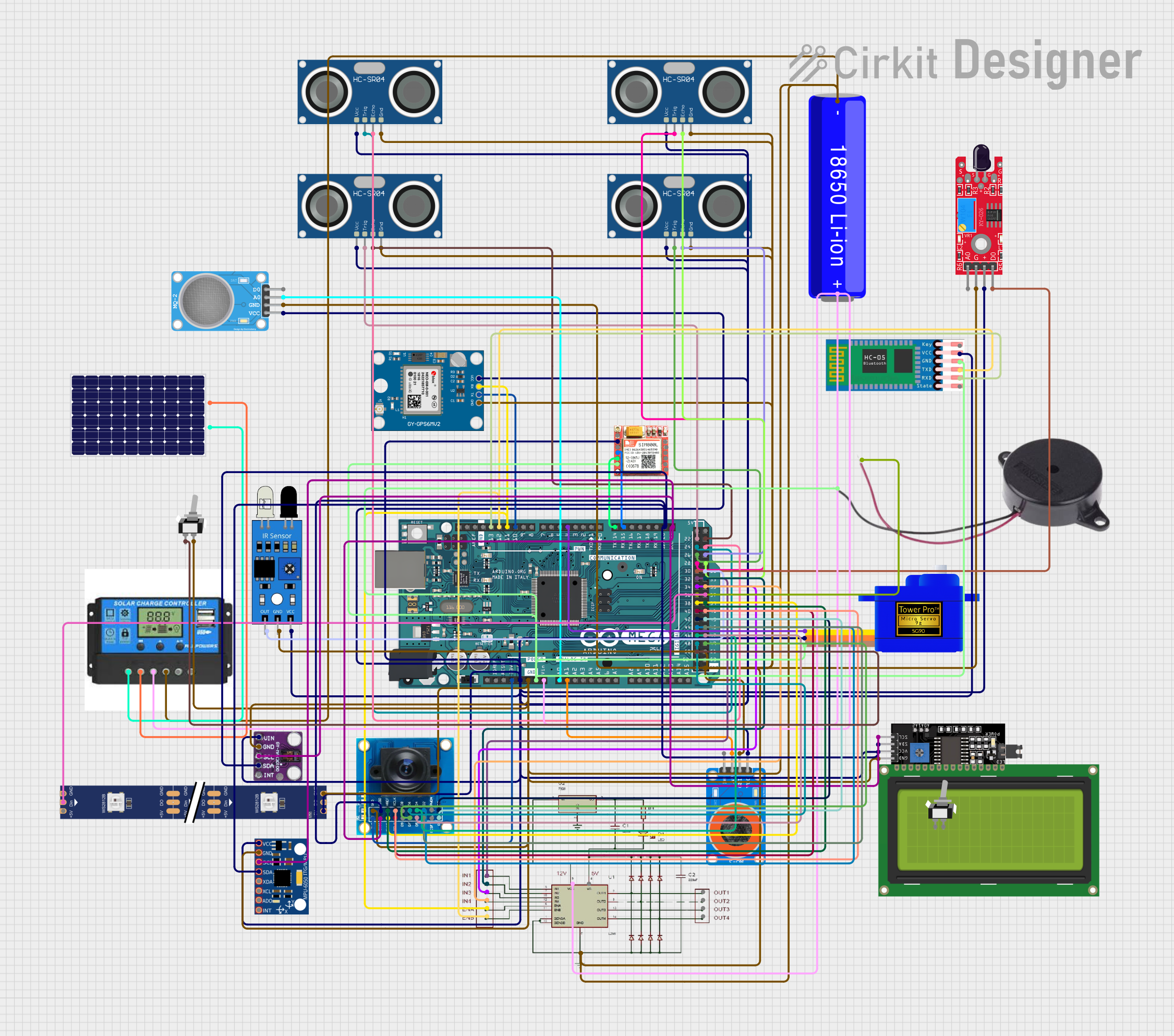
Circuit Documentation
Summary
The circuit in question is a complex system that integrates various sensors, a microcontroller, communication modules, a motor driver, and power management components. The central processing unit of the circuit is an Arduino Mega 2560, which interfaces with a GPS module, multiple ultrasonic sensors, a flame sensor, gas sensors, an IR sensor, a servo motor, Bluetooth and GSM modules, a buzzer, a charge controller connected to a solar panel and battery, an LCD display, a camera module (OV7725), a motion sensor (MPU-6050), an RGB LED strip, and a pulse oximetry sensor (max30100). The circuit is designed to perform multiple functions, including distance measurement, flame detection, gas and alcohol detection, remote communication, image capture, motion tracking, visual indication, and power management.
Component List
Sensors:
- Neo 6M GPS Module: Provides location data.
- HC-SR04 Ultrasonic Sensor: Measures distance via ultrasonic waves.
- kY-026 Flame Sensor: Detects the presence of a flame or fire.
- MQ-2 Gas Sensor: Senses gases like LPG, propane, and methane.
- MQ-3 Alcohol Sensor: Detects alcohol vapors.
- IR Sensor: Detects obstacles and measures their proximity.
- MPU-6050 Motion Sensor: A 6-axis gyroscope and accelerometer.
- OV7725 Camera Module: Captures images and video.
- Max30100 Pulse Oximetry Sensor: Measures oxygen saturation and heart rate.
Actuators:
- Servomotor SG90: A small and lightweight servo for precise control.
- Buzzer: Provides audible alerts or feedback.
Communication Modules:
- HC-05 Bluetooth Module: Enables wireless communication.
- SIM800L GSM Module: Allows cellular network connectivity.
Power Management:
- Charge Controller: Manages power flow from the solar panel to the battery and load.
- Solar Panel: Converts sunlight into electrical energy.
- 18650 Li-ion Battery: Stores electrical energy for the circuit.
Display:
- LCD Display 20x4 I2C: Displays text and data to the user.
Control:
- Arduino Mega 2560: The main microcontroller board that controls the circuit.
- L298N Motor Driver: Controls the direction and speed of motors.
Indication:
- WS2812 RGB LED Strip: Provides visual feedback through color changes.
Miscellaneous:
- Toggle Switch (SPST): A simple on/off switch for controlling power or other functions.
Wiring Details
Neo 6M GPS Module
- TX -> Arduino Mega 2560 (D10 PWM)
- RX -> Arduino Mega 2560 (D11 PWM)
- VCC -> 5V Power Rail
- GND -> Ground Rail
HC-SR04 Ultrasonic Sensors
- VCC -> 5V Power Rail
- TRIG -> Arduino Mega 2560 (D22, D24, D26, D28)
- ECHO -> Arduino Mega 2560 (D23, D25, D27, D29)
- GND -> Ground Rail
kY-026 Flame Sensor
- D0 -> Arduino Mega 2560 (D30)
- VCC -> 5V Power Rail
- GND -> Ground Rail
MQ-2 Gas Sensor
- A0 -> Arduino Mega 2560 (A0)
- VCC -> 5V Power Rail
- GND -> Ground Rail
MQ-3 Alcohol Sensor
- A0 -> Arduino Mega 2560 (A1)
- VCC -> 5V Power Rail
- GND -> Ground Rail
IR Sensor
- out -> Arduino Mega 2560 (D31)
- vcc -> 5V Power Rail
- gnd -> Ground Rail
Servomotor SG90
- SIG -> Arduino Mega 2560 (D4 PWM)
- VCC -> 5V Power Rail
- GND -> Ground Rail
HC-05 Bluetooth Module
- TXD -> Arduino Mega 2560 (D13 PWM)
- RXD -> Arduino Mega 2560 (D12 PWM)
- VCC -> 5V Power Rail
- GND -> Ground Rail
SIM800L GSM Module
- RXD -> Arduino Mega 2560 (D15/RX3)
- TXD -> Arduino Mega 2560 (D14/TX3)
- VCC -> 5V Power Rail
- GND -> Ground Rail
Buzzer
- POSITIVE -> Arduino Mega 2560 (D36)
- NEGATIVE -> Ground Rail
Charge Controller
- Solar Positive -> Solar Panel (+)
- Solar Negative -> Solar Panel (-)
- Battery Positive -> 18650 Li-ion Battery (+)
- Battery Negative -> 18650 Li-ion Battery (-)
Solar Panel
- + -> Charge Controller (Solar Positive)
- - -> Charge Controller (Solar Negative)
18650 Li-ion Battery
- + -> Charge Controller (Battery Positive)
- - -> Charge Controller (Battery Negative)
LCD Display 20x4 I2C
- SCL -> Arduino Mega 2560 (D21/SCL)
- SDA -> Arduino Mega 2560 (D20/SDA)
- VCC -> 5V Power Rail
- GND -> Ground Rail
OV7725 Camera Module
- 3V3 -> Arduino Mega 2560 (3V3)
- GND -> Ground Rail
- SIOC -> Arduino Mega 2560 (D21/SCL)
- SIOD -> Arduino Mega 2560 (D20/SDA)
- VSYNC -> Arduino Mega 2560 (D38)
- HREF -> Arduino Mega 2560 (D39)
- PCLK -> Arduino Mega 2560 (D40)
- XCLK -> Arduino Mega 2560 (D41)
- D0-D7 -> Arduino Mega 2560 (D42-D49)
MPU-6050 Motion Sensor
- SCL -> Arduino Mega 2560 (D21/SCL)
- SDA -> Arduino Mega 2560 (D20/SDA)
- VCC -> 5V Power Rail
- GND -> Ground Rail
L298N Motor Driver
- IN1-IN4 -> Arduino Mega 2560 (D32-D35)
- ENA, ENB -> Arduino Mega 2560 (D11 PWM, D12 PWM)
- 12V -> 18650 Li-ion Battery (+)
- GND -> Ground Rail
WS2812 RGB LED Strip
- DIN -> Arduino Mega 2560 (D37)
- 5V -> 5V Power Rail
- GND -> Ground Rail
Max30100 Pulse Oximetry Sensor
- scl -> Arduino Mega 2560 (D21/SCL)
- sda -> Arduino Mega 2560 (D20/SDA)
- Vin -> 5V Power Rail
- gnd -> Ground Rail
Toggle Switch (SPST)
- L1 -> Arduino Mega 2560 (D50)
- COM -> Ground Rail
Documented Code
Arduino Mega 2560 (Main Microcontroller)
void setup() {
  // put your setup code here, to run once:

}

void loop() {
  // put your main code here, to run repeatedly:

}
The provided code is a template with empty setup() and loop() functions, which are the entry points for Arduino sketches. The setup() function is called once when the sketch starts and is used for initializing variables, pin modes, starting using libraries, etc. The loop() function is called repeatedly and contains the main logic of the sketch.
The actual implementation of the code would depend on the specific functionalities required by the circuit, such as reading sensor data, controlling actuators, managing communication, and handling power management tasks.