
Arduino UNO Based Smoke and Flame Detection System with I2C LCD Feedback and Buzzer Alert
View and Edit Project In Cirkit Designer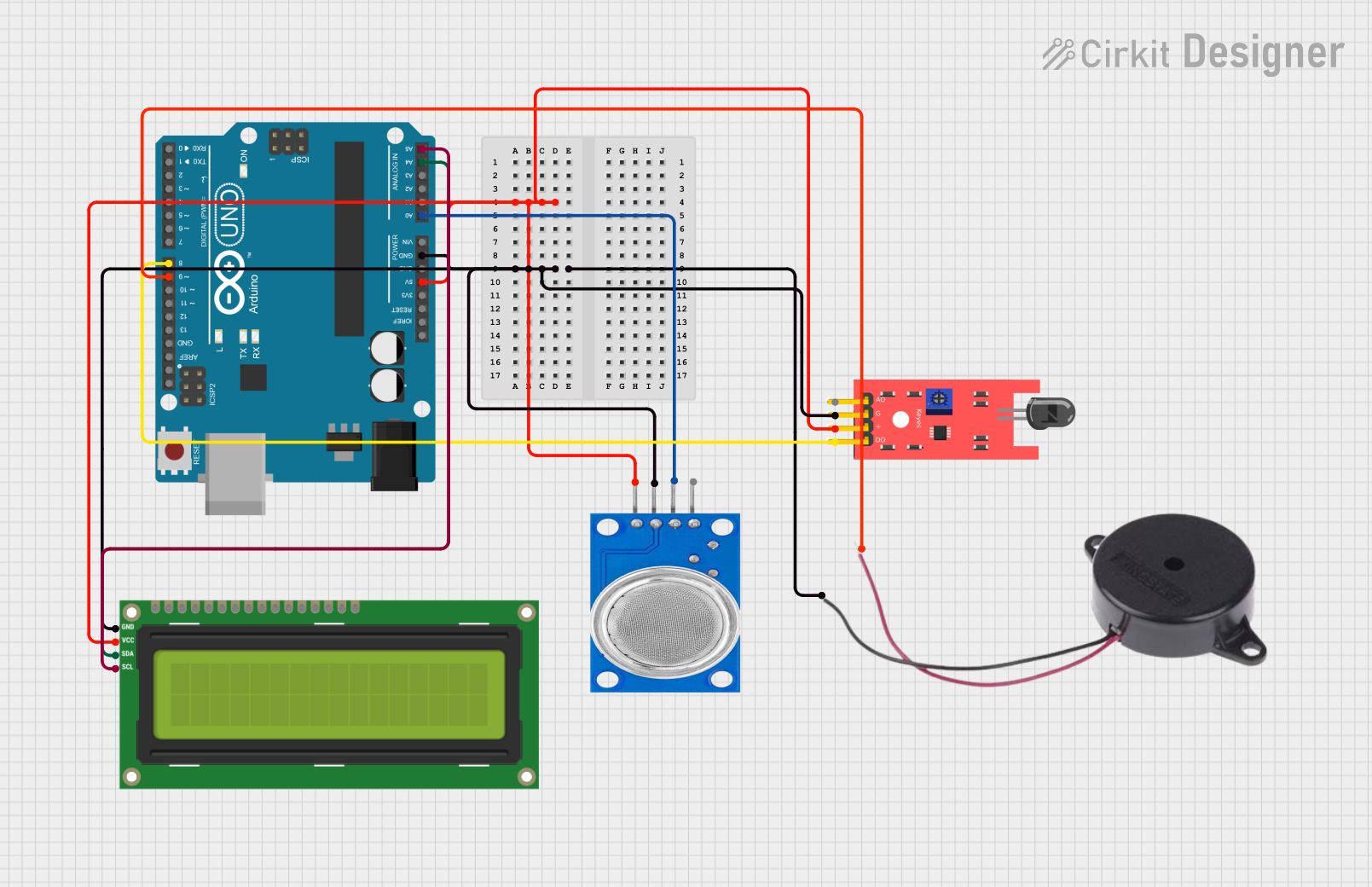
Circuit Documentation
Summary of the Circuit
This circuit is designed to monitor environmental conditions using an MQ135 smoke sensor and a KY-026 flame sensor. The data from these sensors is displayed on an I2C LCD 16x2 screen. Additionally, a buzzer is included in the circuit to provide an audible alert when smoke or flame is detected. The core of the circuit is an Arduino UNO microcontroller, which processes the sensor data, controls the LCD display, and manages the buzzer state based on the sensor inputs.
Component List
Arduino UNO
- Microcontroller board based on the ATmega328P
- It has 14 digital input/output pins, 6 analog inputs, a 16 MHz quartz crystal, a USB connection, a power jack, an ICSP header, and a reset button.
MQ135 Gas Sensor
- Air quality sensor for detecting a wide range of gases, including NH3, NOx, alcohol, benzene, smoke, and CO2.
KY-026 Flame Sensor
- Sensor for detecting fire and flame wavelengths between 760 nm to 1100 nm.
I2C LCD 16x2 Screen
- Alphanumeric liquid crystal display with 16 characters by 2 lines.
- It uses the I2C communication protocol for interfacing with the microcontroller.
Buzzer
- An electromechanical component that produces sound when an electrical signal is applied.
Wiring Details
Arduino UNO
- 5V: Powers the MQ135 sensor, KY-026 flame sensor, and I2C LCD screen.
- GND: Common ground for MQ135 sensor, KY-026 flame sensor, I2C LCD screen, and Buzzer.
- A0: Receives analog input from the MQ135 sensor.
- A4 (SDA): I2C data line connected to the I2C LCD screen.
- A5 (SCL): I2C clock line connected to the I2C LCD screen.
- D8: Digital input connected to the D0 pin of the KY-026 flame sensor.
- D9: Digital output connected to the positive pin of the Buzzer.
MQ135 Gas Sensor
- VCC: Connected to 5V on the Arduino UNO.
- GND: Connected to GND on the Arduino UNO.
- A0: Analog output connected to A0 on the Arduino UNO.
KY-026 Flame Sensor
- VCC: Connected to 5V on the Arduino UNO.
- GND: Connected to GND on the Arduino UNO.
- D0: Digital output connected to D8 on the Arduino UNO.
I2C LCD 16x2 Screen
- SCL: I2C clock line connected to A5 on the Arduino UNO.
- SDA: I2C data line connected to A4 on the Arduino UNO.
- VCC (5V): Connected to 5V on the Arduino UNO.
- GND: Connected to GND on the Arduino UNO.
Buzzer
- POSITIVE: Connected to D9 on the Arduino UNO.
- NEGATIVE: Connected to GND on the Arduino UNO.
Documented Code
/*
 * Smoke and Flame Sensor using a Display
 * This Arduino sketch reads data from an MQ135 smoke sensor and a KY-026 flame
 * sensor. It displays the smoke level on an I2C LCD 16x2 screen and activates
 * a buzzer if smoke or flame is detected.
 */

#include <Wire.h>
#include <LiquidCrystal_I2C.h>

// Pin definitions
const int smokeSensorPin = A0;
const int flameSensorPin = 8;
const int buzzerPin = 9;

// I2C LCD address and dimensions
LiquidCrystal_I2C lcd(0x27, 16, 2);

void setup() {
  // Initialize serial communication
  Serial.begin(9600);

  // Initialize LCD
  lcd.begin();
  lcd.backlight();

  // Initialize pins
  pinMode(smokeSensorPin, INPUT);
  pinMode(flameSensorPin, INPUT);
  pinMode(buzzerPin, OUTPUT);

  // Initial LCD display
  lcd.setCursor(0, 0);
  lcd.print("Smoke: ");
  lcd.setCursor(0, 1);
  lcd.print("Flame: ");
}

void loop() {
  // Read sensor values
  int smokeLevel = analogRead(smokeSensorPin);
  int flameDetected = digitalRead(flameSensorPin);

  // Display smoke level on LCD
  lcd.setCursor(7, 0);
  lcd.print(smokeLevel);

  // Display flame status on LCD
  lcd.setCursor(7, 1);
  if (flameDetected == LOW) {
    lcd.print("Yes");
  } else {
    lcd.print("No ");
  }

  // Activate buzzer if smoke or flame is detected
  if (smokeLevel > 300 || flameDetected == LOW) {
    digitalWrite(buzzerPin, HIGH);
  } else {
    digitalWrite(buzzerPin, LOW);
  }

  // Print sensor values to serial monitor
  Serial.print("Smoke Level: ");
  Serial.print(smokeLevel);
  Serial.print(" | Flame Detected: ");
  Serial.println(flameDetected == LOW ? "Yes" : "No");

  // Delay for a short period
  delay(500);
}
This code is responsible for reading the analog value from the MQ135 smoke sensor and the digital value from the KY-026 flame sensor. It then displays these values on the I2C LCD screen and activates the buzzer if either sensor detects a threshold condition. The code uses the LiquidCrystal_I2C library to interface with the LCD and standard Arduino functions for reading inputs and controlling outputs.