
Raspberry Pi Pico W-Based Smart Safety System with Flame Detection and Intruder Alerts
View and Edit Project In Cirkit Designer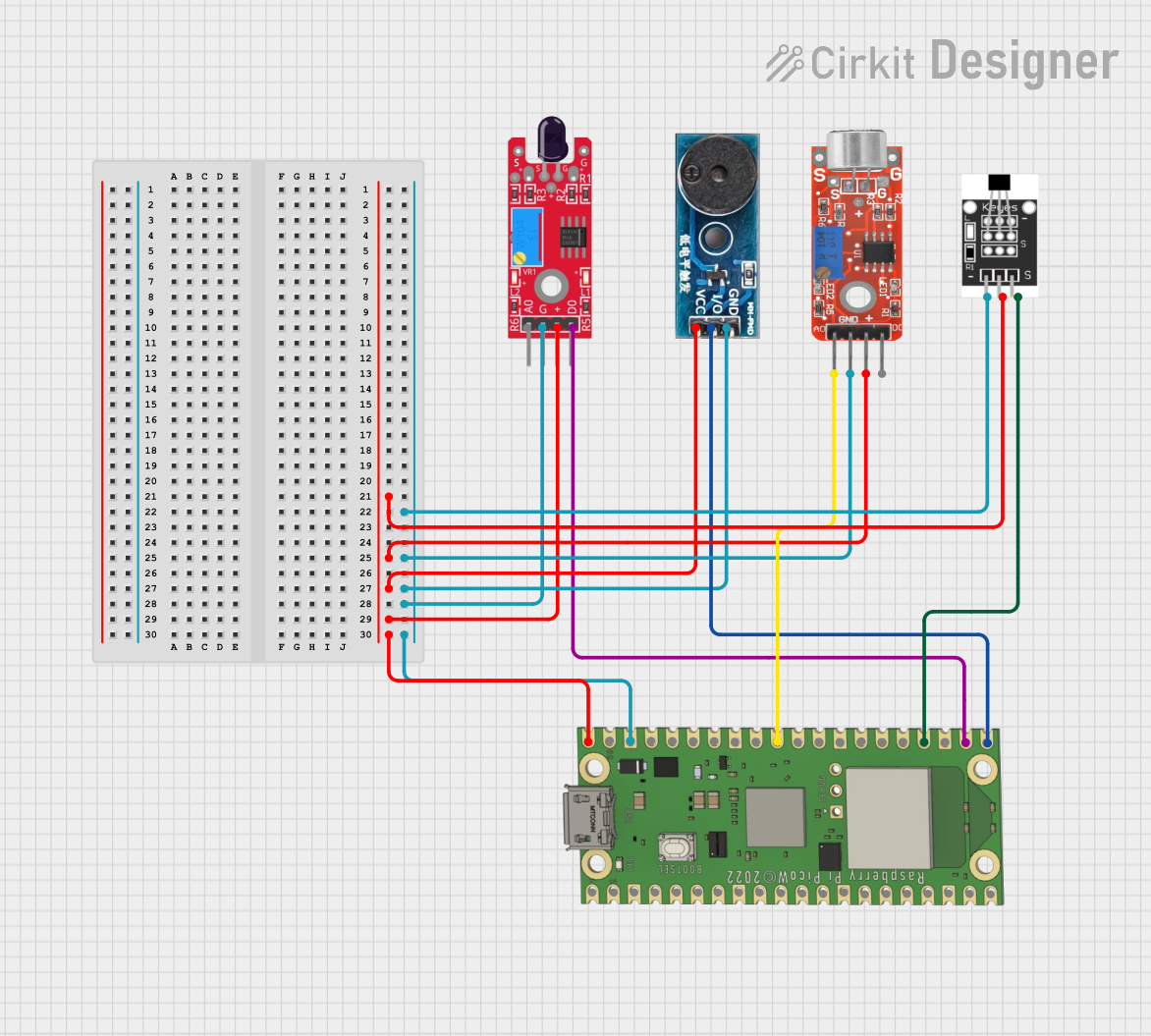
Circuit Documentation
Summary
This circuit is designed to monitor environmental conditions and respond to specific events such as the presence of a flame, a magnetic field, or sound. It utilizes a Raspberry Pi Pico W as the central microcontroller to process inputs from a flame sensor, a microphone module, a hall sensor, and to control a buzzer module as an output. The Raspberry Pi Pico W is also responsible for connecting to Wi-Fi and sending notifications via the Pushbullet API.
Component List
KY-026 Flame Sensor
- Description: A sensor module designed to detect flames or fire.
- Pins: AO (Analog Output), GND (Ground), VCC (Power Supply), DO (Digital Output).
Buzzer Module
- Description: An electronic buzzer for audible alerts.
- Pins: GND (Ground), Vcc (Power Supply), I/O (Input/Output).
Raspberry Pi Pico W
- Description: A microcontroller board with Wi-Fi capabilities.
- Pins: VBUS, VSYS, GP16-GP22, RUN, GP26-GP28, ADC_VREF, 3V3 OUT, 3V3_EN, GP0-GP15.
KY-037 Microphone
- Description: A microphone module with both analog and digital outputs.
- Pins: Analog output, Ground, VCC, Digital output.
Hall Sensor
- Description: A sensor that detects magnetic fields.
- Pins: -, +, S (Signal).
Wiring Details
KY-026 Flame Sensor
- VCC: Connected to the power supply net.
- GND: Connected to the ground net.
- DO: Connected to GP17 on the Raspberry Pi Pico W.
Buzzer Module
- Vcc: Connected to the power supply net.
- GND: Connected to the ground net.
- I/O: Connected to GP16 on the Raspberry Pi Pico W.
Raspberry Pi Pico W
- VBUS: Connected to the power supply net.
- GND: Connected to the ground net.
- GP16: Connected to the I/O of the Buzzer Module.
- GP17: Connected to the DO of the KY-026 Flame Sensor.
- GP18: Connected to the S of the Hall Sensor.
- GP26: Connected to the Analog output of the KY-037 Microphone.
KY-037 Microphone
- VCC: Connected to the power supply net.
- Ground: Connected to the ground net.
- Analog output: Connected to GP26 on the Raspberry Pi Pico W.
Hall Sensor
- +: Connected to the power supply net.
- -: Connected to the ground net.
- S: Connected to GP18 on the Raspberry Pi Pico W.
Documented Code
import network
import urequests
import time
from machine import Pin

# Wi-Fi credentials
SSID = 'Redmi Note 13'
PASSWORD = 'adam1234'

# Pushbullet API key
PUSHBULLET_API_KEY = 'o.WWpAnnZrgeeKGetvwP6YniVbcAMpuOgc'

# Initialize the flame sensor pin (assuming D0 is connected to GP15)
flame_sensor = Pin(17, Pin.IN)
buzzer_pin = machine.Pin(16, machine.Pin.OUT)
contact_sensor_pin = machine.Pin(18, machine.Pin.IN)
sound_pin = machine.ADC(26)
uart = machine.UART(0, baudrate=9600, tx=0, rx=1)

# Function to connect to Wi-Fi
def connect_wifi():
    wlan = network.WLAN(network.STA_IF)
    wlan.active(True)
    wlan.connect(SSID, PASSWORD)

    while not wlan.isconnected():
        time.sleep(1)

    print('Connected to Wi-Fi')
    print('IP Address:', wlan.ifconfig()[0])

# Function to send a Pushbullet notification
def send_push_notification(title, message):
    url = 'https://api.pushbullet.com/v2/pushes'
    headers = {
        'Authorization': f'Bearer {PUSHBULLET_API_KEY}',
        'Content-Type': 'application/json'
    }
    payload = {
        'type': 'note',
        'title': title,
        'body': message
    }

    response = urequests.post(url, json=payload, headers=headers)

    if response.status_code == 200:
        print('Notification sent successfully')
    else:
        print('Failed to send notification', response.status_code)

def check_pushbullet():
    url = f"https://api.pushbullet.com/v2/pushes"
    headers = {
        "Access-Token": "o.WWpAnnZrgeeKGetvwP6YniVbcAMpuOgc"
    }

    response = urequests.get(url, headers=headers)

    while (response.status_code == 200) :
        pushes = response.json().get("pushes", [])
        if pushes:
            latest_push = pushes[0]  # Get the most recent push
            title = latest_push.get("title")
            body = latest_push.get("body")
            print("Received push notification:", title, body)
        time.sleep(10)
        if body == "aa":
                send_push_notification('Entry verified!', '')
                buzzer_pin.value(0)
                break
        else :
            send_push_notification('No verification has been made!', 'A intruder has entered the hause, check immediately')
            while True:
                    for i in range (10):
                        buzzer_pin.value(1)
                        time.sleep(0.1)
                        buzzer_pin.value(0)
                        time.sleep(0.2)
                    break
            break

    else:
        print("Error fetching Pushbullet data")


# Main code
connect_wifi()

while True:
    sound_value = sound_pin.read_u16()
    if int(str(sound_value) + "\n")> 4000 :
        send_push_notification('Loud sound alert!', 'Check the area immediately!')
    time.sleep(0.1)
    if contact_sensor_pin.value() == 0:  # Check if flame is detected (value 1 means flame detected)
        print("Door opened!")
        send_push_notification('Door opened!', '')
        time.sleep(5)
        check_pushbullet()
        time.sleep(10)
    if flame_sensor.value() == 1:  # Check if flame is detected (value 1 means flame detected)
        print("Fire detected!")
        send_push_notification('Fire Alert', 'A fire has been detected. Check the area immediately!')
        while (flame_sensor.value() == 1) :
            buzzer_pin.value(1)
            time.sleep(0.3)
            buzzer_pin.value(0)
            time.sleep(0.2)

    else:
        buzzer_pin.value(0)
        print("No fire detected")

    time.sleep(1)  # Check every 1 second
This code is designed to run on the Raspberry Pi Pico W microcontroller. It sets up Wi-Fi connectivity, monitors the connected sensors, and sends notifications based on sensor inputs. The buzzer is activated in response to certain conditions, such as the detection of a flame or an unauthorized entry.